

 X
 facebook
 WhatsApp
 Email


Introduction
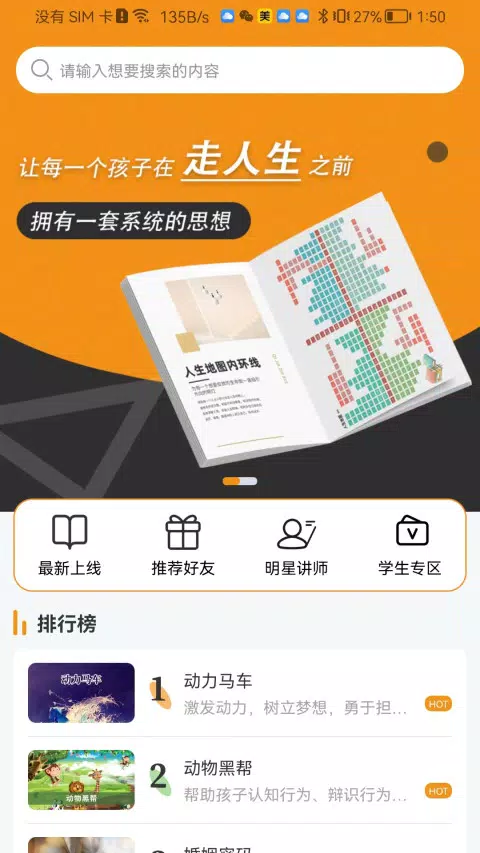
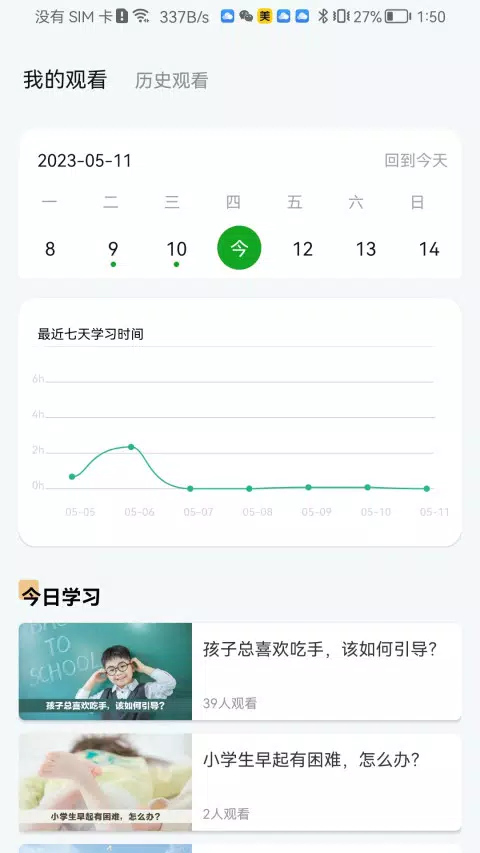
齐家之学 is a practical Android app that gathers household knowledge, learning modules, and family management tools into a single interface. It helps users organize tasks, access short lessons, and track progress across daily routines. The app targets parents, homeowners, and anyone looking for structured household learning and workflow tools.
Overview
齐家之学 blends educational content with utility features while keeping navigation straightforward. Rather than presenting long courses, it emphasizes bite-sized modules that fit into daily life. The design aims to reduce friction when users switch between learning, checklists, and household planning.
Core Features at a Glance
- Micro-lessons: Short, categorized lessons that cover topics such as budgeting, child care basics, home maintenance, and etiquette.
- Task & Checklist Management: Create recurring routines, delegate tasks, and set reminders for family members.
- Progress Tracking: Visual indicators and history logs to measure completion rates and learning streaks.
- Resource Library: Curated articles, short videos, and printable templates for home projects.
How It Works
The app organizes content into clearly labeled sections. Users start by selecting areas they want to improve—finance, childcare, maintenance, or cooking. Each area contains guided steps and short lessons. Tasks are linked with lessons so completing a lesson can automatically add recommended tasks to your checklist.
Tools and Systems
齐家之学 provides a lightweight task engine and a knowledge pack system. Knowledge packs are collections of related lessons that can be downloaded for offline use. The task engine supports repeating tasks, shared lists, and progress syncing across devices using a simple account system.
Customization and Personal Workflow
Personalization is straightforward. Users can reorder lesson modules, set the frequency of reminders, and assign tasks to household members. Themes and font size options let users adapt the interface for long reading or quick reference. The app also supports bookmarking and note-taking within lessons for future reference.
Interface and Performance
The interface prioritizes clarity over decoration. Navigation is handled through a bottom bar with clear icons and a persistent search field. Performance is smooth on modern mid-range phones; lessons load quickly and offline packs reduce data usage. Background sync is optimized to avoid battery drains.
User Experience and Accessibility
齐家之学 pays attention to accessibility: text contrast, adjustable font sizes, and straightforward language in lessons. New users will find the onboarding walkthrough useful, and advanced users can jump directly into task automation. The app avoids overwhelming notifications and keeps alerts focused on important reminders.
Best Practices for New Users
- Start with a single knowledge pack to avoid overload.
- Create a weekly routine of two short lessons and three tasks to build momentum.
- Use shared lists to coordinate chores with family members and track completion in the progress log.
Why People Choose It
Many users appreciate how 齐家之学 bridges practical learning with task management. The emphasis on short, actionable content and the ability to link lessons directly to household tasks make it useful for busy adults. It fits into daily routines without demanding long study sessions.
Getting Started and Installation
Installing 齐家之学 is straightforward from the Android app store. The initial setup asks about household size and interests to tailor recommendations. Most features are available for free, while some advanced packs and extended templates are behind an optional subscription.
Final Notes and Tips
For best results, integrate lessons into real tasks—read a short lesson on meal planning and immediately add a shopping checklist for the week. Regularly review the progress dashboard to identify which routines need adjustment. With deliberate use, 齐家之学 can become a compact hub for both household learning and effective family coordination.
Information

What would it be like to download video software for free? In this collection, you can find various video software that interests you, whether it’s video players or video editors—everything you need is here. All of it is provided for free, allowing you to download with ease and without any worries.





User Comments

face video downloader makes it easy to save publicly available short videos that highlight faces for offline viewing and reference. The app supports common video formats and keeps saved clips organized so you can review them later within the app.

STREAMING is a mobile app for discovering and watching on-demand video and live channels. The app organizes movies, shows and broadcasts into categories and provides search and playback controls for a consistent viewing experience.

Vanced Tube PopUp Video Guide For Vanced is a practical companion that explains how to enable ad-free playback and a floating pop-up player for online video services so you can keep watching or listening while switching between apps. The guide walks users through multitasking playback, blocking intrusive ads, searching for content and creating playlists to streamline viewing. It is intended for people who multitask—students, commuters and professionals—and includes notes on safety and the importance of obtaining tools from trusted sources.

荐片播放器 is a lightweight Android video player that organizes local and streamed videos and provides personalized recommendations in a simple, uncluttered interface. With 荐片播放器 you can browse and manage your library and playlists, play common video formats with external subtitle support, and control playback using gesture controls and adjustable speed.

Stream on Screen for Price Tag is a digital signage tool that replaces paper price tags with live, updateable on-screen labels, letting retailers broadcast pricing, promotions and product details from a single dashboard. Designed for stores of any size, Stream on Screen for Price Tag simplifies content management by pushing updates to multiple displays instantly and improves pricing accuracy while reducing staff time spent on manual changes.

iFeng Video puts global headlines and China-focused stories into a single, video-first app so you can watch and follow developments without hunting across sources. The app surfaces breaking news, finance, military and entertainment clips alongside longer documentaries, and it offers an integrated browser, personalized alerts and offline playback so you can download videos over Wi‑Fi and watch later. With a clean, category-driven interface and a search bar to find related material, iFeng Video is useful for commuters, busy professionals and anyone who prefers watching curated news on demand.

The RTÉ Player app is your go-to destination for all your favorite TV shows in Ireland, both live and on-demand. With a vast library of gripping dramas, entertaining soaps, live sports, and popular entertainment shows, there is something for everyone. Easily browse and switch between RTÉ channels, including RTÉ One, RTÉ2, RTÉ News, and RTÉ Kids, all on the go. Keep the little ones entertained with RTÉ Player Kids, offering a variety of fun, educational, and entertaining content from RTÉjr.

Get all the latest and most important sports news, with a focus on football, right at your fingertips with Viper Play Net Fútbol TV. Stay up to date on all the action happening in the world of sports, from game results to player transfers and more. Viper Play makes sure you never miss a beat when it comes to the latest sports updates. Whether you're a die-hard football fan or just like to stay informed on trending sports topics, Viper Play has got you covered. Download the app now and elevate your sports news experience to the next level!

Are you a movie buff looking for the ultimate streaming app? Look no further than CineB - More! This app, also known as CineB - Plus - Filmes e Séries, is your one-stop destination for all things entertainment. With a vast library of movies, TV shows, and documentaries, CineB - Plus offers detailed information about your favorite titles and allows you to curate your own watchlist based on your genre preferences. Say goodbye to endless scrolling and endless ads, and hello to a seamless streaming experience with it.

Stay in the loop with all things cricket by downloading Live Cricket TV -Watch Matches! This app provides you with live streaming of matches, expert analysis, upcoming match schedules, player rankings, and more. Customize the app to suit your preferences with themes, live banners, and easy-to-use UI/UX. Dive into the world of cricket with ball-by-ball scoreboards, match highlights, and in-depth statistics. Whether you're a seasoned cricket enthusiast or a newcomer to the game, Live Cricket TV HD Streaming has something to offer everyone.

Discover a world of entertainment with Splash TV online - Rádios - Câmeras ao vivo that brings together TV channels, live radio stations, and live cameras from around the globe. With just a few clicks, you can access a wide variety of content to suit all tastes and preferences. Whether you're in the mood for watching your favorite TV shows, listening to live music on the radio, or exploring different cities through live cameras, this app has got you covered. Say goodbye to boredom and hello to endless hours of entertainment with this user-friendly and convenient app.

For all the die-hard fans of Chilean soccer, Live Chilean Soccer is the ultimate must-have app. With this application, you can easily keep track of all the matches in the Chilean Football League in real-time, ensuring that you never miss any of the action. Whether you're following the Scotiabank and Primera B Championship, the Chilean Cup, or international contests like the Copa América, Copa Libertadores, and Copa Sudamericana, Live Chilean Soccer has you covered.