

 X
X
 facebook
 WhatsApp
 Email
Email
Introduction
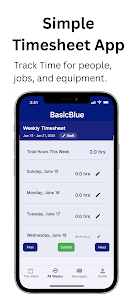
BasicBlue is a straightforward iPhone app for small businesses that need a no-frills way to record and review employee timesheets. BasicBlue lets teams log hours against people, projects and equipment, then produces simple, easy-to-read reports that managers can use for basic payroll or job tracking. Because access is controlled at the company level, your employer must purchase a subscription and provide an employerID before employees can sign in; that keeps data entry centralized and prevents unauthorized accounts.
Key features and core functions
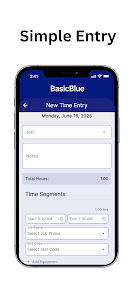
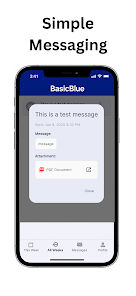
The app concentrates on the essentials: fast time entry, clear project and equipment association, and compact reports that avoid clutter. Time entries can be added, edited or deleted in a few taps, with fields to identify the person, the project or job, and any equipment used. Reporting focuses on readable summaries rather than deep analytics so owners get the information they need without a steep learning curve. The minimal interface reduces distractions and helps staff complete entries quickly during busy shifts.
How interactions and controls work
BasicBlue uses familiar touch interactions common to iPhone apps: tap to add or select an item, swipe gestures to reveal simple actions, and standard pickers for dates and projects. The workflow is designed for quick sessions—open the app, select the person and project, enter hours or start/stop a timed entry, and save. Editing an entry allows corrections without navigating complex menus, and the overall control scheme is intended to feel natural to users who already use other iOS productivity tools.
Workflow, progression and user roles
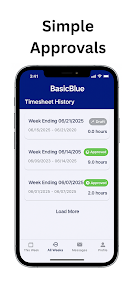
Onboarding typically begins with an administrator or employer setting up the subscription and sharing an employerID with staff. Employers can define projects and list equipment so entries remain consistent across the team. As employees log hours, records build into a simple progression of dated entries grouped by person and project, making it easier to track work over pay periods. Role and access management are handled by the subscribing organization, so different teams can adopt the app according to their internal approval and review processes.
Reports, review and recordkeeping
Reporting in BasicBlue emphasizes clarity and straightforwardness. Reports are formatted for quick review by owners or supervisors who need totals by person, project, or equipment for payroll or basic job costing. The goal is to present the most relevant numbers clearly, helping administrators identify who worked when and on which tasks without sifting through dense, technical analytics. Because reports are intentionally simple, they integrate neatly into small-business workflows that rely on manual payroll review or basic accounting systems.
Design, accessibility and device considerations
The visual approach is intentionally minimal: legible typography, high-contrast elements where appropriate, and large touch targets for ease of use during busy shifts. These choices help reduce mistakes and make the app approachable for users with varying levels of familiarity with mobile tools. While BasicBlue is designed as an iPhone app, its straightforward screens and controls make it easy for staff to adopt quickly, and employers can document internal usage guidance to support accessibility needs.
Offline use, data handling and security
The app is built for short, frequent interactions and performs best with a network connection so entries sync to the employer's records. Employers should confirm how their subscription handles data synchronization and offline caching, since provisioning and sync policies are controlled at the company level. BasicBlue places access control with the subscribing organization, which helps ensure that only authorized employees can view or edit time records.
Limitations and intended audience
BasicBlue is intended for small teams that want straightforward time tracking without the complexity of enterprise platforms. That focus means some trade-offs: a subscription and an employerID are required to use the app, reporting remains intentionally simple rather than offering advanced analytics, and the app is developed for iPhone users so colleagues on other platforms may not have direct access. For businesses that need a compact, low-overhead timesheet solution, BasicBlue delivers a focused toolset that reduces administrative friction and keeps time records organized for routine payroll and job tracking needs.
Information
 Google Play
User Comments
FleetDocs is a mobile document management app that helps trucking fleets capture, submit, and organize paperwork using a smartphone camera. FleetDocs puts common driver tasks — photographing bills of lading, scanning receipts, combining multiple pages and sending them to an administrator — into a simple, repeatable workflow designed for fast processing and less paper handling.

InterForum is the official mobile app for attendees of InterForum conferences, designed to simplify planning, participation, and networking at live and virtual events. It centralizes agendas, official programs and session details so users can browse schedules, track updates, and build a personalized timetable that fits their interests. The app also supports live interaction with speakers, real-time polls, and in-app messaging to help attendees stay informed and connected. If you attend InterForum events regularly or are a first-time participant, this app streamlines event logistics and boosts opportunities to learn, ask questions, and meet other professionals.

Visit UIC is a compact guide to the University of Illinois Chicago's annual Open House, offering a clear overview of the September 16 event and why it matters for prospective students, families, and community visitors. The app summarizes what to expect—over 100 sessions, faculty talks, lab and studio demonstrations, hands-on activities on the quad, and practical sessions on admissions and financial aid—so you can quickly see whether UIC's academic programs, facilities, and urban campus culture match your interests before attending in person.
msgKarriere is a mobile career companion designed to help candidates and employees discover job opportunities, follow industry trends, and manage professional development from any location. In the first moments after opening msgKarriere you can search curated listings, read firsthand employee 'Job Stories', and start an application with a streamlined workflow that reduces friction between finding a role and applying. The app centralizes company profiles, event details, and project summaries in a compact, user-focused layout so users can make informed choices about roles and workplace culture on the go.

Dhaka Share Bazar puts Bangladesh's stock market into a compact, mobile-friendly interface so you can check live quotes, indices and company information on the go. Dhaka Share Bazar is designed for anyone who needs concise market reference — from experienced traders who review intraday moves to investors and students who study company filings and sector trends. The app focuses on delivering exchange-sourced data in a clear layout that reduces time spent navigating multiple websites and gives a single place to consult prices, charts and corporate summaries.

政府職缺快找 is a streamlined app that helps users discover and manage government job vacancies in one place. The app aggregates the latest public-sector openings, lets you filter searches, save favorites, and view full job details so you can prepare applications with fewer steps. Job seekers, career changers, and recent graduates will appreciate the ability to create tailored search conditions and receive deadline reminders via calendar sync. If you want a single dashboard for monitoring official vacancy announcements and organizing potential applications, 政府職缺快找 offers the basic tools to simplify the process.