

 X
X
 facebook
 WhatsApp
 Email
Email
Introduction
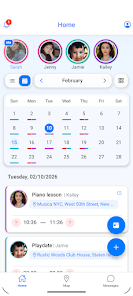
Kidow helps busy families keep every caregiver on the same page by combining a shared family calendar with automated reminders, arrival confirmations and a simple SOS contact flow. Designed for parents, grandparents and babysitters, Kidow places responsibility tags on events, sends timely notices about when it's time to leave, and confirms when a child reaches a destination so everyone sees the same up-to-date status without dozens of calls or group messages.
Key features
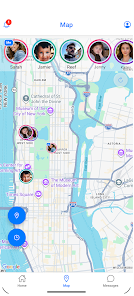
At the core of Kidow is a shared calendar that supports recurring events, color-coded categories and optional syncing with a personal calendar so appointments and lessons appear in the places caregivers already check. Event cards show who is assigned to pick up or drop off, include notes about supplies or allergies, and trigger automatic reminders at configurable intervals. The one-tap SOS function alerts the whole caregiver group with a clear message, suggested next steps and a timestamped request so nearby helpers can respond quickly. Location-aware arrival alerts register when a predefined geofence is crossed and send confirmation messages to listed parents or guardians.
How it works
Setting up Kidow begins with creating a family group and inviting caregivers by phone number or email. Assignments are made directly on an event when you create or edit it: tap to assign, tap again to change, and add contextual notes in the same screen. Reminder timing, notification channels and the size of the arrival geofence are adjustable per event. For caregivers who prefer minimal interaction, automatic leave-time calculations estimate travel using standard traffic assumptions and local time, then push a single actionable reminder indicating when to depart.
Controls and user experience
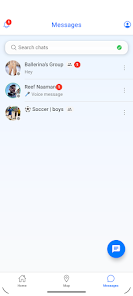
The interface focuses on quick taps and readable information: large event tiles, clear icons for responsibilities, and a single-screen view for today's schedule. Caregivers can swipe through days, long-press an event to edit details, and use in-app confirmation buttons to mark drop-offs or arrivals. Notifications include concise buttons to confirm arrival, message the assigned caregiver, or call directly, reducing the need to open the app for simple confirmations. Visual cues and short text help minimize mistakes during rushed transitions.
Customization and progression
Kidow supports multiple customization layers so families can scale its use over time. Start with basic calendar sharing, then add timed reminders, geofenced arrivals and SOS contacts as all caregivers become comfortable. Event types and categories can be customized to mirror household routines, and notification intensity can be increased or relaxed based on how much automation you want. Over weeks of use the app adapts to common patterns, making scheduling progressively faster and more reliable as habitual events are saved and reused.
Accessibility and inclusions
The app aims for clear typography, adjustable font sizes and high-contrast color options to improve readability for all users. Interactive elements are large and spaced for users who need more time to press controls, and key actions are labeled explicitly to help anyone using assistive technology. Multi-language labels and simplified phrasing reduce friction for mixed-language households, and the straightforward onboarding sequence explains location permissions, notification settings and how to invite additional caregivers.
Offline behavior and battery impact
Kidow caches the family schedule so essential details remain viewable when a device is offline, and queued confirmations are delivered once connectivity returns. Location updates and background activity are optimized to balance timeliness with battery life: updates can be set to lower frequency, limited to specific hours, or restricted to Wi-Fi to reduce power draw. The app provides clear prompts to explain why certain permissions improve functionality and offers alternatives when permissions are declined.
Privacy and safety
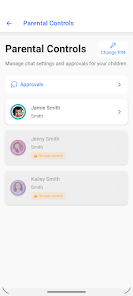
Location sharing and arrival alerts are optional and controlled by each participant, so caregivers only share what they consent to. Kidow emphasizes transparency about what is shared with the group and when alerts are sent, and it allows administrators to remove or limit members at any time. The SOS pathway is designed to streamline help requests to known caregivers rather than broadcasting to large public channels, and the app logs timestamps so families can review event histories when needed.
Limitations and practical notes
Kidow works best when all caregivers accept invitations and enable chosen features; without participation from others, the shared calendar and arrival confirmations will be limited. Real-time location and arrival detection require location services and occasional connectivity, so in areas with poor signal alerts may be delayed. Families should expect a short setup period while preferences are configured and caregivers learn to use confirmation buttons consistently. For households comfortable with shared scheduling and optional location sharing, Kidow offers a compact toolset that reduces calls, clarifies responsibilities and helps routines run more smoothly over time.
Information
User Comments

BrandSafer2 is a mobile authentication app designed to help shoppers and brand teams verify product authenticity quickly using a smartphone camera. BrandSafer2 reads a visually distinctive Hybrid Tag engineered with special materials and printing techniques, runs anti-counterfeit checks, and returns clear pass/fail feedback so users can make informed decisions at the point of purchase. The app is intended for consumers, retailers, and brand partners who need an easy, reliable way to confirm provenance and report suspicious tags.

Anarkali Fashion Style is a focused visual reference that brings curated Anarkali suit designs to your device, presenting traditional and contemporary looks in a single, easy-to-browse gallery. Whether you are researching outfits for a wedding, planning a party look, or simply exploring everyday styles, Anarkali Fashion Style shows floor-length and mid-length silhouettes, embroidery techniques, color palettes, and accessory suggestions alongside clear photos and short descriptive notes. The app is designed to be a quick source of inspiration: high-resolution images, clean navigation, and a small set of organizational tools keep the focus on design details rather than shopping or booking services.

Marina Bay Sands Singapore puts the resort's promotions, dining and shopping information, and rewards program into a single mobile companion so guests and visitors can discover offers and manage benefits on the go. The app lets you browse the latest promotions, explore more than 170 luxury and premium boutiques, and find over 80 dining options and award-winning attractions, all from your phone. You may want this app if you frequent the property or plan a visit, because it simplifies tracking Sands Rewards Dollars, signing up for complimentary membership and redeeming perks such as parking instantly through the Sands Rewards e-Card.

CoVince is a software application that lets users join Metaverse Parks to experience shared virtual spaces and collaborate with others in real time. The app highlights collective experience, community growth, and cooperative activities that bring people together in park-like digital environments, making it useful for social meetups, team collaboration, and community building. CoVince focuses on connecting participants, facilitating shared sessions, and supporting ongoing interaction so groups can explore, collaborate and grow together within accessible virtual venues.

Living Spiritual Masters Daily is an app that delivers carefully selected daily quotes from contemporary spiritual teachers to inspire personal practice and reflection. It presents short teachings from living masters to remind users about surrender, self-realization and the power of direct guidance, while offering tools to weave those teachings into everyday routines. Users may download it to receive daily prompts, set alarms, choose background tunes, and keep favorite sayings for study or sharing. The design aims to be a gentle companion—helpful for anyone seeking daily spiritual focus without replacing personal mentorship.

e-Diyet Teknoloji Diyeti is a lightweight digital wellbeing app designed to help you take back control of everyday phone use by automatically tracking screen time, analyzing which apps occupy your attention, and sending gentle reminders when usage exceeds the limits you set. From the first run the app records app-by-app activity and produces readable summaries so you can quickly see where your minutes go; e-Diyet Teknoloji Diyeti is built to support gradual habit change rather than enforce harsh blocks.