

 X
 facebook
 WhatsApp
 Email


Introduction
C Launcher is a customizable Android launcher that replaces the home screen with a lightweight, privacy-minded interface and a large theme library. C Launcher focuses on efficient performance and battery-friendly animations while giving users simple tools to personalize their phones, from DIY theme building to app-hiding and quick search features. Users running Android 4.0 and newer will find the launcher adapts to a wide range of devices, including Galaxy and Redmi models, without demanding high system resources.
Key Features
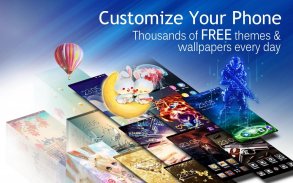
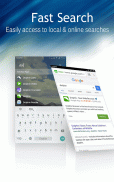
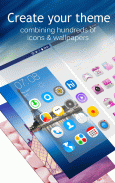
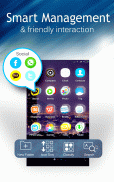
The feature set in C Launcher centers on flexibility and everyday utility. The DIY theme editor lets you combine wallpapers, icon packs and layout settings in a few steps and then share those creations with friends. Built-in 3D and live wallpaper options and an HD wallpaper gallery provide ready-made looks, while a widget launch center consolidates commonly used controls. Privacy tools include app hiding and a password-protected drawer, and an app locker supports gesture-based locking to protect sensitive apps. The fast search bar reduces friction by locating apps, launching downloads, or offering uninstall options from one place. Automatic folders, unread counts and notification badges help keep a busy app collection readable at a glance.
Controls and Navigation
Interaction with C Launcher is gesture-driven and designed to be intuitive: swipe gestures open drawers and quick panels, long-pressing icons triggers edit and widget placement modes, and drag-and-drop reorganizes apps across home screens and folders. The launcher supports multiple home screen pages and a customizable dock for frequently used apps; these structural elements act like levels of organization, so you can prioritize tools, contacts or media controls on different pages. Touch targets and menu spacing are conservative to reduce accidental taps, and animation speeds can be tuned so the interface feels either snappy or smooth depending on device capability.
Customization and Progression
C Launcher encourages steady personalization rather than overwhelming new users with all options at once. The DIY editor serves as a progression path: start with a base theme, then swap icons, tweak the grid and add a live wallpaper to evolve your home screen over time. You can save theme presets to reuse or restore a previous look after testing alternatives. Categorized theme packs and icon collections make discovery straightforward and allow incremental upgrades to your setup — a low-effort progression system for users who enjoy refining the look and layout gradually rather than committing to one style immediately.
Visual Style and Performance
The visual approach balances effects and performance. C Launcher offers both minimalist themes for low-power operation and richer 3D or live wallpapers for modern hardware. Developers have optimized animations and transitions to keep CPU and battery impact modest, but very old or low-end smartphones may still show reduced smoothness when running heavy visual effects. The app includes options to reduce animation frame rates and disable resource-intensive features, giving users control over the trade-off between appearance and battery life.
Organization, Productivity and Replay Value
Beyond looks, the launcher contributes to daily productivity: automatic app grouping sorts apps by function so your utility apps, social apps and games appear in sensible clusters. Unread badges and folder previews provide quick context without opening individual apps, and the universal search bar saves time when you need an app or setting fast. The combination of a wide theme library and the DIY editor offers high replay value for users who enjoy frequent personalization; updating wallpapers, icon packs and layout choices is simple and can keep the home screen feeling fresh over months or years of use.
Accessibility and Offline Use
C Launcher supports accessibility best practices through configurable font sizes and conservative touch targets to help users with reduced dexterity. Most core functions — home screen layout, themes you have installed, app hiding and offline wallpapers — work fully without an internet connection, so day-to-day use remains consistent when you are offline. When connected, the theme store and sharing features enable browsing and exchanging new content, but those online features are optional rather than required for basic operation.
Known Limitations
While C Launcher aims to be broadly compatible, some limitations are worth noting: a few descriptive strings in the app’s marketing copy reference older years and could feel dated, and very old devices will experience limitations with live or 3D wallpaper performance. Deep customization through the editor requires some time and experimentation to master, which may be a small learning curve for new users. Overall, the launcher provides a privacy-oriented, resource-conscious alternative for people who want to rebuild their Android home screen with flexible customization tools and straightforward controls.
Information
Other Games by the Same Mobotap
Social networking apps have become essential tools in everyday life, making communication with others more convenient. These apps allow you to easily stay in touch with old friends while also providing opportunities to meet new people, helping to expand your social network beyond its usual boundaries. This page features a handpicked selection of the best social apps, making it your go-to choice for mobile socializing!





User Comments

Introducing Phone Ringtones - the ultimate solution to boring phone ringtone music! Say goodbye to generic tones and hello to a world of personalized ringtones that reflect your unique style. With a vast collection of the latest iphone ringtones, notification sounds, and remixes, you'll never have to settle for default sounds again. Our user-friendly app allows for easy customization, so you can set different ringtones for contacts and alarms with ease. And with added features like wallpapers and the ability to share with friends, Phone Ringtones is more than just a ringtone app - it's a complete phone makeover experience. Upgrade your phone now with Phone Ringtones and let your personality shine through!

Upgrade your Android device with the most comprehensive icon pack available today from ENIX. With over 4200 unique icons and regular updates to keep up with the latest trends, your home screen will never look the same. But that's not all - the motion calendar feature offers a fresh take on the traditional calendar view, while a diverse collection of stunning 3D wallpapers adds a whole new level of customization. With ENIX, your phone will always be up-to-date and your user experience will be maximized to its full potential. Try it now and see the difference!
Experience the ultimate personalization for your mobile device with iPhone 11 Pro max. This innovative app provides you with a wide range of stunning themes, icons, and wallpapers designed in 4D to give your phone a fresh and stylish look. With a variety of categories to choose from, you can easily customize your screen display with high-quality graphics and unique designs. The app is user-friendly, free to use, and allows you to easily change and customize icons and names for any app on your device. Give your phone a makeover and download iPhone 11 Pro max today to transform your mobile experience.

Looking to make your phone stand out with a fresh new look? Look no further than Mellows Theme! This comprehensive launcher beautification program covers icons, wallpaper, folders, menus, skins, and more to give your phone a complete makeover. Compatible with popular launchers like CLauncher, Go Launcher EX, and iOS 7 Launcher, Mellows Theme offers a variety of wallpapers and lockers to suit your style. With C Launcher, you can simplify, beautify, and supercharge your Android phone with tools to save battery life and clean up junk files. Download Mellows Theme now and transform your phone into a true reflection of your personality!
USB Screen Share - Phone to TV is the ultimate USB connection app for mirroring your phone or tablet to a TV. With the ability to easily connect your device to a TV using a USB cable or wireless connection, this app allows you to share your favorite videos, photos, and other content on the big screen. With features like USB screen mirroring and customizable settings, USB Screen Share - Phone to TV is perfect for anyone looking to enhance their viewing experience and share content with others effortlessly. Whether you're a tech pro or a beginner, this app is a must-have for enjoying your device's content on a larger display.
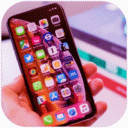
Enhance the look and functionality of your Android device with ios 12 launcher xs - ilauncher. Customize your home screen with a variety of themes, wallpapers, icons, and widgets to give your device a fresh and unique look. Enjoy fast and smooth navigation through your phone with options to personalize layouts, hide apps, and optimize app organization. With smart searching capabilities and app suggestions, finding what you need is easier than ever. Keep your apps private with icon hiding and backup your settings for added convenience. Experience a new level of customization and efficiency with ios 12 launcher xs - ilauncher.