

 X
X
 facebook
 WhatsApp
 Email
Email



Introduction
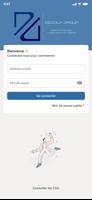
DG EXPERTS is a mobile application from the Degouy Group designed to centralize accounting, document management and key performance indicators so small business owners and accountants can monitor finances and business health in real time. The app presents a secure, simple and intuitive interface that reduces reliance on email threads and paper by letting users submit documents, check the status of tasks and receive deadline alerts from their accounting firm. This introduction explains how DG EXPERTS organizes workflows, what to expect during setup and how the app supports everyday bookkeeping tasks.
Key features and how they work
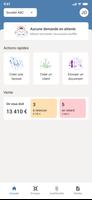
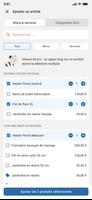
The central dashboard in DG EXPERTS brings together live KPI cards, recent accounting entries and outstanding actions so you can see the next priorities at a glance. Document exchange is built around a clear upload flow: capture or select files, attach metadata such as date and category, then send to your firm with an optional message. Deadline tracking links reporting and filing dates to status markers so overdue items and upcoming submissions are surfaced automatically. Communication tools keep messages and files tied to the relevant task to avoid fragmented threads.
Navigation, controls and accessibility
The app uses a straightforward navigation model with separate sections for Documents, Messages, KPIs and Deadlines so users can move directly to the area they need. Controls are intentionally simple: tap to open a document, long press to view details, and swipe gestures or buttons to change status or add notes. DG EXPERTS is designed with readability and accessibility in mind, supporting larger text sizes and clear contrast for better legibility, and labeling elements so common screen readers can interpret the interface more reliably.
Onboarding, roles and progression
Getting started follows a stepwise progression: create an account, verify identity if required by your firm, link the app to your accounting provider and set up initial preferences such as notification rules and which KPIs to display. Access and available actions depend on assigned roles and permissions, which lets firms control what clients can view or modify. As you use the app, work items move through stages from draft to submitted to reviewed, offering a simple progression that mirrors routine bookkeeping and month end cycles.
Data presentation and visual style
Visual presentation favors clarity over complexity. KPIs appear as compact metric cards with trend indicators and short explanations, while charts provide a quick view of cash flow and revenue trends without overwhelming detail. Documents are shown with concise thumbnails and status badges so you can quickly scan what requires attention. This restrained visual style helps users focus on numbers and tasks rather than decorative elements.
Customization and repeated workflows
Users can configure which KPIs are shown on the main screen and choose notification settings for reminders and status updates, creating a workspace that reflects their priorities. Common tasks such as monthly expense submissions or recurring reporting are stored as repeatable workflows so routine items require fewer steps over time. These configurable elements increase efficiency for users who perform similar accounting cycles each month or quarter.
Offline support, security and file handling
DG EXPERTS supports offline capture of receipts and documents with a queued upload system that sends files when a network connection returns, preserving work performed away from an internet connection. The app emphasizes secure exchange and storage of sensitive files through authenticated access and encrypted transfer, and it keeps a clear activity record so users can track who submitted or reviewed specific documents. Supported file types include common image and PDF formats to match typical accounting needs.
Limitations and practical considerations
The app depends on active participation from your accounting firm to unlock its full value; features related to review, approval and firm-side configuration may be limited if the firm is not set up on the same platform. Some functions are controlled by account permissions, so certain actions might be restricted based on your role. DG EXPERTS is intended to streamline communication and reduce manual handling, but it is most effective when both client and firm adopt the shared workflow.
Information
 Google Play
Other Games by the Same MY UNISOFT

User Comments
FleetDocs is a mobile document management app that helps trucking fleets capture, submit, and organize paperwork using a smartphone camera. FleetDocs puts common driver tasks — photographing bills of lading, scanning receipts, combining multiple pages and sending them to an administrator — into a simple, repeatable workflow designed for fast processing and less paper handling.

InterForum is the official mobile app for attendees of InterForum conferences, designed to simplify planning, participation, and networking at live and virtual events. It centralizes agendas, official programs and session details so users can browse schedules, track updates, and build a personalized timetable that fits their interests. The app also supports live interaction with speakers, real-time polls, and in-app messaging to help attendees stay informed and connected. If you attend InterForum events regularly or are a first-time participant, this app streamlines event logistics and boosts opportunities to learn, ask questions, and meet other professionals.

Visit UIC is a compact guide to the University of Illinois Chicago's annual Open House, offering a clear overview of the September 16 event and why it matters for prospective students, families, and community visitors. The app summarizes what to expect—over 100 sessions, faculty talks, lab and studio demonstrations, hands-on activities on the quad, and practical sessions on admissions and financial aid—so you can quickly see whether UIC's academic programs, facilities, and urban campus culture match your interests before attending in person.

msgKarriere is a mobile career companion designed to help candidates and employees discover job opportunities, follow industry trends, and manage professional development from any location. In the first moments after opening msgKarriere you can search curated listings, read firsthand employee 'Job Stories', and start an application with a streamlined workflow that reduces friction between finding a role and applying. The app centralizes company profiles, event details, and project summaries in a compact, user-focused layout so users can make informed choices about roles and workplace culture on the go.

Dhaka Share Bazar puts Bangladesh's stock market into a compact, mobile-friendly interface so you can check live quotes, indices and company information on the go. Dhaka Share Bazar is designed for anyone who needs concise market reference — from experienced traders who review intraday moves to investors and students who study company filings and sector trends. The app focuses on delivering exchange-sourced data in a clear layout that reduces time spent navigating multiple websites and gives a single place to consult prices, charts and corporate summaries.

政府職缺快找 is a streamlined app that helps users discover and manage government job vacancies in one place. The app aggregates the latest public-sector openings, lets you filter searches, save favorites, and view full job details so you can prepare applications with fewer steps. Job seekers, career changers, and recent graduates will appreciate the ability to create tailored search conditions and receive deadline reminders via calendar sync. If you want a single dashboard for monitoring official vacancy announcements and organizing potential applications, 政府職缺快找 offers the basic tools to simplify the process.