
 X
 facebook
 WhatsApp
 Email
Introduction
Weather Station FREE is a compact weather utility that consolidates local and remote meteorological data into a clear, glanceable dashboard. Designed for quick forecasts, live sensor readings, and basic historical charts, it helps users track conditions and plan activities with straightforward tools and minimal setup time.
Overview
Weather Station FREE positions itself as a no-frills weather companion focused on usability. It aggregates forecast data, displays current conditions, and supports external sensors when available. The app aims for a balance between useful telemetry and a lightweight interface that runs smoothly on most Android devices.
Key tools and capabilities
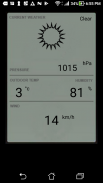
- Current Conditions: Instant readouts for temperature, humidity, wind speed and direction, and pressure.
- Short-term Forecasts: Hour-by-hour predictions and a simple multi-day outlook for quick planning.
- Sensor Integration: Compatibility with networked weather stations—to pull live sensor data when configured.
- Historical Snapshots: Basic trendlines that let you review recent temperature and pressure changes.
- Notifications: Optional alerts for significant weather changes or custom thresholds.
Interface and performance
The interface in Weather Station FREE emphasizes clarity: large numeric readouts, intuitive icons, and a neutral color palette that keeps attention on the data. Animations are restrained, which helps preserve battery life and keeps the app responsive even on older hardware. Menus are organized logically, so users can switch between current conditions, forecasts, and settings without friction.
Practical uses
For commuters, gardeners, and hobbyists, the app provides actionable information without unnecessary complexity. Check wind and precipitation chances before cycling, set alerts for frost risk, or monitor pressure drops that often precede storms. Weather Station FREE is particularly useful when paired with an external station: hobby meteorologists can view live sensor feeds on their phones.
How it works
Data sourcing is straightforward. The app either uses public forecast APIs for regional predictions or pulls directly from compatible weather station hardware on the same network. After initial setup, updates occur automatically at user-defined intervals. Users can toggle between metric and imperial units and adjust refresh frequency to suit mobile data constraints.
Customization options
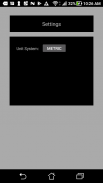
- Units and thresholds: Switch temperature, wind, and pressure units; set alert thresholds for specific parameters.
- Display preferences: Choose between compact and detailed views depending on how much information you want at a glance.
- Notification settings: Control which alerts fire and whether they appear as persistent notifications or occasional pop-ups.
User experience and workflow
Setting up Weather Station FREE is typically quick. Install the app, select your location manually or let it detect coordinates, and optionally add station credentials to access local sensors. Daily use is reduced to a single tap or glance: the home screen presents key metrics while deeper pages hold historical charts and settings.
Tips for new users
- Allow location access if you want automatic, precise forecasts without manual input.
- Limit refresh intervals if you have a restrictive mobile plan—less frequent polling conserves data and battery.
- Enable only the alerts you need to avoid notification fatigue.
- If using a personal weather station, test connectivity while on the same Wi‑Fi to confirm credentials and port settings.
Why people choose this app
Users often cite the clean presentation and lightweight footprint as the main draws. Weather Station FREE is a practical choice for those who need reliable weather metrics without intrusive features. Its ability to interface with local sensors gives it an edge for enthusiasts who want more than a generic forecast widget.
Limitations to consider
The free version focuses on essential functionality, so advanced analytics and long-term archives are limited. Power users seeking highly detailed historical datasets or complex visualizations may prefer a pro-grade solution. That said, for everyday monitoring and quick decision-making, the app covers the most common needs effectively.
Getting started
Download and open Weather Station FREE, verify location settings, and choose whether to add a personal station or rely on regional forecasts. Explore display preferences and set one or two alerts that match your daily routine. Within minutes you should have a tailored weather dashboard that keeps you informed without clutter.
Information

The Remote App Tool collection includes many Android apps that allow remote control. With the growing number of smart devices, it's easy to misplace remotes. These apps solve that problem, offering a convenient, free way to control your devices. They provide great convenience for your daily life!






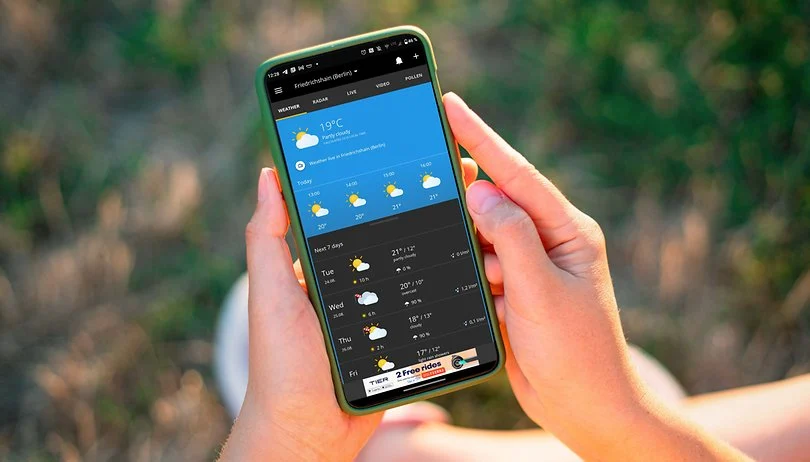
What are some reliable weather apps without ads? A great weather app not only helps you stay informed about daily weather conditions but also delivers accurate weather data. Some apps even come with smart voice alerts, ensuring you're always prepared when heading out. These weather apps are ad-free, with all forecasts and updates sourced from trusted meteorological organizations, providing you with the most precise information. If you're looking for such a tool, download and try one today!





User Comments
Weather Station - Data Manager helps you collect, organize, and review sensor readings from local and networked weather stations. The app imports common data formats, displays interactive charts, and supports export for further analysis.
Weather app widget- Live radar puts real-time weather, forecasts and radar maps on your device so you can plan ahead and avoid surprises. This compact weather utility delivers precise local forecasts, a seven-day outlook and hour-by-hour updates, plus a live radar view to track storms and precipitation across your area. Users who want fast access can add customizable home screen widgets showing temperature, humidity, wind, UV index and more. Weather app widget- Live radar also reports advanced metrics such as dew point, visibility and pressure, and includes an Air Quality Index to monitor common pollutants.

DashClock Moon Phase Extension brings the moon’s current phase directly to your Android home or lock screen, letting you check lunar phases at a glance without opening extra apps. This lightweight extension integrates with the DashClock Widget to display whether the moon is new, waxing, full or waning and requires no complex setup — simply add the extension to your existing DashClock Widget and enable it.

News 9 Weather provides accurate local forecasts, live radar, severe weather alerts, and on-demand forecast videos for your area. News 9 Weather offers hourly and 10-day forecasts, interactive radar maps, and customizable push notifications to help you plan your day.

AI Weather - AI Assistant is a smart weather utility that uses artificial intelligence to give personalized forecasts, packing practical travel planning and everyday advice into a simple interface. Choose your destination and travel dates, and the app analyzes upcoming conditions to suggest what to pack, whether you'll need an umbrella, and tips for staying comfortable in different climates. Travelers and daily planners will appreciate the tailored recommendations, while the hybrid approach combines AI-driven insights with familiar forecast formats so you stay prepared for changing weather.
Sun Shield brings real-time UV safety tools to your phone so you can plan outdoor time based on current conditions. Sun Shield provides current, hourly and daily UV Index readings for any location worldwide, including solar-noon measurements and hourly intervals, and pairs that data with a six-day UVI forecast and ozone column information.