

 X
X
 facebook
 WhatsApp
 Email
Email
Introduction
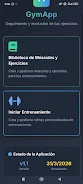
GymApp Control is a compact fitness management app designed for people who prefer to plan and track weightlifting and bodyweight sessions from a phone or tablet. GymApp Control puts the essentials—an editable exercise library, a manual training builder, an adjustable rest timer and clear progress charts—into a lightweight, offline package so you can record sets, reps and weights without distractions or constant connectivity.
Key features
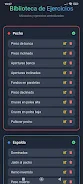
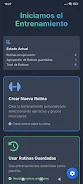
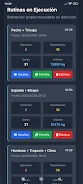
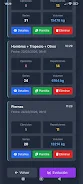
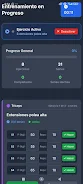
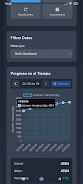
The app includes an editable exercise library with more than 50 predefined movements that you can retitle, re-categorize or remove to match your routine. A manual workout builder lets you assemble sessions from scratch or duplicate templates, then record reps and weights in real time as you train. The rest timer supports customizable intervals and audible or vibration alerts, and session data is saved immediately to local storage for a dependable, private history. Visual statistics show load, volume and rep progression over time to help you spot trends and personal records.
Controls are intentionally simple: tap to start a set, swipe to advance to the next exercise or long-press to edit an entry. Timers are front-and-center during a session with one-tap pause and resume so you can manage supersets or unexpected interruptions without losing data. Settings let you choose sound, vibration and countdown formats so the app behaves predictably in a gym, at home or in a quiet studio.
Progression tools focus on practical tracking rather than automated coaching. You can follow logged history to apply progressive overload across sessions, estimate one-rep maximums from recent lifts, and review week-by-week volume to plan deloads or intensity ramps. Templates can be saved as phased programs for beginners, intermediates and more advanced routines, allowing simple periodization by adjusting reps, sets and load targets between phases.
The visual style is clean and minimal, prioritizing legibility and quick feedback. Charts use clear color contrasts and simple axes so you can compare metrics at a glance, and session screens emphasize current weight, target reps and remaining rest. The interface avoids clutter and large, tappable controls are used throughout to reduce mis-taps during sweaty or rushed workouts.
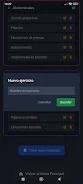
Customization is extensive within the app’s manual framework: add custom exercises with notes about equipment, change default rep ranges, reorder steps inside a workout and duplicate sessions for easy reuse. The predefined library is a starting point; users who prefer very specific or unusual movements can build their own sets and keep them organized into categories like warmup, strength, accessory and mobility.
Offline-first design means GymApp Control runs without an internet connection and saves every session locally, which reduces battery use and keeps your training history private on the device. Because data is kept on your phone or tablet, there are no built-in cloud sync features; this makes the app a good option for people prioritizing privacy or who frequently train in areas with limited reception.
Replay value comes from the manual nature of the app: creating new routines, chasing personal records and refining templates produces ongoing motivation. The app records incremental improvements, highlights recent bests and lets you compare similar sessions to see which adjustments produced better results. A 15-day free trial unlocks premium tools for deeper charting before you decide on the one-time €6 purchase for permanent access.
Accessibility and user experience are considered across the interface. Text sizes are legible, buttons are sized for single-handed use, and the app avoids small, crowded controls that can frustrate users with limited dexterity. Notification and sound options allow the app to be usable in noise-sensitive environments, and the step-by-step workflow keeps session entry short so logging does not interrupt momentum.
Notes and limitations
GymApp Control is intentionally focused on local, manual tracking rather than automated coaching or social features. If you need cloud backup, multi-device sync or an integrated training marketplace you will find those are not part of this design. The predefined exercise list (50+ items) aims to cover common lifts and bodyweight movements, but advanced lifters may want to expand the library with custom entries. The single one-time payment model is straightforward for many users, though those who prefer subscriptions will need to consider that when choosing an app.
Information
 Google Play
Social networking apps have become essential tools in everyday life, making communication with others more convenient. These apps allow you to easily stay in touch with old friends while also providing opportunities to meet new people, helping to expand your social network beyond its usual boundaries. This page features a handpicked selection of the best social apps, making it your go-to choice for mobile socializing!






User Comments

Enjoy all night is a practical, health-focused companion designed to help men recognize and manage common age-related sexual health concerns through clear education, guided daily habits, and discreet progress tracking. The Enjoy all night app presents factual information in short learning modules, offers lifestyle suggestions that support energy and wellbeing, and furnishes simple tools for users to monitor symptoms and document changes over time without replacing professional medical advice.

Bend Pill Box is a mobile app from a long-standing local pharmacy that helps you manage prescriptions, set refill and medication reminders, and access savings and health information all in one place. Designed for patients and caregivers, the app makes it simple to request refills, get refill reminders, view co-pay coupons (saving up to $450 on many popular brand medications), watch medication videos, and connect directly with the pharmacy by touch-to-call. Users who rely on home delivery or hospice and long-term care services will find the app useful for streamlining routine pharmacy tasks and staying informed about their medications.

DocFinder is a mobile directory and appointment helper that makes it faster to locate healthcare professionals and essential services near you. With DocFinder you can search for doctors, hospitals, dentists and pharmacies, compare provider details, and use integrated maps to navigate to the clinic you choose. The app presents current contact numbers, office hours, service descriptions and patient reviews so you can evaluate providers before you call or visit; it also helps you organize trusted clinics with saved favorites and links appointment-related calls directly to your device calendar for smoother scheduling.

کێش helps users understand their body weight relative to their height by calculating Body Mass Index and providing practical guidance for healthier living. By entering height and weight, the app delivers a clear assessment of whether someone is underweight, overweight, or in a healthy range, along with personalized recommendations to reach weight goals safely. With a simple, user-friendly interface and daily usability in mind, کێش is aimed at people who want a lightweight, accurate tool to monitor trends, make informed lifestyle choices, and track small progress without technical complexity.

YouFit Industries is a comprehensive app designed for fitness professionals and clients who want a streamlined way to manage training and nutrition in a single place. The YouFit Industries experience centers on practical tools for tracking workouts, logging meals, setting daily targets and monitoring progress over time, while keeping communication with coaches straightforward and focused. This editor introduction explains how the app organizes routines, supports professional workflows, and helps individuals turn short-term activity into lasting habit changes.

Похудеть за 7 дней is a focused, science-informed seven-day weight-loss program built around clear daily plans and practical tools created by professional nutritionists. The app guides users through one-week cycles of personalized meal suggestions, short guided exercise routines and daily reminders so people with busy schedules can aim for measurable progress—up to about 6 kilograms for some users—while prioritizing safety and sustainable habits. Designed for all fitness levels, Похудеть за 7 дней keeps decisions simple with a clean interface, step-by-step instructions and nutrition notes that make following the program realistic even on tight days.