
 X
 facebook
 WhatsApp
 Email
Introduction
AZ Plugin 2 (newest) is an add-on for AZ Screen Recorder that brings more capable mobile-first editing to your recorded clips, letting you trim with frame accuracy, crop and reframe footage, replace or adjust audio tracks, and convert short videos into smoother GIFs without leaving your device. Designed as a companion tool, AZ Plugin 2 (newest) focuses on hands-on, precise post-processing tasks that often require desktop software, but executed with touch-friendly controls so you can polish clips on the go.
Key features
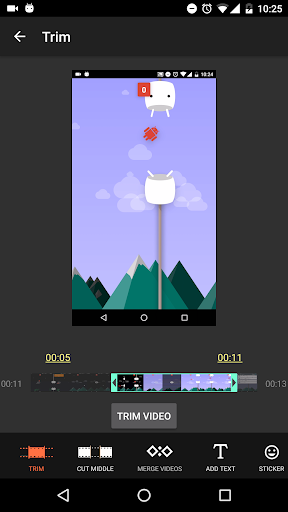
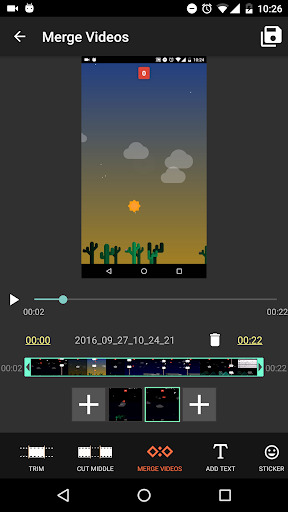
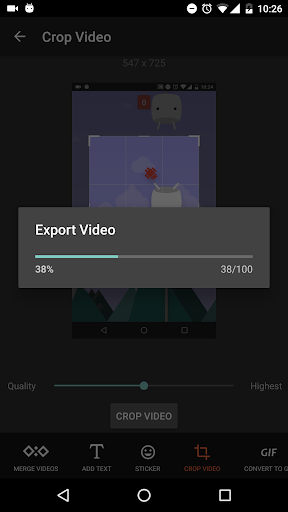
The plugin offers frame-accurate trimming and cut tools so you can remove unwanted frames or split a take at exact moments, and it includes cropping tools with common aspect-ratio presets to help you prepare clips for different platforms. GIF conversion includes basic frame-rate and loop options to balance fluidity and file size. Audio features let you replace an existing soundtrack with MP3 or other common formats, or adjust the volume level of the original audio track. On-device compression and simple merge functions reduce file sizes and combine multiple clips into one file, while sticker and text overlays let you annotate moments or add titles directly within the editor. Every feature is integrated to work inside AZ Screen Recorder so edits remain part of your recording workflow.
Workflow and controls
AZ Plugin 2 (newest) uses an intuitive timeline-based approach adapted for touchscreens: drag handles to set in and out points, scrub frame-by-frame when you need precision, and pinch to zoom the timeline to refine edits down to individual frames. Overlays and text are placed with simple drag-and-drop behavior and can be adjusted by tapping to open basic style controls for font size, color, and position. Exports are previewed before finalizing so you can check how compression or GIF settings affect motion and clarity. The interface emphasizes a short edit cycle: import or open a recording, make focused adjustments, preview, and export — all without switching apps.
Customization and presets
The editor includes sensible presets to speed up common choices: compression profiles to prioritize quality or file size, crop presets for standard aspect ratios, and GIF options tuned for smooth playback on messaging platforms. Text and sticker elements come with a selection of default styles so you can apply consistent titles and watermarks quickly; these basic customization options help speed production without exposing a steep learning curve. Audio replacement supports commonly used formats and lets you choose export bitrate options that balance fidelity and storage needs.
User experience and accessibility
Targeted at creators who prefer mobile editing, the plugin keeps controls visible and labeled, with large touch targets for trimming and overlay placement. The UI organizes tools by task rather than feature names, helping new users find common actions quickly. Basic accessibility considerations include high-contrast text options for overlays and adjustable timeline zoom, which can make detailed edits easier for users with limited dexterity. The editing flow is straightforward enough for quick corrections while still providing the precision required for polished clips.
Offline use, performance and device considerations
Because processing happens on-device, you can edit offline without needing an internet connection, which is convenient when you are on the move or dealing with sensitive footage. On-device compression reduces upload sizes when you choose to share later, but complex edits or high-resolution exports will naturally require more memory and processing time; the app is designed to surface simple progress indicators and let you cancel or reconfigure an export if needed. For best performance, close other heavy apps while exporting and consider using the lower compression preset for very long recordings.
Practical tips and limitations
For quick results, open a recent recording from AZ Screen Recorder, trim to the essential segment, apply a crop preset, replace audio if needed, then use a compression profile to make sharing faster. Keep in mind that AZ Plugin 2 (newest) works only as a plugin, so the host recording app must be installed to access its features. Development continues and the team releases updates periodically, so advanced features may arrive over time; until then the plugin covers the most common mobile editing needs without requiring desktop tools.
Information
Other Games by the Same AZ Screen Recorder

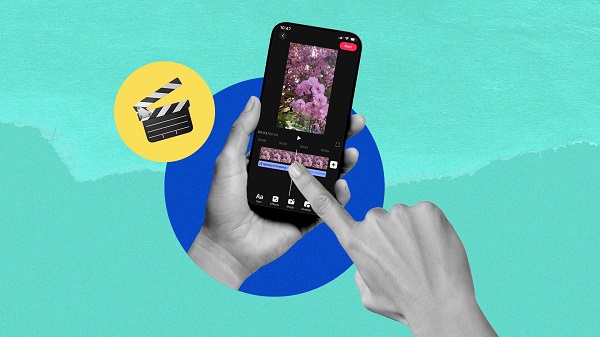
What would it be like to download video software for free? In this collection, you can find various video software that interests you, whether it’s video players or video editors—everything you need is here. All of it is provided for free, allowing you to download with ease and without any worries.






User Comments

HTC Service Pack is a support update package that bundles previously released fixes and improvements to make your HTC device more stable and reliable. Delivered free of charge, this service pack centralizes maintenance updates so users can install a single package rather than hunting individual patches. Installing the latest HTC Service Pack helps keep system components current and can reduce unexpected glitches, improving daily usability. This update focuses on background services and platform reliability rather than adding new consumer-facing features, so it’s recommended for anyone who wants a smoother, more predictable HTC experience.

Get behind the wheel of your dream car with this incredible Minecraft PE addon! With amazing vehicles like a detailed jeep with custom sounds, a classic hot rod with a flame paintjob, a realistic police car with sirens, and a luxurious sports car for fast-paced fun, you'll be cruising in style in no time. Choose from 12 different colors, test your speed on the roads, and enjoy the thrill of driving around in the pixelated world of Minecraft. Don't let your horse hold you back - download Cars mod now and experience the excitement of virtual driving like never before!

Are you tired of losing your precious photos and videos? Say goodbye to the stress of accidentally deleting important files with a simple solution - récuva images delected! This app makes it easy to recover all your deleted images and videos with just one simple step. No need for any complicated programs or computers, just download the app and say hello to effortlessly retrieving your files. Don't let your memories disappear - récuva images delected has got you covered!
SmartEmail puts email and multimedia services in one app, combining a full-featured mail client with access to apps, music, movies, TV shows and reading material so you can manage communication and entertainment from a single interface. If you want to stop switching between apps and keep your inbox, contacts and calendar synced across devices, SmartEmail offers an all-in-one solution that streamlines productivity and leisure. The app is useful for people who travel or work across phone, tablet and laptop and prefer a consistent, easy-to-navigate interface that keeps important messages and media within reach.

Elberfelder Bible in german is a lightweight, searchable Bible app that brings the classic Elberfelder translation to Android devices. It combines precise German text with fast navigation, offline access, and study-friendly tools to help readers explore scripture anytime, anywhere with clarity and ease.

ALARME ORION IP2 is an app for the ORION IP2 control panel and cameras that lets you manage and monitor your alarm system from anywhere. It enables configuration of the central unit, activation and deactivation control, real-time status checks and access to event history. With ALARME ORION IP2 you receive instant alerts and live video streams remotely and can control numerous electrical devices connected to the system. For users who want continuous remote surveillance and convenient device management, this app centralizes alerts, video and system controls into a single interface.