

 X
X
 facebook
 WhatsApp
 Email
Email





Introduction
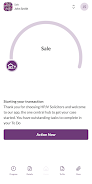
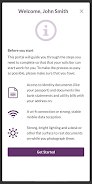
HPJV Solicitors brings real-time visibility of your legal matters to your mobile device, putting time-stamped updates, quotes and progress indicators into a single, easy-to-read view so you no longer need to wait for calls or emails to know what is happening with your case. The app is built for clients who value transparency and clarity: open the app to check the current status of a matter, review recent actions, and see which steps are coming next without combing through paperwork or long message threads.
Key features and navigation
The HPJV Solicitors app centres around a live matter dashboard that consolidates current status, recent activity and outstanding tasks on one screen. Navigation relies on familiar touch patterns — tap to open a matter, swipe between recent items and use a top-level search to jump to a client reference or case number — making routine checks quick and predictable on devices of all sizes. Sections can be expanded to reveal a timeline, cost breakdowns or attached documents, and previews load in a format optimised for mobile reading so you can assess information at a glance.
Progression system and matter timeline
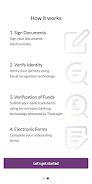
Each matter follows a clear progression system that mirrors the firm’s workflow: from initial quote and instruction through intermediate milestones such as document preparation, filings and court events, to final completion and archival. The timeline is visual and step-based so you can see which milestones are complete, which are pending and which actions have been recorded by the practice. Timestamps on every entry help you understand when updates occurred and give a realistic sense of expected timescales for each stage.
Document handling and information access
Beyond status lines the app provides direct access to quote details, itemised cost information, invoices and uploaded documents related to any matter you are authorised to view. Documents open in a mobile-friendly preview with metadata such as upload date, author and file type shown clearly so provenance and context are obvious. Where appropriate the app indicates whether information is a firm-managed entry or a client-supplied item, keeping the record accurate without presenting external events that have not been logged by the practice.
Notifications, customization and user controls
Push notifications alert you when a task is updated or a milestone is reached, and notification settings are granular so you receive only the alerts you want. Within the app you can set frequency, choose types of events that trigger alerts, enable or disable sound and vibration, and define quiet hours to reduce interruptions. These controls allow you to tailor the experience to your daily routine and ensure important updates are not missed while minimising noise from routine activity.
Visual style and accessibility
The visual design emphasises legibility and reduced cognitive load through consistent iconography, clear contrast and readable typography. Accessibility options include scalable text sizes, a high-contrast mode and descriptive labels for screen readers, and interactive elements are spaced and labelled to support users who rely on assistive tools. Layouts adapt to both phones and larger devices so priority information — urgent tasks or time-sensitive messages — appears prominently regardless of screen size.
Offline use, caching and limitations
The app caches recent matter details and documents so you can review quotes and timelines offline; however, live updates and new notifications require an internet connection. Cached data is intended for reference when connectivity is limited and will synchronise when the device reconnects, at which point any updates recorded by the firm will appear. Users should be aware that changes made by the practice while you are offline will only be visible after synchronisation and that the app displays only matters the firm manages unless external steps have been input to the record.
Security, privacy and account controls
Secure login and standard authentication protect access to matter details so only authorised users can view sensitive information. The app surfaces the firm contact for each matter and records which team member made an update, supporting transparency and accountability. Privacy prompts explain how notifications and local caching work, and you can revoke permissions, clear cached data or sign out when you change devices to keep your information under your control.
Daily use, historical value and practical utility
For routine enquiries the HPJV Solicitors app reduces the need for phone calls and email by placing the key facts at your fingertips and providing a concise historical record of actions and issued quotes. It is useful both during active matters and after completion when you need to review past decisions, fees or documents. Built-in search and filters help you locate specific entries quickly, and the audit-style timeline supports efficient review of a matter’s lifecycle for personal records or follow-up questions with the firm.
Known constraints
Notifications depend on device permissions and may be missed if alerts are disabled; certain features require online access to reflect the latest status. The app focuses on transparency and convenience for matters handled by the firm rather than serving as a general legal research tool, so if external steps are critical to your case you should confirm they have been recorded in the matter. Regular use and timely synchronisation are recommended to ensure you always see the most current information.
Information
User Comments

FleetDocs is a mobile document management app that helps trucking fleets capture, submit, and organize paperwork using a smartphone camera. FleetDocs puts common driver tasks — photographing bills of lading, scanning receipts, combining multiple pages and sending them to an administrator — into a simple, repeatable workflow designed for fast processing and less paper handling.

InterForum is the official mobile app for attendees of InterForum conferences, designed to simplify planning, participation, and networking at live and virtual events. It centralizes agendas, official programs and session details so users can browse schedules, track updates, and build a personalized timetable that fits their interests. The app also supports live interaction with speakers, real-time polls, and in-app messaging to help attendees stay informed and connected. If you attend InterForum events regularly or are a first-time participant, this app streamlines event logistics and boosts opportunities to learn, ask questions, and meet other professionals.

Visit UIC is a compact guide to the University of Illinois Chicago's annual Open House, offering a clear overview of the September 16 event and why it matters for prospective students, families, and community visitors. The app summarizes what to expect—over 100 sessions, faculty talks, lab and studio demonstrations, hands-on activities on the quad, and practical sessions on admissions and financial aid—so you can quickly see whether UIC's academic programs, facilities, and urban campus culture match your interests before attending in person.

msgKarriere is a mobile career companion designed to help candidates and employees discover job opportunities, follow industry trends, and manage professional development from any location. In the first moments after opening msgKarriere you can search curated listings, read firsthand employee 'Job Stories', and start an application with a streamlined workflow that reduces friction between finding a role and applying. The app centralizes company profiles, event details, and project summaries in a compact, user-focused layout so users can make informed choices about roles and workplace culture on the go.

Dhaka Share Bazar puts Bangladesh's stock market into a compact, mobile-friendly interface so you can check live quotes, indices and company information on the go. Dhaka Share Bazar is designed for anyone who needs concise market reference — from experienced traders who review intraday moves to investors and students who study company filings and sector trends. The app focuses on delivering exchange-sourced data in a clear layout that reduces time spent navigating multiple websites and gives a single place to consult prices, charts and corporate summaries.

政府職缺快找 is a streamlined app that helps users discover and manage government job vacancies in one place. The app aggregates the latest public-sector openings, lets you filter searches, save favorites, and view full job details so you can prepare applications with fewer steps. Job seekers, career changers, and recent graduates will appreciate the ability to create tailored search conditions and receive deadline reminders via calendar sync. If you want a single dashboard for monitoring official vacancy announcements and organizing potential applications, 政府職缺快找 offers the basic tools to simplify the process.