

 X
X
 facebook
 WhatsApp
 Email
Email


Introduction
Basiskwaliteit YourAssets helps property and maintenance teams define, communicate and enforce minimum quality standards for building components so everyone understands the expected level of finish. Basiskwaliteit YourAssets makes it simple for managers to set required quality levels, attach illustrative photos and explanatory notes, and keep rental agents, supervisors and contractors working from the same scope during repairs and change maintenance. The app is designed for on-site use: it clarifies expectations, reduces rework and documents decisions with clear records that teams can consult while standing in front of the asset.
Key features and workflow mechanics
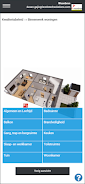
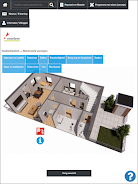
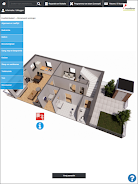
The app centers on component-level profiles that outline what ‘acceptable’ looks like for walls, floors, doors, plumbing fixtures and other building parts. Managers create or import profiles and assign quality tiers per component; each tier can include annotated photos, descriptive text and examples of acceptable and unacceptable finishes. During inspection or handover, users navigate a simple touch-driven interface to select a component, review the defined standard and capture a photo with notes. The workflow encourages structured decisions: select the required action, attach supporting media, and save a timestamped record so the reasoning behind a repair or rejection is preserved for later review.
Controls and on-site interaction
Controls are optimized for field work: large touch targets for quick selection, a camera-first capture tool for immediate photo documentation, and inline note fields that support short, focused descriptions. Annotate directly on photos to highlight defects or acceptable repairs, and use pre-filled options to speed repetitive entries. The app supports role-aware screens so rental agents, supervisors and contractors see the tasks and guidance relevant to their responsibilities, which reduces miscommunication and accelerates sign-off.
Progression, versioning and policy governance
Basiskwaliteit YourAssets supports a lightweight progression system for policy rollout. Administrators can publish baseline standards, iterate on them by creating new versions, and track adoption across properties. Each version is associated with a changelog and effective date so teams understand which rules applied to a specific repair or inspection. This versioning helps resolve disputes by showing which standard was in effect at the time of a job and provides a clear path for continuous improvement.
Visual style and level structure
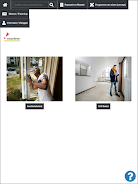
The interface emphasizes photographic examples and clean component hierarchies rather than dense text. Building parts are organized into logical levels — for example room > wall > finish — so users drill down from a high-level view to precise requirements. Visual guidance uses real-world photos with overlays and short captions to reduce interpretation errors. This photo-first approach improves consistency during inspections and makes requirements immediately actionable for field workers.
Customization, templates and replay value
Organizations can tailor profiles to local practice by creating templates for common repair types and saving reusable note sets. These custom templates reduce data entry and increase consistency across sites. The app retains historical records of inspections and repairs, which makes it easy to replay past workflows for audits, training or root-cause analysis. Reviewing prior cases also supports continuous learning and reduces repeated mistakes over time.
User experience, accessibility and offline capabilities
Good user experience is central: clear labels, concise guidance and an uncluttered layout help staff make confident on-site decisions. Accessibility considerations include scalable text sizes and high-contrast visuals for field conditions. For locations with limited connectivity, the app can cache component profiles and capture records offline, then synchronize changes when a connection is available so work is not blocked by network outages.
Challenge handling and structured feedback
The app helps prevent disputes by requiring documented rationale for out-of-scope work and by locking repair scopes to activities recorded in the profile. Where disagreements occur, structured feedback forms let users submit observations linked to specific profiles or components; these inputs feed administrative reviews and can trigger profile updates. Over time, the feedback loop supports targeted improvements to the quality policy and reduces recurring points of contention.
Who benefits and typical use cases
Basiskwaliteit YourAssets is useful for housing associations, property managers, maintenance contractors and facility supervisors who need to enforce consistent standards across multiple properties. It is particularly effective during tenant turnovers, planned maintenance cycles and change maintenance projects where clear, documented expectations reduce delays and cost overruns. The combination of photo-based guidance, scoped activities and versioned policies makes it straightforward to scale standards across teams while preserving local insights.
Information
User Comments

FleetDocs is a mobile document management app that helps trucking fleets capture, submit, and organize paperwork using a smartphone camera. FleetDocs puts common driver tasks — photographing bills of lading, scanning receipts, combining multiple pages and sending them to an administrator — into a simple, repeatable workflow designed for fast processing and less paper handling.

InterForum is the official mobile app for attendees of InterForum conferences, designed to simplify planning, participation, and networking at live and virtual events. It centralizes agendas, official programs and session details so users can browse schedules, track updates, and build a personalized timetable that fits their interests. The app also supports live interaction with speakers, real-time polls, and in-app messaging to help attendees stay informed and connected. If you attend InterForum events regularly or are a first-time participant, this app streamlines event logistics and boosts opportunities to learn, ask questions, and meet other professionals.

Visit UIC is a compact guide to the University of Illinois Chicago's annual Open House, offering a clear overview of the September 16 event and why it matters for prospective students, families, and community visitors. The app summarizes what to expect—over 100 sessions, faculty talks, lab and studio demonstrations, hands-on activities on the quad, and practical sessions on admissions and financial aid—so you can quickly see whether UIC's academic programs, facilities, and urban campus culture match your interests before attending in person.

msgKarriere is a mobile career companion designed to help candidates and employees discover job opportunities, follow industry trends, and manage professional development from any location. In the first moments after opening msgKarriere you can search curated listings, read firsthand employee 'Job Stories', and start an application with a streamlined workflow that reduces friction between finding a role and applying. The app centralizes company profiles, event details, and project summaries in a compact, user-focused layout so users can make informed choices about roles and workplace culture on the go.

Dhaka Share Bazar puts Bangladesh's stock market into a compact, mobile-friendly interface so you can check live quotes, indices and company information on the go. Dhaka Share Bazar is designed for anyone who needs concise market reference — from experienced traders who review intraday moves to investors and students who study company filings and sector trends. The app focuses on delivering exchange-sourced data in a clear layout that reduces time spent navigating multiple websites and gives a single place to consult prices, charts and corporate summaries.

政府職缺快找 is a streamlined app that helps users discover and manage government job vacancies in one place. The app aggregates the latest public-sector openings, lets you filter searches, save favorites, and view full job details so you can prepare applications with fewer steps. Job seekers, career changers, and recent graduates will appreciate the ability to create tailored search conditions and receive deadline reminders via calendar sync. If you want a single dashboard for monitoring official vacancy announcements and organizing potential applications, 政府職缺快找 offers the basic tools to simplify the process.