

 X
 facebook
 WhatsApp
 Email
Introduction
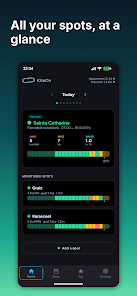
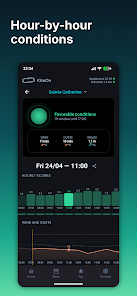
KiteOn: Kitesurf Wind Forecast is a focused mobile companion for kitesurfers who need clear, localized wind, tide, and weather information before they launch. KiteOn: Kitesurf Wind Forecast places an emphasis on actionable data — hourly wind vectors, gust estimates, tide schedules and spot-specific context — so riders can decide whether conditions fit their experience and equipment. The app blends model output with nearby station readings and presents results in a compact interface that works on the water or on the move.
Practical overview
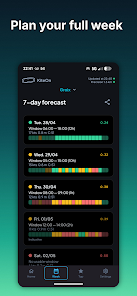
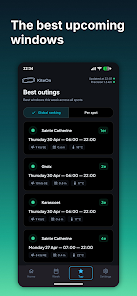
Instead of raw meteorology, the app prioritizes clarity: simple timelines show when wind strength and direction best match a selected spot, while confidence indicators explain where predictions are more or less certain. The visual timeline aligns wind, gusts and tide events so you can spot favorable windows at a glance. Map views include angle-to-shore information and common launch hazards, helping you evaluate onshore, cross-shore or offshore tendencies without digging through dense menus.
Features and controls
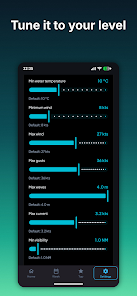
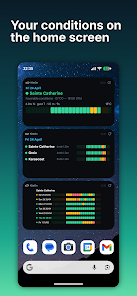
Controls are designed for quick decisions. Tap any map spot to open a condensed forecast card, swipe the timeline to preview conditions across the day, and pinch to zoom map layers for wind fields or buoys. Custom wind presets let you define ideal ranges for specific kite and board setups; once saved, those presets drive notifications and highlight matching windows in the timeline. Widgets provide immediate at-a-glance data on the home screen so you can see current wind and the next recommended window without launching the full app.
Progression and personalization
While not a game, KiteOn encourages progression through a learning loop: save local spots, compare live station readings to model forecasts, and tune your wind presets as you learn local biases. Over time the personalized spot list and alert history help you recognize consistent patterns, such as thermal onshore afternoons or tidal channels that intensify gusts. That growing familiarity effectively levels up a rider’s local knowledge and reduces uncertainty on new days.
Visual design and accessibility
The design favors contrast and legible charts for quick comprehension in bright outdoor conditions. Color-coded wind strength, clear arrowed directions and concise glyphs reduce the need to interpret numbers while on the beach. Accessibility options include larger text, simplified contrast-friendly themes and clearly labeled controls to support users who rely on screen magnifiers or voice-over tools. The layout keeps critical decisions one or two taps away to minimize distraction when preparing to launch.
Offline capability and reliability
For trips to remote coastlines KiteOn: Kitesurf Wind Forecast supports offline caching so you can pre-download forecasts for specified spots and time windows; cached data includes timeline views and tide tables. Forecast reliability varies with sensor density: where buoys and shore stations are plentiful the app blends observational data with models for sharper local results, and in sparser regions it surfaces confidence levels and recommends relying more on nearby station readings where available.
Replay value and practical tools
The app’s replay value stems from repeatable planning workflows: checking a spot timeline, adjusting wind presets, and scheduling alerts creates a routine that riders use for every session. Built-in tools like shareable condition snapshots and spot notes let you coordinate with crew or preserve local tips about launch zones, ideal tides, or unusual thermal behavior. Regularly using these features turns raw forecasts into consistent decision-making aids.
Safety and user guidance
KiteOn encourages conservative, informed choices by prominently showing tide extremes, onshore gust risk and recommended wind ranges for common equipment. The app is a planning aid, not a substitute for local judgment: always double-check beach access, currents and other real-world hazards before launching. Smart alerts can warn you when conditions rapidly change so you avoid arriving at a spot at the wrong time.
Getting started
Install and allow location permissions to populate nearby spots, then save a few favorite launch sites and set your wind presets to match your kit. Enable push alerts and configure widgets for quick updates. Regular use builds a reference of local model biases and alert history that helps you make safer, more confident choices. KiteOn: Kitesurf Wind Forecast is geared toward riders who want timely, practical data without wading through complex meteorological tables.
Information
 Google Play

The Remote App Tool collection includes many Android apps that allow remote control. With the growing number of smart devices, it's easy to misplace remotes. These apps solve that problem, offering a convenient, free way to control your devices. They provide great convenience for your daily life!






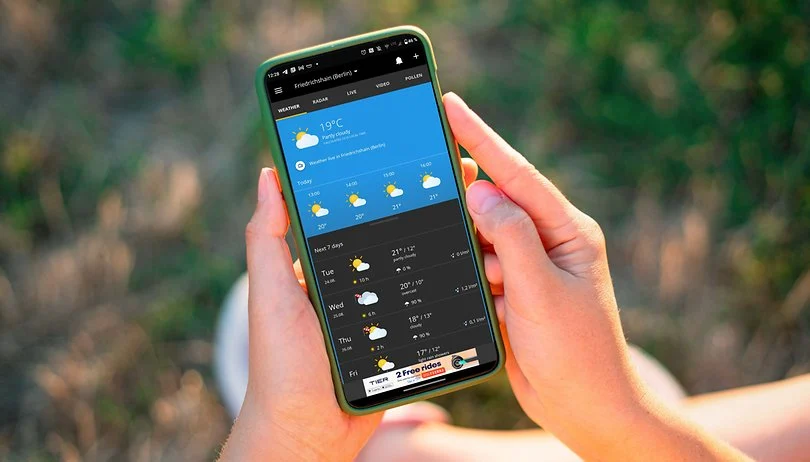
What are some reliable weather apps without ads? A great weather app not only helps you stay informed about daily weather conditions but also delivers accurate weather data. Some apps even come with smart voice alerts, ensuring you're always prepared when heading out. These weather apps are ad-free, with all forecasts and updates sourced from trusted meteorological organizations, providing you with the most precise information. If you're looking for such a tool, download and try one today!






User Comments
Weather Station - Data Manager helps you collect, organize, and review sensor readings from local and networked weather stations. The app imports common data formats, displays interactive charts, and supports export for further analysis.
Weather app widget- Live radar puts real-time weather, forecasts and radar maps on your device so you can plan ahead and avoid surprises. This compact weather utility delivers precise local forecasts, a seven-day outlook and hour-by-hour updates, plus a live radar view to track storms and precipitation across your area. Users who want fast access can add customizable home screen widgets showing temperature, humidity, wind, UV index and more. Weather app widget- Live radar also reports advanced metrics such as dew point, visibility and pressure, and includes an Air Quality Index to monitor common pollutants.

DashClock Moon Phase Extension brings the moon’s current phase directly to your Android home or lock screen, letting you check lunar phases at a glance without opening extra apps. This lightweight extension integrates with the DashClock Widget to display whether the moon is new, waxing, full or waning and requires no complex setup — simply add the extension to your existing DashClock Widget and enable it.

News 9 Weather provides accurate local forecasts, live radar, severe weather alerts, and on-demand forecast videos for your area. News 9 Weather offers hourly and 10-day forecasts, interactive radar maps, and customizable push notifications to help you plan your day.

AI Weather - AI Assistant is a smart weather utility that uses artificial intelligence to give personalized forecasts, packing practical travel planning and everyday advice into a simple interface. Choose your destination and travel dates, and the app analyzes upcoming conditions to suggest what to pack, whether you'll need an umbrella, and tips for staying comfortable in different climates. Travelers and daily planners will appreciate the tailored recommendations, while the hybrid approach combines AI-driven insights with familiar forecast formats so you stay prepared for changing weather.
Sun Shield brings real-time UV safety tools to your phone so you can plan outdoor time based on current conditions. Sun Shield provides current, hourly and daily UV Index readings for any location worldwide, including solar-noon measurements and hourly intervals, and pairs that data with a six-day UVI forecast and ozone column information.