

 X
X
 facebook
 WhatsApp
 Email
Email
Introduction
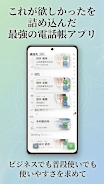
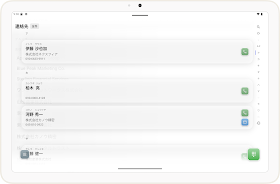
Biz Contacts is a flexible contacts manager that brings your phonebook, dialer and call history together in one place, designed for business users and everyday organization. Biz Contacts helps you find the right person quickly, whether you work with Japanese kanji names, need clear call history for client follow-ups, or want to separate work and personal contacts on a single device. This app description outlines how Biz Contacts organizes information, how it handles interaction and customization, and what to expect when you integrate it into a daily workflow.
Key features and everyday use
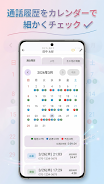
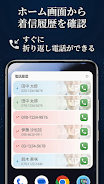
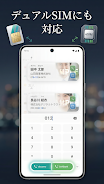
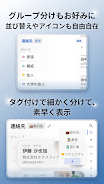
At its core, Biz Contacts simplifies contact discovery and communication: fast search supports kanji readings without furigana, so Japanese-heavy address books become searchable by pronunciation as well as by characters. The app merges a dialer and unified call history so incoming, outgoing and missed calls are visible alongside per-contact histories that include call duration and last-contact dates. You can organize entries into groups, tag contacts for projects or departments, and assign company relationships for a structured address book that scales with your needs. Practical tools such as dual SIM handling, multiple account support, QR code sharing and vcf export let you move contacts between devices or accounts without complex syncing services, and local backup/restore keeps your data under your control.
User interaction and controls
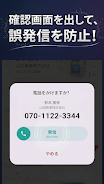
Interactions in Biz Contacts follow familiar mobile patterns to keep learning time low: tap to call or message, use the search box to filter by name, company, number or email, and open a contact card to view full history and actions. The dialer integrates with the contact list so you can start calls directly from search results or history entries. Contextual actions let you share a contact via QR or export a vcf file to local storage. Small safeguards such as accidental-call confirmation reduce misdials during busy days. The home-screen widget provides one-tap access to frequent contacts or the dialer, improving speed for heavy phone users.
Organization, progression and address-book structure
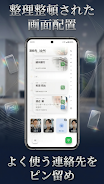
Biz Contacts supports a clear hierarchical approach: individual contacts belong to companies, can be grouped into teams or projects, and carry tags for flexible cross-referencing. As your organization grows, these structures function like a progression system—pin favorites to the top, filter out incomplete entries when preparing outreach lists, and use history views to prioritize follow-ups based on last-contact dates. This makes it easier to manage a growing list of leads, clients or vendors without losing context or history, and it helps you track relationships over time rather than scattering information across different apps.
Customization and visual style
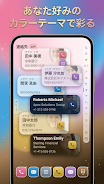
The app gives practical personalization options so you can match the interface to your workflow and accessibility needs. Choose color themes and font families, adjust font sizes for legibility, enable left-handed mode for one-handed use, and select the preferred start screen—whether you want the dialer, contacts list or recent calls first. Layout choices let you emphasize either a compact list for scanning many entries or a detailed view for rich contact cards. These options help the app fit into different visual preferences without changing core functionality.
Accessibility, offline use and reliability
Biz Contacts is designed to work offline by keeping contact data local and offering manual export and import for backups. This offline-first design is useful when traveling or when enterprise policies limit cloud syncing. Accessibility controls such as adjustable text size and high-contrast themes improve readability, while simple design choices support screen readers and one-handed navigation. Local backups and vcf export provide reliable fail-safes so you can restore data without relying on third-party services.
Replay value and long-term productivity
Although not a game, Biz Contacts offers replay value in the form of daily productivity gains: recurring use improves the quality of your contact database as you tag, group and clean entries, and the call-history insights make it easier to maintain regular contact with key people. The app’s small conveniences—QR sharing for quick exchange, accidental-call confirmation, and the widget—add up to saved time across weeks and months, making the app more valuable the more you use it.
Limitations and subscription details
Some advanced personalization and organizational features are gated behind a monthly premium tier, including extended theme packs, premium fonts and additional tag capacity for power users. The core functionality—search, dialer, call history, groups, companies, QR sharing, dual SIM support and local vcf export—remains available without subscription so individuals and small teams can rely on the essentials before deciding whether to upgrade.
Overall, Biz Contacts aims to be a practical, privacy-friendly contacts manager that balances powerful organizational tools with straightforward controls and offline reliability, suitable for professionals who need a structured address book and clear call history on a single device.
Information
 Google Play
User Comments

Forum Joomla!FR brings the Francophone Joomla community to your phone and tablet, offering fast access to the official French Joomla forum and community resources so you can read, reply and stay informed from anywhere. Forum Joomla!FR centralizes discussions, AFUJ announcements and practical resources in a responsive interface designed to work smoothly on both smartphones and larger screens, helping developers, site maintainers and newcomers keep up with topics and collaborate in French.

Space messenger is a compact messaging application aimed at everyday communication, letting users exchange text and media, organize conversations, and manage contacts in a straightforward interface. It is useful for people who want a simple, efficient way to keep in touch without complex setup; the app's design focuses on clear message threads and quick sharing. Space messenger suits users who prefer a lightweight messaging tool for personal or small-team conversations and who value a no-frills approach to sending messages and viewing chat history.

VSN is a utility and mobile recharge app that lets users pay bills and send IMPS transfers quickly and securely. Designed for people who want to simplify routine payments, VSN combines bill reminders, transaction history, and secure online payments in a single, easy-to-use interface. The app is useful for individuals and small businesses that need a dependable way to manage mobile recharges, electricity, water, and other utility bills without juggling multiple providers. With clear workflows and built-in safeguards, VSN reduces the time spent on payments and helps avoid missed dues.

APP Técnicos is a specialized mobile app designed for technicians who maintain Tennant cleaning equipment, providing a compact, field-ready tool to receive, manage and document service work orders. The app delivers detailed job information—model, serial number, reported faults—so technicians can diagnose and resolve issues quickly. Technicians can update job status in real time, attach photos and notes, and keep a complete service log. Secure, credential-based access ensures only authorized personnel use the system, while offline mode lets teams continue work without connectivity and sync changes when a connection returns.

Kemendesa Corner is a centralized communication and resource app designed to help employees of the Ministry of Desa, Pembangunan Daerah Tertinggal, and Transmigration stay informed and work more efficiently. The application gathers reference materials, news updates, discussion spaces and direct consultation tools into a single interface so staff can quickly find documents, follow program developments and coordinate activities across village development, Bumdes initiatives and transmigration programs. Users who need a reliable internal hub for sharing policy updates, accessing training videos and resolving questions will appreciate how Kemendesa Corner reduces fragmentation and speeds everyday collaboration.

ChubbSurvey is a mobile application built to help officers and staff manage accident investigations and claims more efficiently. The app centralizes scene logging, evidence capture and reporting so teams can record photos, audio notes, descriptive damage assessments and GPS coordinates directly from the field. Organizations choose ChubbSurvey to reduce paperwork, keep stakeholders informed with automated alerts and ensure consistent, professional documentation that speeds up claim processing. Designed for both on-site and remote use, it helps surveyors and insured companies locate incidents precisely and maintain organized exploration records from first assessment through final reporting.