
 X
 facebook
 WhatsApp
 Email
Introduction
Microsoft OneNote is a versatile digital notepad that helps you capture ideas, scan documents, record audio, and organize tasks in one place; whether you're jotting quick text notes, clipping web content, sketching with a stylus, or building a multi-section notebook for a long-term project, Microsoft OneNote keeps those pieces together and accessible across devices.
Key features and capture methods
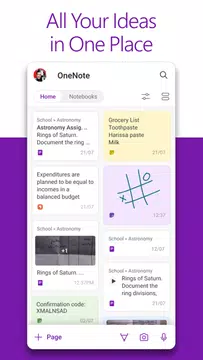
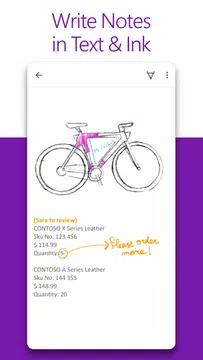
The app offers multiple capture modes so you can work the way you prefer: typed notes, freehand ink, voice recordings and dictation (available in 27 languages with automatic punctuation), and an integrated notes scanner that extracts text from photos. The flexible page canvas means you can position text boxes, images, and drawings anywhere, and tools like ink-to-shape tidy hand-drawn diagrams while OCR pulls searchable text from scanned pages. Quick Capture and the Homepage are designed to shorten the time between idea and saved note, and sharing and editing links make it straightforward to collaborate with coworkers or classmates while preserving the original layout.
User controls and editing workflow
Editing in Microsoft OneNote is driven by straightforward, familiar controls: a tappable toolbar for formatting and drawing, simple gestures for panning and zooming, and clear buttons for recording or scanning. If you prefer keyboard and mouse on larger screens, the app supports efficient navigation between pages and sections so you can move quickly through a project. Ink tools let you change pen color and thickness, convert handwriting to typed text when desired, and apply automatic shape correction to polish diagrams. The voice recorder and dictation controls are intentionally simple — start, stop and play back — so capturing spoken ideas during a meeting or lecture is fast and unobtrusive.
Organization, progression and structure
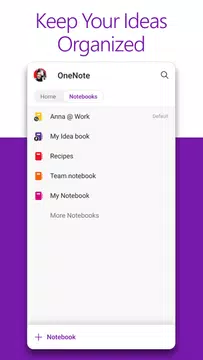
Notes live in a multi-level structure of notebooks, sections and pages that helps you build an evolving information system. You can progress from rough idea sketches on a page to structured notes with checklists and labeled tasks, then archive or reorganize pages into different sections as a project matures. Custom labels and simple tagging systems help prioritize follow-ups and create visible workflows for personal or team projects. The app's search and the Homepage make it practical to retrieve older notes as you expand a project over days, months or years.
Visual style and customization
The visual style is intentionally flexible: pages can be mostly blank for freeform sketching or structured with headings and lists for clean reference. You can control colors, choose basic layout options, and place multimedia elements in context with text to create visually distinct notes. Drawing and diagramming tools include smoothing and correction so casual sketches look tidy; when visual clarity matters, the canvas supports layering images, ink and typed text in a single view.
Collaboration, integrations and user experience
Sharing is built into the experience: you can share a page or an entire notebook and collaborate with others in a way that integrates with common Office workflows. Integration with email and document apps streamlines moving notes into longer documents or meeting follow-ups, while the design aims for low friction when switching between devices. The app focuses on practical productivity rather than decorative features, giving priority to speed of capture, reliability of search, and the ability to maintain context across mixed media notes.
Accessibility, offline behavior and reliability
Microsoft OneNote is designed to be usable on a wide range of devices and to support users who need accessible input options: voice dictation, visual contrast in the UI, and a clear layout that works with assistive technologies. The synchronization model ensures your latest changes are propagated across linked devices when a connection is available; the app also keeps recent content responsive on-device so you can continue working in environments with intermittent connectivity. Data integrity and simple sharing controls help teams maintain a single source of truth for meeting notes and project references.
Limitations and practical considerations
While powerful, the app has a few practical limits to keep in mind: dictation is limited to the 27 supported languages, and a very freeform canvas can become cluttered unless you adopt an organization strategy. Automatic shape correction and handwriting conversion are helpful but may not perfectly interpret very complex drawings or messy handwriting, so some manual cleanup can be necessary for detailed diagrams. Finally, large multimedia notes can grow in size, so regular housekeeping of notebooks helps keep performance smooth.
Information
 Google Play
Other Games by the Same




User Comments

Looking for a faster, safer, and more private web browsing experience? Look no further than Proxy Browser. This app is designed to protect your personal data and online activities by encrypting all information, providing 100% anonymity and security. With quick and secure VPN integration, this app ensures worry-free browsing without the risk of information disclosure. Say goodbye to annoying ads with the built-in ad blocker and enjoy a smooth web surfing experience. Plus, with automatic deletion of browsing history, cookies, and cache, your online footprint will remain untraceable. Choose Proxy Browser for a seamless, ad-free, and secure browsing experience.

Stay informed about the MIR adjudications from 2001 to 2017 with this handy app, Plaza MIR. Simply select your criteria such as province, hospital center, or specialty to easily access the information you need. Whether you're a current medical student or a curious observer, this app provides quick and efficient access to past MIR placements. Keep up with the latest trends and make informed decisions for your future with just a few taps on your device. Don't miss out on this valuable resource for navigating the world of Internal Medical Residency.
Pdf Reader & Converter is the ultimate solution for managing all your PDF needs on Android. With features like PDF editing, scanning, conversion, annotation, signature, merging, compressing, splitting, magnifying, and even listening to PDFs aloud, this app has everything you need to handle your documents efficiently. The advanced AI functionalities, such as auto-correcting distortions, summarizing lengthy documents, and AI Chat assistance, make this app stand out from the rest. Whether you're a student, professional, or simply looking to organize your files, the PDF Viewer, Reader, and Scanner app has got you covered. Download now and revolutionize your document management experience!

AlwaysOnDisplay is good app! This app offers a convenient way to access key information without fully activating your screen, saving battery life and time. Choose from a variety of clock designs, add personalized animated GIFs, and access useful widgets with just a double-tap. With landscape mode, brightness adjustment, and theme customization, the possibilities are endless. Easily configure your preferences and enjoy a seamless experience tailored to your needs. Whether you're in a meeting or on the move, Always On Display keeps you informed with just a glance. Download now and enhance your device's functionality!

Looking to learn Turkish quickly and easily? Look no further than Turkish for Beginners! This language learning app is perfect for beginners looking to gain basic conversational skills in Turkish for free. Developed by top methodologists and linguists, our vocabulary trainer offers quality content that is both comprehensive and easy to use. With topics ranging from family and friends to food and drinks, you can tailor your learning experience to suit your interests. Spend just 5-20 minutes a day practicing with our lessons and see your progress with our detailed reports. Download Turkish for Beginners today and start your journey to mastering the Turkish language!

Unleashing Developer Potential: My Indispensable SQLite Editor is a game-changing app that revolutionizes how Android developers interact with SQLite databases. With the ability to inspect and modify database schemas directly on your device, debugging processes are streamlined and accelerated. The root access feature even allows you to delve into system-level databases, providing valuable insights for optimizing app performance. From troubleshooting issues to teaching database concepts, this app is a must-have for any developer serious about data-layer craftsmanship. With real-time syncing, backup prompts, and support for encrypted databases, this powerful tool offers unprecedented functionality for efficient and effective database management.

Do you enjoy word games and puzzles? The کلمه ساز فارسی با حروف الفبا is perfect for you! Whether you're stuck on a level or just looking to expand your vocabulary, simply enter the letters you have into the app and quickly find the correct answers. With features like learning new Persian words, displaying words based on letter count, and categorizing meaningful words by number of letters, this app is both educational and entertaining.
Say goodbye to the stress and confusion with our Step By Step Math Problem Solver & Graph Solver. Our math equation solver not only provides quick results, but also guides you through the solution step by step. From integrals to algebra, limits to trigonometry, our app has got you covered. With features like graphing calculator, algebra calculator with fractions, and easy-to-understand steps, you'll be acing math in no time. Save time and energy by downloading our free math solver app today and watch your math skills soar.

With Nexpart, you have all the key features of the platform right at your fingertips. Secure access allows you to log in easily to any Nexpart-enabled parts supplier, while also being able to switch between parts sellers effortlessly. Searching for parts is a breeze with options to stock check, search by part number, or scan a VIN with your mobile device. Ordering parts is just as convenient - you can place live orders to multiple locations within the same seller and everything syncs seamlessly between your mobile and desktop devices.

Laudate is the ultimate Catholic app for those seeking to deepen their faith and spirituality. With a wide range of features available in multiple languages, including daily Mass readings, prayers, podcasts, meditations, and more, this app is a one-stop hub for all your spiritual needs. Whether you're looking to follow along with the liturgy, pray the Rosary, or reflect on the daily Bible verse, Laudate has you covered. With the ability to customize and save your own prayers, this app is a personal tool for spiritual growth and reflection.

Introducing the Kundalik.com o'quvchi for students on the go - a convenient, easy-to-use mobile app designed to make accessing emaktab.uz a breeze. With this app, you can quickly and effortlessly navigate through the website's resources, making studying and learning more efficient than ever before. Say goodbye to the hassle of searching for information on a desktop - now you can have everything you need right at your fingertips. Download the app today and experience the convenience and ease of learning on the go with emaktab.uz's mobile app.

With real-time tracking, insightful stats, and personalized reading suggestions, Bookly: Book & Reading Tracker Mod will help you read more efficiently and develop a consistent reading habit. Set goals, track your reading speed, and generate detailed reports for each book to stay motivated and engaged. Organize your library, scan ISBN barcodes, and never lose a book again with the book lending feature. Whether you want to read more books, improve your reading speed, or simply have fun while reading, Bookly has got you covered. Download now and start your reading journey!