

 X
X
 facebook
 WhatsApp
 Email
Email
Introduction
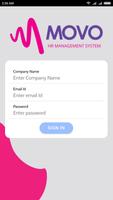
MOVO HR is a compact human resources management app designed for mobile-first teams, and MOVO HR puts essential HR tools into a single, easy-to-use interface so managers and staff can handle routine administration on the go. This introduction covers how the app organizes attendance, leave workflows, employee records and a basic payroll overview while keeping access controls and document storage concise and secure.
Overview
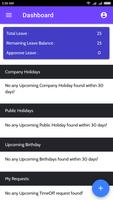
The app targets HR staff, people managers and small business administrators who need a practical mobile companion for daily HR tasks. It centralizes time and attendance tracking, streamlines leave requests and approval flows, and keeps employee profiles and employment documents accessible from a consistent dashboard. The emphasis is on reducing friction for common activities while preserving audit trails and privacy controls so organizations can maintain simple compliance practices.
Core features and how they work
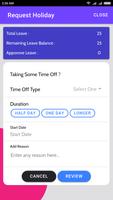
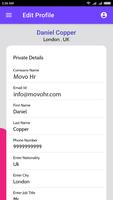
At its center, MOVO HR handles attendance and time tracking, leave submission and approvals, employee directory management, and a basic payslip and payroll overview. Attendance entries typically record check-in and check-out times with timestamps; leave requests collect date ranges, reasons and attachments and route to authorized approvers. Employee profiles store contact details, role information and employment documents that can be uploaded and securely referenced during reviews. Notifications alert approvers to pending tasks and remind staff of upcoming deadlines.
Navigation, controls and user interaction
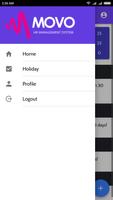
The interface is designed for mobile controls that feel familiar: tap-driven navigation, swipe gestures to move between modules, quick actions for common items and contextual menus for approvals. Managers can approve or reject requests with a single tap, add notes to a workflow and view the audit history for transparency. Search and filters make it straightforward to find an employee record or to filter attendance by date, department or status, helping users complete tasks using minimal taps.
Progression, workflows and task management
Rather than game-like progression, MOVO HR uses structured workflows and role-based progression: administrators configure permission levels and define approval chains that determine how requests move through the organization. The app supports staged approvals and status updates so a leave request moves predictably from submission to final decision. Progress indicators and task lists help users monitor outstanding items and track completion over time.
Customization, modules and data structure
The app allows customization of core elements such as leave types, departmental groupings and custom profile fields to reflect company-specific needs. Dashboards are modular so HR staff can prioritize the panels they use most, and document folders can be organized logically by employee or record type. These customization options support clearer internal workflows without requiring deep technical setup.
Security, privacy and offline considerations
Security features include role-based access controls, encrypted storage for sensitive documents and audit logs for changes to records. Administrators can manage who can view, edit and approve items, and the app logs actions to support internal reviews. For users who work in areas with intermittent connectivity, MOVO HR provides limited local caching of recent records and queued actions that synchronize when a connection is re-established, reducing disruption to daily operations.
Visual style, accessibility and user experience
The visual approach favors a clean, minimal layout with clear typography, consistent iconography and high-contrast elements to improve readability. Accessibility is considered through adjustable font sizes, keyboard-friendly navigation for mobile devices that support external input and compatibility with common screen readers. The goal is a predictable, low-friction experience that keeps routine HR tasks fast and transparent for diverse teams.
Practical use cases and long-term value
Teams use MOVO HR for daily timekeeping, managing leave calendars, maintaining employee records ahead of reviews and for basic payroll checks before formal payroll processing. The app reduces repetitive administrative overhead, improves response times for approvals and maintains a searchable history that supports audits and performance discussions. Its repeatable workflows and configurable structure make it a practical tool for small to medium organizations looking to keep HR processes centralized and manageable on mobile devices.
Information
 Google Play
User Comments

FleetDocs is a mobile document management app that helps trucking fleets capture, submit, and organize paperwork using a smartphone camera. FleetDocs puts common driver tasks — photographing bills of lading, scanning receipts, combining multiple pages and sending them to an administrator — into a simple, repeatable workflow designed for fast processing and less paper handling.
InterForum is the official mobile app for attendees of InterForum conferences, designed to simplify planning, participation, and networking at live and virtual events. It centralizes agendas, official programs and session details so users can browse schedules, track updates, and build a personalized timetable that fits their interests. The app also supports live interaction with speakers, real-time polls, and in-app messaging to help attendees stay informed and connected. If you attend InterForum events regularly or are a first-time participant, this app streamlines event logistics and boosts opportunities to learn, ask questions, and meet other professionals.
Visit UIC is a compact guide to the University of Illinois Chicago's annual Open House, offering a clear overview of the September 16 event and why it matters for prospective students, families, and community visitors. The app summarizes what to expect—over 100 sessions, faculty talks, lab and studio demonstrations, hands-on activities on the quad, and practical sessions on admissions and financial aid—so you can quickly see whether UIC's academic programs, facilities, and urban campus culture match your interests before attending in person.
msgKarriere is a mobile career companion designed to help candidates and employees discover job opportunities, follow industry trends, and manage professional development from any location. In the first moments after opening msgKarriere you can search curated listings, read firsthand employee 'Job Stories', and start an application with a streamlined workflow that reduces friction between finding a role and applying. The app centralizes company profiles, event details, and project summaries in a compact, user-focused layout so users can make informed choices about roles and workplace culture on the go.

Dhaka Share Bazar puts Bangladesh's stock market into a compact, mobile-friendly interface so you can check live quotes, indices and company information on the go. Dhaka Share Bazar is designed for anyone who needs concise market reference — from experienced traders who review intraday moves to investors and students who study company filings and sector trends. The app focuses on delivering exchange-sourced data in a clear layout that reduces time spent navigating multiple websites and gives a single place to consult prices, charts and corporate summaries.
政府職缺快找 is a streamlined app that helps users discover and manage government job vacancies in one place. The app aggregates the latest public-sector openings, lets you filter searches, save favorites, and view full job details so you can prepare applications with fewer steps. Job seekers, career changers, and recent graduates will appreciate the ability to create tailored search conditions and receive deadline reminders via calendar sync. If you want a single dashboard for monitoring official vacancy announcements and organizing potential applications, 政府職缺快找 offers the basic tools to simplify the process.