

 X
X
 facebook
 WhatsApp
 Email
Email
Introduction
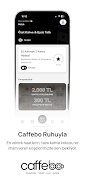
Caffebo puts a modern café experience on your phone, letting you browse coffees, desserts and a calm, curated menu with the clarity of a well-organized menu board. The app is built for people who value fresh ingredients, thoughtful bean selection and the feeling of a quiet coffee break; within the first screen Caffebo highlights daily-updated items, explains ingredient sources and offers one-tap ordering to speed up an in-person pickup.
Key Features
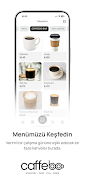
The core features focus on discovery and convenience without overpromising. Caffebo presents a daily-rotating menu so users see what is freshly available each day, along with clear ingredient notes for each item and short tasting descriptions for specialty beans and desserts. The in-app ordering system supports order-ahead pickup workflows: choose an item, customize basic parameters, select a pickup window and place the order. The app also preserves an order history and lets you mark favorites for quick reordering, helping you find preferred combinations over time.
How It Works
Menus are grouped into intuitive sections—espresso-based drinks, filter coffees, seasonal specialties, desserts and light bites—so browsing feels natural rather than cluttered. Each menu card shows price, size options and ingredient information; tapping a card expands details and customization controls. When you place an order Caffebo confirms the estimated preparation time and stores the order in a simple queue view so you can track upcoming pickups during a visit. The app is designed primarily for single-device use and to complement, not replace, the atmosphere of visiting the physical café.
Controls & Navigation
Navigation relies on familiar mobile gestures and controls: tap to open categories, swipe through images and use a search field to find a bean, dessert or ingredient. Customization controls are presented inline: size, milk choice, sweetness level and special notes appear as selectable options and text fields on each item page. The interface emphasizes clarity over complexity so that first-time users can place an order with a few taps, while experienced users can fine-tune their selections without extra steps.
Progression, Personalization & Replay Value
Caffebo supports gentle progression through personalization rather than competitive systems. As you use the app it builds a small personal profile of order history and favorites, which improves convenience and helps the app suggest likely choices when you open it. Daily updates to the menu and rotating small-batch beans create natural reasons to return frequently, and the detailed tasting notes and ingredient information give repeat users a richer understanding of differences between roast profiles and dessert pairings.
Visual Style, Level Structure & Customization
The visual approach is calm and minimal, with warm photography that highlights products and muted accent colors that match a relaxed café interior. Menu structure is modular: featured items at the top, followed by core categories and a short notes area for beans and suppliers. Customization options are straightforward, focusing on the most common choices customers expect; the app avoids deep nested menus to maintain speed and readability while still offering meaningful control over each order.
Accessibility, Offline Use & Performance
Accessibility considerations are present in large tap targets, readable typography and support for common screen magnification settings; the app aims to be usable without requiring overly precise gestures. To help when connectivity is unreliable, Caffebo caches the most recently viewed menu and your saved favorites so you can still reference details and reorder from cached items for a short period. The app is optimized to load images progressively and minimize wait times on modest mobile connections.
Advantages
Users will appreciate fast order-ahead workflows, clear ingredient transparency and the way Caffebo connects the digital experience with the in-person atmosphere of the café. The combination of daily menu updates and searchable tasting notes makes it easy to discover new beans and desserts while relying on saved favorites for dependable choices.
Disadvantages
Caffebo cannot reproduce the physical ambiance of the café or the sensory experience of freshly brewed coffee; it is a tool to extend convenience and information. Because the menu changes daily, some items may be unavailable at times, and where local ordering rules or shop hours apply the app will reflect those limits rather than offering unlimited availability.
Information
 Google Play
Other Games by the Same Nextlua

User Comments

Kicho Sushi places a full sushi ordering experience on your phone, making it easy to browse a complete menu, build a cart and arrange delivery without a call or a trip to the restaurant. Kicho Sushi is designed for straightforward use by new and returning customers: organized categories help you find rolls, sashimi and combos, the cart lets you confirm details before checkout, and the app requests only the information needed to deliver your meal. Multiple payment choices and timely email updates are included so you can plan around preparation and delivery windows.

مملحات is an Arabic-language recipe app focused on Ramadan salads, traditional North African sweets and a variety of Middle Eastern dishes collected into a single, easy-to-use reference. مملحات places clear, photographed step-by-step recipes and practical tips within reach of both beginners and experienced cooks, and the app’s offline mode means you can consult instructions without internet access during busy meal preparation times.

Chope is Asia's leading dining platform that makes booking a table simple and helps you discover new restaurants and money-saving promotions across the region. The app lets you search, view menus and reviews, and reserve a table at more than 13,000 restaurants in Singapore, Jakarta, Bali, Bangkok, Hong Kong and Phuket, while offering perks like 1-for-1 deals, off-peak discounts and set-menu savings. Users who want quick confirmations for date nights, family meals or group outings will appreciate Chope's streamlined reservation flow and rewards, and Singapore users can also order food for pickup or delivery.

KOMA is the official companion app for the KOMA service, designed to consolidate news, announcements, and account tools into a single, easy-to-use mobile experience. The app helps both long-time users and newcomers stay informed with timely alerts and a centralized news hub, while offering straightforward access to account details and support. KOMA focuses on clear communication of official information so you can track promotions, feature updates, and service notices without visiting multiple pages or channels.

Mu Lan Cambridge is a mobile app designed to bring restaurant ordering to your phone, letting you browse menus, place orders and manage your account without calling or visiting in person. In the Mu Lan Cambridge app you can move from menu exploration to checkout in a few taps, with pre-filled fields and the option to keep several delivery or pickup addresses on file. The app focuses on clear, direct interaction with participating restaurants so you receive timely confirmations and an estimated ready time without unnecessary intermediaries.

The Nawabi App is a simple, all-in-one shopping and delivery app that lets users order meals and groceries from their phone and have them delivered to the doorstep. It combines restaurant menus and everyday essentials in a single interface so busy professionals, parents, or anyone who values convenience can save time on errands. With straightforward navigation and clear ordering steps, the Nawabi App reduces friction from browsing to checkout and supports multiple payment methods and live order updates, making it a practical choice for reliable, contact-free delivery of food and household items.