
 X
X
 facebook
 WhatsApp
 Email
Email
Introduction
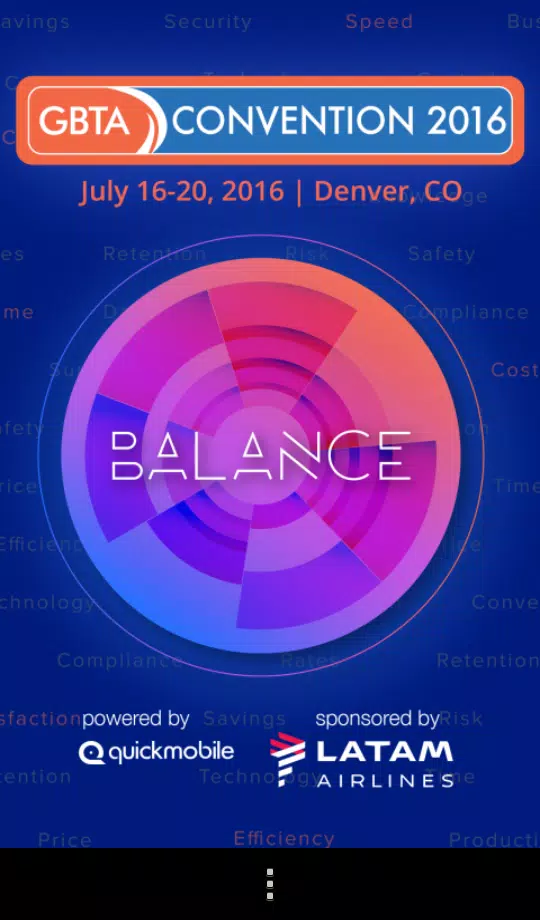
GBTA Convention 2016 App is a mobile companion designed to help attendees navigate sessions, exhibitors and networking events during the annual GBTA conference. It consolidates schedules, maps and speaker profiles into a single interface, making it easier for participants to plan their day and connect with colleagues on the show floor.
Key features at a glance
The GBTA Convention 2016 App offers a compact set of tools focused on conference productivity. Users can create personalized agendas, browse session descriptions, view speaker bios and receive real-time updates. A searchable exhibitor directory and session filters help attendees quickly locate relevant content without flipping through printed schedules.
Interface and navigation
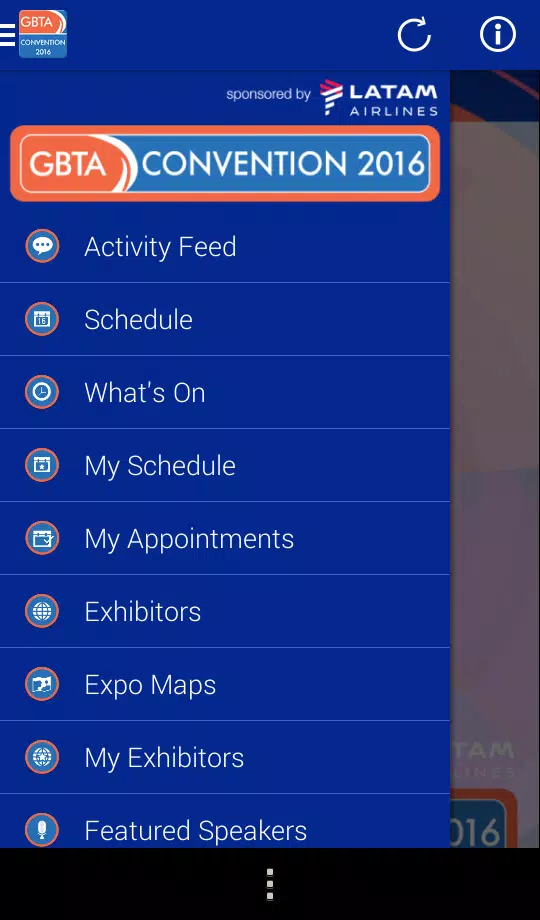
Design emphasizes clarity: large touch targets, readable fonts and consistent iconography guide users through the event. Menus prioritize schedule, map and networking options so common tasks are carried out in two taps or fewer. The app also supports quick access to announcements and alerts to keep attendees informed about last-minute changes.
Schedule management and session tools
Building and managing a daily itinerary is straightforward with the GBTA Convention 2016 App. Add sessions to a personal calendar, set reminders before start times and mark favorites for follow-up. Each session page displays objectives, speaker credentials and related materials when available, allowing users to evaluate which sessions match their learning goals.
Networking and attendee interaction
Networking features turn passive attendance into active engagement. Profile pages let users list interests and contact details, while in-app messaging and social sharing simplify follow-up after meetings. Attendees can flag potential contacts, view who is attending the same sessions and schedule meetups on the show floor.
Maps, exhibitors and venue navigation
Interactive venue maps are included to reduce time spent searching for rooms and exhibitor booths. The exhibitor directory provides location, booth number and a brief description of services or products. Users can plan efficient routes between sessions and exhibitions and save must-visit booths to their personal list for a focused show-floor strategy.
Push notifications and updates
The app delivers push notifications for schedule changes, keynote reminders and special announcements. Organizers can send targeted alerts to specific attendee groups, ensuring important information reaches the right people quickly. Notifications are configurable so users control the types and frequency of messages they receive.
Offline usability and data management
Recognizing variable venue connectivity, the GBTA Convention 2016 App caches schedules and maps for offline access. Basic functionality remains available without an active network, while features that require live data—such as messaging and last-minute updates—resume when connectivity returns. Data usage is optimized to limit cellular bandwidth consumption.
Performance and compatibility
The app is optimized for a wide range of Android devices and aims to balance visual polish with battery efficiency. Loading times are minimized and animations are kept modest to maintain responsiveness on mid-range hardware. Periodic updates address compatibility with newer Android releases and ensure stability throughout the event.
Getting started and practical tips
- Download early: Install the GBTA Convention 2016 App before arriving to pre-load schedules and save time onsite.
- Complete your profile: Add a photo and brief summary so other attendees can recognize and connect with you.
- Use filters: Narrow sessions by track, topic or speaker to build a focused agenda.
- Enable notifications selectively: Choose only the alert types you need to avoid overload.
Whether planning a packed schedule or targeting a handful of exhibitors, the GBTA Convention 2016 App streamlines event logistics and supports meaningful connections. Its combination of mapping, schedule control and networking tools makes it a practical assistant for anyone attending the conference.
Information
Other Games by the Same



Social networking apps have become essential tools in everyday life, making communication with others more convenient. These apps allow you to easily stay in touch with old friends while also providing opportunities to meet new people, helping to expand your social network beyond its usual boundaries. This page features a handpicked selection of the best social apps, making it your go-to choice for mobile socializing!





User Comments

Huntplex ACE puts essential management tools for fitness businesses into a single mobile app, helping gym owners, class instructors and studio managers run daily operations more smoothly. Designed to centralize billing, invoices, attendance tracking, customer enquiries and promotional messaging, Huntplex ACE reduces the need to juggle multiple systems and gives clearer visibility into revenue and client engagement across gyms, yoga studios, group classes and martial arts schools.

Adzshop is an Android utility that brings campaign setup, creative management, and real-time analytics into a single, mobile-friendly dashboard. It helps marketers and small business owners launch ads, track ROI, and optimize budgets on the go, combining practical tools for ad creation, scheduling, and performance monitoring in one compact package.

Journote is an all-in-one toolkit for journalists who need to record, organize and publish on the go. The app combines a document scanner, an audio recorder, a quick note pad, a built-in calendar and a camera so reporters can capture interviews, paperwork, photos and deadlines without switching apps. It also offers a radio stream for news monitoring and direct blog publishing from the app, making it a practical companion for fast-paced reporting. Journalists will want Journote for its convenience: it reduces context switching and keeps essential reporting tools together in one streamlined interface.

SIIP Alexandre Luz is an application designed for municipal public lighting technicians to manage maintenance tasks and service orders efficiently. The app centralizes reporting and reception of work requests so field teams can notify faulty points, receive assignments from a control center, and close or update existing orders directly from a mobile device. Technicians may create new posts, record inspections, and track previously reported locations using a straightforward, easy-to-use interface. SIIP Alexandre Luz aims to reduce paperwork and speed up repair workflows by keeping communication and status updates in one place for municipal lighting operations.
With Dynamics 365 Mobile, your sales team will be equipped with a powerful tool that seamlessly integrates data, tasks, and insights into one streamlined platform. Whether you're at the office or on the go, this app provides offline capabilities, innovative note-taking features, personalized workspaces, and visual tracking of key metrics to keep your business moving forward. Say goodbye to data loss and hello to increased productivity, efficiency, and confidence in your mobile operations. Experience the command center that is redefining business agility with Dynamics 365 Mobile today.
With just a few simple steps, our innovative Letterhead Maker app can help you create a sleek and professional letterhead in minutes. Begin by filling in your profile information, then select a template from our vast collection of modern designs. Preview your customized letterhead and easily download it to your device. Share it with ease via various messaging channels and rest assured knowing that all data is securely stored locally on your phone. No more time-consuming processes or hassle - our app streamlines the creation of personalized letterheads with ease and efficiency. Choose your template, input your details, and voila - your professional letterhead is ready to go!