

 X
X
 facebook
 WhatsApp
 Email
Email

Introduction
McLeod Choice Pharmacy delivers a focused mobile app designed to make prescription management and pharmacy communication faster and more convenient for local customers. The app concentrates on practical tasks such as requesting refills, scanning prescription labels for quick submissions, transferring prescriptions from other pharmacies, and contacting staff by phone or secure message. It is intended for people who regularly manage medications and want a straightforward tool to reduce time spent on routine pharmacy errands.
How it works: core interactions and controls
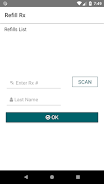
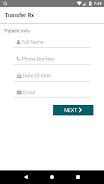
The workflow centers on a few simple controls: tap-based navigation to open Home, Refills, Transfers and Messages, a camera-based label scanner to capture prescription details, and straightforward forms for refill or transfer requests. The label scan tool uses the device camera so users can point, capture, and confirm the prescription number without typing long codes. Refill submissions include clear progress indicators so you can see that a request was received and whether additional information is required. Calling or messaging the pharmacy is one touch from the contact screen, and common actions keep the number of required taps to a minimum to preserve speed and accessibility.
Progression and status within the app
Rather than game-style progression, the app tracks practical progress: a prescription moves from pending to processed based on pharmacy procedures. Users can save a preferred pickup location and basic prescription details so subsequent refills take less time. Notifications and in-app updates reflect changes when available, but final refill times and transfer completion depend on pharmacy processing policies. The app’s design emphasizes predictable, repeatable steps so users become more efficient with daily medication tasks through repeated use.
App structure and visual design
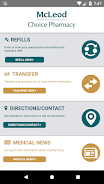
The interface adopts a clean, readable layout with clear labels for each section: Refills, Transfer Prescriptions, Store Info and Messages. Visual elements prioritize legibility—large type for prescription names, contrasted buttons for primary actions, and simple icons to indicate common tasks. The color palette and visual rhythm are intended to reduce confusion during quick interactions, such as scanning a label in low-light conditions or confirming pickup times while on the go.
Customization and personalization
Users can set preferences for their default store location, manage saved prescription profiles, and choose how they receive updates from the pharmacy. These preferences remove repetitive steps and tailor the experience to an individual’s needs. Contact preferences allow users to select phone or message as their preferred communication method, while simple profile settings let the app prefill routine fields to accelerate refill requests.
Replay value and everyday usefulness
Replay value for this utility app comes from its role in routine care: most users will open the app regularly to request refills, check store hours, or contact staff. Because the app reduces friction for common tasks, it encourages consistent use rather than one-off visits. The convenience of scanning labels and saving frequently used prescriptions makes repeated interactions progressively faster and less error-prone.
Accessibility and offline behavior
Accessibility considerations include scalable text sizes and high-contrast elements that improve readability, and straightforward navigation that supports screen reader workflows. The app caches essential store information and saved prescription metadata so that basic details, such as pharmacy hours and contact numbers, remain available offline. Refill submissions and messaging require connectivity; if an action cannot be completed immediately, the app provides clear guidance on when it will try again or how to complete the request once online.
Reliability, privacy, and safeguards
The app focuses on reliable submission of refill and transfer requests and provides validation checks to reduce common input errors. While the app streamlines requests, outcomes such as refill readiness or transfer acceptance are governed by pharmacy policies and regulatory requirements. Messages and contact actions are intended for care-related communication; users should allow reasonable time for staff response and follow any verification steps the pharmacy requires.
Who benefits and known limitations
This tool is particularly useful for regular customers of McLeod Choice Pharmacy who want a compact, practical way to manage prescriptions and contact their local store. It consolidates essentials—refill requests, label scanning, transfers, store details and direct messaging—into a single place. Users should note that support for prescriptions outside participating McLeod Choice Pharmacy locations may be limited and that processing times vary by store.
Getting started
Download the app to set up your profile, save preferred pickup locations and try the label scan for your next refill. McLeod Choice Pharmacy aims to reduce the administrative overhead of medication management so you can spend less time on routine tasks and more time on day-to-day life.
Information
User Comments

Аптека is a mobile pharmacy app (Good Day Pharmacy) that helps you find, reserve and manage medicines and health products from pharmacies across Ukraine. The app lets you search nearby locations, check product availability, and book items for immediate redemption, saving time and unnecessary visits. Аптека also integrates a digital loyalty program with a virtual bonus card, shows your bonus balance and purchase history, and delivers personal offers and medication reminders. With information on opening hours, contacts and detailed product instructions for thousands of SKUs, Аптека aims to simplify routine pharmacy tasks on your phone.

Navi Radiography Pro is a compact, offline radiography reference designed to put an interactive atlas and step-by-step exposure guidance into the palm of your hand. The app combines matched 3D visualizations of X-ray beam direction, patient positioning and synchronized skin, bone and radiograph overlays so that radiologic technologists, radiographers, radiologists and students can quickly clarify projection geometry and expected image appearance during clinical work or study. This editor’s introduction highlights how the interface, visual models and study workflow are arranged to support practical learning and on-shift decision making.

My Derm is a free, clinician-developed app that helps people with inflammatory skin conditions monitor symptoms, manage treatments, and access trusted educational resources to support daily wellbeing. Built with input from patients and dermatology professionals, My Derm brings personal health records, medication and appointment reminders, symptom and lifestyle tracking, and a curated educational feed together in a single, easy-to-use mobile experience designed to support long-term self-management and better conversations with clinicians.

Centro Médico is a mobile application designed for members of the Salto Medical Center that centralizes appointment scheduling, test results, diagnostic images and medication records on a smartphone. The app streamlines routine healthcare tasks—book consultations with specialists, view laboratory and imaging reports, and keep track of prescriptions—so patients can manage their care without unnecessary calls or visits. Users seeking faster access to medical information and clearer communication with clinicians will find Centro Médico useful for staying informed and handling appointments and treatments from anywhere with an intuitive, patient-focused interface.

Mammakarzinom onkowissen is a clinical reference app created for oncology professionals who require clear, practical guidance on metastatic breast cancer at the point of care. The Mammakarzinom onkowissen interface consolidates diagnostic pathways, subtype-specific therapy algorithms and concise drug information into a mobile-oriented layout so clinicians can quickly find evidence-informed options for HR+, HER2+ and triple-negative disease.
CVA Flow is a secure clinical communication app designed to streamline time-sensitive stroke workflows and support coordinated decision-making across EMS crews, emergency departments and remote specialists. This editor introduction explains how CVA Flow organizes cases, the controls and progression tools clinicians rely on during urgent events, and the practical balance it strikes between usability and strict privacy controls for regulated healthcare settings.