

 X
X
 facebook
 WhatsApp
 Email
Email







Introduction
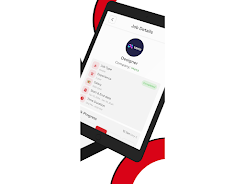
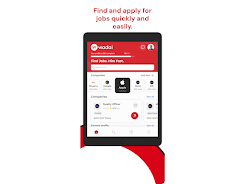
Wadai is a freelance marketplace designed to simplify how independent professionals and businesses find each other, manage work, and keep billing and timelines organized. Wadai brings job listings, profile tools, secure authentication, and in-app messaging together in a single, easy-to-navigate interface so freelancers can showcase their skills, apply to projects, and track earnings while clients post jobs, review proposals, and manage engagements without jumping between multiple services.
Key Features
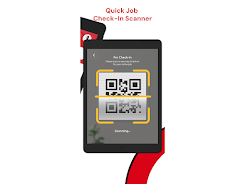
The app combines core features that support the full project lifecycle: a searchable jobs feed organized by category and expected delivery, configurable profile pages with photo and portfolio support, secure account verification to help build trust, and in-app messaging for direct communication. Real-time push notifications keep both sides informed about new opportunities, messages, and status updates. Built-in project tracking records milestones and payments so users can see progress and historical earnings in one place. QR code sharing and simple profile setup let users exchange contact information quickly at events or meetings.
How it works: controls and navigation
Navigation in Wadai is focused on clarity: a persistent bottom navigation or top tabs (depending on screen size) give quick access to the jobs feed, your profile, messages, and a personal dashboard. Controls are standard mobile patterns—tap to open listings, swipe to browse more results, long-press to save favorites, and form-driven flows to submit proposals. Editing your profile and portfolio uses familiar photo pickers and text fields with inline validation, and messaging supports simple attachments so you can share images or brief samples of work directly in a conversation.
Progression systems and user experience
Instead of game-like levels, Wadai emphasizes professional progression that grows from activity and completeness: a clear profile completion meter, saved project history, and an earnings log help freelancers demonstrate reliability over time. The dashboard surfaces recent wins, pending proposals, and invoices or billing notes so users can track momentum. For clients, verified profiles and curated portfolios make it easier to evaluate candidates and move faster from posting to hiring. Informative onboarding guides new users through verification, profile setup, and submitting a first proposal so the learning curve is gentle.
Visual style, customization, and personalization
Wadai presents a clean, functional visual style with readable typography and consistent spacing to reduce clutter when reviewing proposals or portfolios. Users can personalize their public profile with a professional photo, headline, skills tags, and sample work. The app supports language preferences and basic theme choices to match device settings, and interface elements adapt to different screen sizes for a consistent experience on phones and tablets. These customization options help users express their brand and make listings more discoverable.
Project and level structure
Projects in Wadai are organized by category and by expected workload, enabling freelancers to filter by skill, budget, or timeline. Listings range from quick tasks to longer engagements and include clear descriptions, deliverables, and suggested milestones when provided by the client. This structure makes it straightforward to assess fit and prepare realistic proposals. Saved searches and notification preferences allow users to watch particular categories or keywords so they see new, relevant opportunities as they appear.
Replay value, challenges, and realistic expectations
Wadai encourages repeated use through fresh job postings, the ability to refine and re-submit tailored proposals, and ongoing communications about active projects. While popular categories may be competitive, building a detailed profile and concentrating on niche skills increases the chance of matching with suitable clients. Response times and project availability depend on market activity, so persistence and timely replies are important parts of success on the platform.
Accessibility, offline support, and security
The app includes accessibility features such as adjustable font sizes, clear contrast, and localized text to support users across regions. Basic offline support lets you draft proposals and edit your profile without an active connection; drafts sync when you reconnect so you do not lose work. Security and privacy are handled through secure authentication, optional verification steps to reduce fraud, and standard protections for messages and personal data, giving both freelancers and clients confidence when they interact through the platform.
Wadai is tailored for professionals who want a focused tool to manage applications, communications, and earnings in one place. The interface balances useful controls, progress tracking, and customization so users can present work effectively and manage projects with fewer tools. Whether you are just starting as a freelancer or hiring for a short-term engagement, Wadai provides centralized workflows and clear signals to help move from opportunity to delivery more smoothly.
Information
 Google Play
User Comments

FleetDocs is a mobile document management app that helps trucking fleets capture, submit, and organize paperwork using a smartphone camera. FleetDocs puts common driver tasks — photographing bills of lading, scanning receipts, combining multiple pages and sending them to an administrator — into a simple, repeatable workflow designed for fast processing and less paper handling.

InterForum is the official mobile app for attendees of InterForum conferences, designed to simplify planning, participation, and networking at live and virtual events. It centralizes agendas, official programs and session details so users can browse schedules, track updates, and build a personalized timetable that fits their interests. The app also supports live interaction with speakers, real-time polls, and in-app messaging to help attendees stay informed and connected. If you attend InterForum events regularly or are a first-time participant, this app streamlines event logistics and boosts opportunities to learn, ask questions, and meet other professionals.

Visit UIC is a compact guide to the University of Illinois Chicago's annual Open House, offering a clear overview of the September 16 event and why it matters for prospective students, families, and community visitors. The app summarizes what to expect—over 100 sessions, faculty talks, lab and studio demonstrations, hands-on activities on the quad, and practical sessions on admissions and financial aid—so you can quickly see whether UIC's academic programs, facilities, and urban campus culture match your interests before attending in person.

msgKarriere is a mobile career companion designed to help candidates and employees discover job opportunities, follow industry trends, and manage professional development from any location. In the first moments after opening msgKarriere you can search curated listings, read firsthand employee 'Job Stories', and start an application with a streamlined workflow that reduces friction between finding a role and applying. The app centralizes company profiles, event details, and project summaries in a compact, user-focused layout so users can make informed choices about roles and workplace culture on the go.

Dhaka Share Bazar puts Bangladesh's stock market into a compact, mobile-friendly interface so you can check live quotes, indices and company information on the go. Dhaka Share Bazar is designed for anyone who needs concise market reference — from experienced traders who review intraday moves to investors and students who study company filings and sector trends. The app focuses on delivering exchange-sourced data in a clear layout that reduces time spent navigating multiple websites and gives a single place to consult prices, charts and corporate summaries.

政府職缺快找 is a streamlined app that helps users discover and manage government job vacancies in one place. The app aggregates the latest public-sector openings, lets you filter searches, save favorites, and view full job details so you can prepare applications with fewer steps. Job seekers, career changers, and recent graduates will appreciate the ability to create tailored search conditions and receive deadline reminders via calendar sync. If you want a single dashboard for monitoring official vacancy announcements and organizing potential applications, 政府職缺快找 offers the basic tools to simplify the process.