
 X
X
 facebook
 WhatsApp
 Email
Email




Introduction
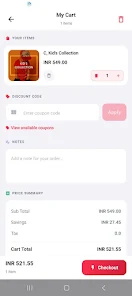
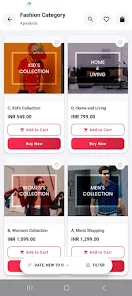
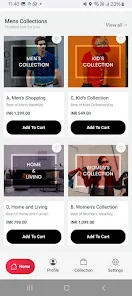
Appokart is a mobile preview tool designed for Shopify merchants, developers, and designers who need a reliable, device-accurate view of their storefront before customers see it. Appokart connects directly to your Shopify store and renders the live storefront on an Android device, letting you check themes, product pages, navigation and mobile responsiveness without guessing how items will appear on phones or tablets. The app focuses on a straightforward preview workflow so you can validate layouts and user flows while you edit in Shopify.
Key features
The preview experience in Appokart emphasizes fidelity and speed: live pages load in a phone-sized view that reflects responsive breakpoints, image scaling, and theme-specific styling. You can toggle orientation to test portrait and landscape layouts, switch between installed themes to compare presentation, and observe changes in near real time as edits are saved in the Shopify admin. The interface is lightweight to reduce lag when navigating product lists, collection pages, and content sections. Security considerations are built in so store data remains private during the preview connection.
How it works
Connecting Appokart to a Shopify store is simple: authenticate from the app to grant read-only preview access and then open your storefront URL to begin. The preview renders pages using the same HTML and CSS that customers receive, so what you see closely matches the live mobile experience. Use on-screen controls to simulate different device widths, inspect the order of page sections, and refresh the view after publishing a theme change. Because Appokart mirrors site output rather than modifying your theme, it serves as a safe QA layer during development and design reviews.
Controls and navigation
Appokart provides intuitive controls for common validation tasks: pinch-to-zoom and swipe gestures mimic basic phone interactions, an orientation toggle switches between portrait and landscape, and a theme selector allows side-by-side comparison without leaving the app. Navigation reproduces the storefront’s own menus and links so you can exercise product search, collection filters, pagination, and checkout entry points to confirm layout and content behavior. These controls help teams identify visual regressions and layout shifts that only appear on smaller screens.
Workflow, progression and replay value
The app fits into iterative design and deployment workflows by supporting repeated preview sessions as your store evolves. Teams can use Appokart during initial theme setup, when adding large catalogs of products, or when making targeted UI adjustments; each preview session helps you progress from early design checks to final pre-launch QA. Because it provides fast visual feedback, the app encourages frequent re-checking after changes, which increases the chance of catching responsive issues before they reach customers and improves long-term store quality.
Visual style and customization
Appokart renders themes using the storefront’s own assets, so typography, spacing, color palettes, and media appear as they will for shoppers. This approach helps designers and developers assess how hero images, product thumbnails, and text blocks scale on different screen sizes. While Appokart does not edit themes in-app, it supports evaluation of visual hierarchy, alignment, and image cropping so you can decide whether a theme or layout needs refinement in your theme editor.
Who benefits from Appokart
Merchants get a clearer picture of the customer mobile experience and can quickly verify product pages, collection displays, and promotional banners. Developers and agencies use the app to validate responsive behavior across breakpoints and to spot CSS or layout regressions. Designers can confirm visual treatments and spacing on handheld screens, and store owners preparing a launch can run rapid checks as content is added or reorganized. Appokart makes it easier for cross-functional teams to collaborate on mobile-first quality assurance.
Limitations and known constraints
Appokart requires an active Shopify store connection to render live previews; it does not provide offline mockups of pages or act as an in-app theme editor. The tool focuses specifically on mobile previews and is not a substitute for full desktop browser testing or comprehensive cross-browser QA. Because it mirrors your storefront, any live content restrictions or storefront access rules still apply while previewing.
Performance and accessibility considerations
The app is optimized to keep previews responsive on typical Android devices and to minimize bandwidth while maintaining visual fidelity. Appokart preserves the storefront’s responsive rules and content structure so you can evaluate accessibility-related layout changes, font scaling, and contrast in context. This makes it a practical tool for checking how assistive settings and larger text sizes affect layout on real devices.
Summary
Appokart is a focused, practical utility for anyone who needs an accurate mobile view of a Shopify storefront. By reflecting real-time changes and supporting quick visual checks, it reduces guesswork when preparing themes or content for mobile shoppers and helps teams ship with greater confidence.
Information
 Google Play
User Comments

Remix is a sustainable fashion app that lets you buy and sell pre-loved and new clothing from more than 13,000 brands. The app combines a clean, searchable interface with curated discovery so you can find outfits quickly, score discounts and clear out your closet for extra cash. Users may want Remix if they care about circular fashion, enjoy branded bargains or want an easy way to sell items they no longer wear. With thousands of fresh listings added daily, Remix makes it simple to refresh your wardrobe responsibly while saving money and reducing waste.

Fresh Tent Farmers Market helps you find nearby farmers markets, connect with independent vendors, and explore fresh, seasonal food in your area. The app makes it simple to browse markets across the country, watch market videos and live streams, and save vendors you want to follow — useful whether you’re planning weekend visits or looking for specialty producers. Fresh Tent Farmers Market puts local food scenes at your fingertips, making it easier to discover new products, support small businesses, and get a real sense of market life before you go.

عالحارك is a delivery app that brings food, groceries and everyday essentials straight to your door, connecting you with local restaurants, markets and shops. Whether you want a hot meal from a favorite restaurant, fresh supermarket items, or a last-minute household supply, عالحارك simplifies ordering with a clean interface, real-time driver tracking and multiple payment options. The app suits busy users, families and anyone who values convenience and local selection, offering exclusive deals and a reliable delivery network to make shopping and meal ordering faster and less stressful.

Appokart is a mobile preview tool designed for Shopify merchants, developers, and designers who need a reliable, device-accurate view of their storefront before customers see it. Appokart connects directly to your Shopify store and renders the live storefront on an Android device, letting you check themes, product pages, navigation and mobile responsiveness without guessing how items will appear on phones or tablets. The app focuses on a straightforward preview workflow so you can validate layouts and user flows while you edit in Shopify.

Magofis Pro places office and stationery shopping into a single, streamlined mobile experience designed for small businesses, home offices, and anyone who manages workplace supplies. Magofis Pro helps you browse a broad catalog of office supplies, stationery, and cleaning products, receive timely alerts about campaigns and discounts, and follow orders from purchase to delivery with clear status updates. The app focuses on simplifying routine procurement so restocking becomes faster and less error prone, while keeping support available when you need it.

Dardanos Work – Alışveriş is a practical mobile shopping app designed to make everyday purchases faster and clearer for users who value straightforward navigation and secure checkout. Dardanos Work – Alışveriş places a prominent search bar and clear category entry points on the first screen so you can find electronics, DIY tools and household essentials within seconds; results are filtered in real time and the interface keeps actions within reach so common tasks like adding to cart or saving items remain efficient.