
 X
X
 facebook
 WhatsApp
 Email
Email
Introduction
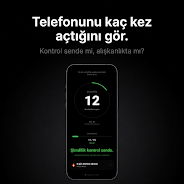
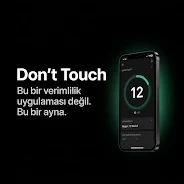
Don't Touch is a small, focused utility that counts every time you unlock your phone and presents that raw data as an honest digital mirror. Don't Touch puts the numbers front and center rather than offering advice or blocking features: its purpose is to measure unlock frequency in real time so you can understand how often you reach for the screen. If you suspect habitual checking, this app gives direct visibility into minutes, unlock counts and short-term trends without gamification or judgement.
How it works
The core mechanic of Don't Touch is simple and transparent: the app listens for system unlock events and increments a lightweight counter each time you access your device. There are no timers or intrusive pop-ups; the app runs in the background with minimal battery impact and stores daily counters locally. Each unlock entry is recorded with a timestamp so the app can reconstruct daily patterns and present the last seven days for quick comparison. Because it only tracks unlock events, it complements rather than replaces full screen-time monitors or parental controls.
Controls and customization
Don't Touch keeps controls intentionally minimal. You can enable or disable background tracking, reset the current day's count, and choose whether the app displays a daily limit warning. The daily limit setting lets you set a personal threshold and receive a clear visual signal when you exceed it; this is a gentle nudge, not a blocker. Visual preferences include a dark, distraction-free theme and a compact display mode for widgets or quick glance views. Settings are organized so users can adjust tracking and privacy options in a few taps.
Progression, trends and analytics
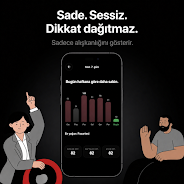
Rather than levels or scores, progression in Don't Touch is represented by trends and averages. The app shows daily, weekly and monthly averages so you can spot gradual shifts in behavior. Short-term progression appears as the last seven days of unlock counts, while longer-term tracking aggregates weekly and monthly means. Premium analytics may offer additional breakdowns, but the core progression — seeing whether your unlocks increase, decrease, or stay stable — is available in the free experience. The focus is self-awareness: repeated reductions in unlock frequency are the natural indicators of progress.
Visual style and level structure
The interface is intentionally minimalist and optimized for low visual strain: a dark palette, clear numeric displays and simple charts that emphasize the counts rather than decorative elements. Think of each day as a single level in a larger pattern; the app's charts let you compare days at a glance and drill down into timestamps to identify peak moments when you tend to reach for the phone. There are no animated rewards or achievement lists — the visual language keeps attention on what matters: the data.
Replay value and daily use
Replay value in Don't Touch comes from repeated self-checks and habitual review. Because the app updates instantly and records new unlocks as they happen, daily opening of the app becomes a brief data review rather than a lengthy session. Users who track progress over time often return each morning to review the previous day's pattern, adjust limits, or export a screenshot for their own notes. The simplicity is itself a reason to re-open: fast, disposable insights that don't demand long attention spans.
Accessibility and privacy
Accessibility considerations include high-contrast text, large numeric readouts and concise language to make the interface approachable for a wide range of users. Don't Touch requires only the permissions necessary to detect unlock events and stores data locally, so your unlock history remains on-device unless you choose to share it. There are no cloud requirements and offline functionality covers the app's primary purpose: counting unlocks and showing local trends with no persistent internet connection required.
Limitations and intended audience
Don't Touch is not a coaching tool, blocker, or full app usage monitor. It deliberately does not provide behavioral interventions, forced downtime, or app-level tracking. Users looking for a blunt, numbers-first perspective on how often they pick up their phone will find it useful; those seeking guided habit-change programs or detailed per-app usage should combine Don't Touch with other tools. Some analytics are labeled premium and may be restricted compared with the core tracking features.
Installation notes
Installation is straightforward: grant the app the minimal permission to detect unlock events, choose your preferred display mode, and let it run in the background. Because it is designed for low resource use, battery and storage impact remain small, and the app continues to work offline. For people who want a candid, data-driven reflection on screen interaction, Don't Touch offers a direct and lightweight way to make blind habits visible.
Information
 Google Play
User Comments

Don't Touch is a small, focused utility that counts every time you unlock your phone and presents that raw data as an honest digital mirror. Don't Touch puts the numbers front and center rather than offering advice or blocking features: its purpose is to measure unlock frequency in real time so you can understand how often you reach for the screen. If you suspect habitual checking, this app gives direct visibility into minutes, unlock counts and short-term trends without gamification or judgement.
Bird‑Care Record App Patapata is a care‑tracking app designed to record your bird’s daily health and condition, bringing meals, weight, cage environment, out‑of‑cage time, medication and vet visits into one tidy interface that helps you stay organized. The app supports multiple birds with individual profiles, lets you attach photos and notes to entries, and provides a simple list view to review past data so you can spot trends like appetite shifts or molting. A built‑in out‑of‑cage timer with notifications makes it easier to keep interaction routines consistent for better daily care.

Pawpass is a pet health management app designed to keep medical records, appointments and important documents for each animal organized and accessible. Pawpass helps owners of dogs, cats, birds and multi-pet households create individual profiles, track vaccinations and medications, log weight and vet visits, and export complete medical histories as PDFs so information is ready when you need it most.

Weys Pharmacy is a digital platform built for pharmacy owners that creates an online storefront, streamlines order handling, and enables home delivery of prescription and over-the-counter medicines. The app helps pharmacies go online to reach more customers, verify prescriptions digitally, and reduce manual tasks so teams can focus on fast, compliant service. Pharmacy managers will appreciate tools for tracking inventory, managing orders from a simple dashboard, and communicating directly with customers to confirm prescriptions or delivery details—making medicine delivery reliable and convenient for both staff and patients.

A Room of Our Own puts massage, beauty and skincare bookings in your pocket, offering Davis, California residents a straightforward way to find and schedule professional treatments. The app is designed for local clients who want to browse service menus, compare providers and secure appointments without spending time on the phone. Clear business hours, contact details and a simple checkout flow are integrated so arranging facials, waxing or massages is fast and predictable.

Airplane Simulator Plane Games is a mobile flight simulation app that recreates piloting small and commercial aircraft in a stylized yet detailed 3D environment. It runs offline and offers a mix of free-flight exploration and mission-based scenarios so users can practice takeoffs, landings, emergency procedures and more without an internet connection. The simulator includes multiple aircraft, realistic cockpit views, dynamic lighting and sound, and simple touch or tilt controls, making it a good choice for hobbyists who want an accessible but immersive flying experience on their device.