

 X
X
 facebook
 WhatsApp
 Email
Email




Introduction
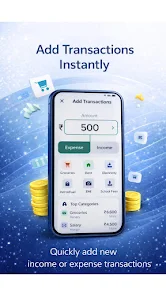
FinFlow AI- Money Manager is a compact personal finance app that automatically reads bank SMS messages to record income and expenses, then organizes that information into clear summaries and AI-driven insights. FinFlow AI- Money Manager is designed for users who want low-effort tracking of daily, weekly and monthly cash flow without spreadsheets or lengthy manual entry, delivering transaction lists, category breakdowns and concise reports that make overspending and saving opportunities easy to spot.
Key features and core functionality
The app pairs automatic SMS parsing with simple manual controls so transactions are captured quickly and corrected easily when needed. Automatic SMS expense tracking identifies incoming and outgoing amounts from bank messages and places them into consolidated lists with detected categories and merchant names. Built-in AI analyzes those transactions to produce readable insights about patterns and recurring costs, and to surface opportunities to reduce spending. Reports are presented in short, focused summaries for specific time windows so you can compare daily, weekly or monthly behavior at a glance. The clean interface keeps navigation straightforward and minimizes taps to get to the most important information.
How it works in practice
When a bank SMS arrives, FinFlow AI- Money Manager scans the message for key fields such as amount, date and transaction type, then creates or updates a record in the local transaction log. Users can review parsed entries to correct category, add notes or split multi-purpose charges. Time-range filters let you view a single day, a rolling week or a full month, and a compact transaction list surfaces the highest-value items first for quick review. The AI commentary appears alongside summaries rather than replacing raw lists, so you always see the underlying transactions that produced each insight.
Controls, navigation and accessibility
The interface relies on standard mobile gestures: tap to open transaction details, swipe to archive or mark as reviewed, long-press to edit categories and pull-to-refresh to re-scan recent messages. Menus are intentionally shallow to reduce friction and get you to common screens — overview, transactions, and reports — with a single tap. Accessibility options include adjustable text size and high-contrast themes to improve readability, and the layout is optimized for screen readers so users who rely on assistive technologies can navigate transaction lists and summaries effectively.
Progression, goals and challenge systems
The app uses practical progression mechanics to help you build better habits: set budget targets for categories, track streaks for staying under budget, and monitor a simple financial health indicator that moves as you reduce overspending or increase saved amounts. Monthly and weekly checkpoints provide automatic snapshots of progress so you can compare performance over time. A challenge system encourages short-term behavior changes, for example a week-long dining-out limit or a no-spend weekend; completion updates your progress view and influences the AI suggestions that follow.
Customization, visual style and level structure
FinFlow AI- Money Manager focuses on clarity and consistency in visual design: muted color palettes with accent tones for categories, legible fonts and compact transaction cards that expand into detail views. Users can customize category names, reorder priority categories, and choose between compact or detailed list styles depending on how much information they want on screen at once. The app’s level structure is time-based rather than gamified — daily, weekly and monthly levels help you drill into specific periods and understand how habits change across billing cycles and pay periods.
Replay value and ongoing utility
This is a utility you return to regularly. Replay value comes from recurring review cycles: reconciling transactions, checking AI insights after a pay cycle, updating budgets and taking new short-term challenges. Because the app focuses on sustainable behavior change rather than one-off features, users find value in repeated use as their financial picture becomes clearer and AI suggestions grow more relevant with more data.
Privacy, offline use and limitations
FinFlow AI- Money Manager stores financial records locally on the device and requests only the permissions required to read SMS for automatic tracking, aligning with a privacy-first approach. The app works offline for viewing and editing existing transactions; automatic SMS capture requires the device to receive messages but does not depend on a cloud service for core functions. Limitations include reliance on banks sending transaction SMS — charges that do not trigger an SMS or that arrive in unusual formats may need manual entry or adjustment to ensure accurate categorization.
Practical notes
Install FinFlow AI- Money Manager to remove repetitive data entry and to surface understandable insights about where your money goes. Regular review of the weekly and monthly summaries combined with occasional manual corrections keeps the AI analysis useful and relevant, helping you plan ahead, set achievable budgets and maintain better control over personal finances without complex tools.
Information
 Google Play
User Comments

腾讯理财通 is Tencent's official wealth management app that aggregates products from major financial institutions into a single, secure hub. The app helps users browse and invest in nearly ten thousand products — from public funds and insurance to securities and high-end options — while offering analysis tools and curated recommendations to support decision-making. Users may want to download 腾讯理财通 for its combination of strong security measures, multi-channel access and professional guidance, which suits both beginners seeking a guided start and experienced investors looking for a broad product selection and market insight.

İzmir Ticaret Borsası is a mobile application that gives traders, investors and businesses direct access to the Izmir Commodity Exchange's information and market publications. The app collects announcements, news and official bulletins in one place so users can follow price movements, hall data and weekly market comments in real time. It also lets users register for events and read the exchange’s monthly and daily reports and its official magazine. Professionals and anyone tracking commodity markets will find the app useful for staying informed, checking reference prices quickly and making better market decisions based on up-to-date data.

廊坊直销银行 is the mobile direct-banking app from Langfang Bank that lets users open accounts, buy curated investment products and manage finances on the go. 廊坊直销银行 targets internet-savvy customers who prefer a simple, secure and responsive digital banking interface, combining online account opening, low-entry investment options and a rewards-driven referral program in a single app. The onboarding flow walks new users through identity verification and initial product selection so customers can begin saving and investing without a branch visit, and the app emphasizes clear product descriptions and risk information to support informed decisions.

国海良时期货 is a mobile futures trading client that brings account management, market quotes and order execution into a streamlined smartphone experience. The app lets users open accounts online, view real-time market updates, perform account diagnostics and move funds securely via bank-futures transfers (银期转账), all from a single interface. With a redesigned, user-friendly layout and faster navigation, 国海良时期货 aims to help both new investors and experienced traders monitor trends and place trades quickly without needing to visit a branch, making it a practical tool for active futures participants.

西南开户宝 is a mobile account-opening app from Southwest Securities that lets users open and manage a securities account entirely from their smartphone without visiting a branch. The app guides new and existing clients through identity upload, video verification, bank linking and risk assessment with clear prompts, so users can complete setup at home or on the go. Prepare a second-generation resident ID and a same-name debit card, keep a stable network connection, and follow the step-by-step flow. The interface focuses on speed, compliance and ease for first-time investors and repeat users.

期货交易通 is a comprehensive futures trading application designed to bring account opening, live market data, and quick order execution into a single, easy-to-navigate mobile interface. Built for both experienced traders and people new to derivatives, 期货交易通 emphasizes clear market access and practical tools: real-time exchange quotes, depth-of-market views, flexible charting with common technical indicators, and a streamlined workflow that helps users analyze opportunities and place orders while remaining aware of the inherent risks of futures trading.

mPay mobile payments is the ultimate all-in-one financial app that revolutionizes the way you handle your daily transactions. From purchasing public transportation tickets with ease to paying for parking without the hassle of searching for change, mPay streamlines your entire travel experience. Need insurance or a quick loan? No problem. With just a few clicks, you can compare offers and secure your coverage or financial assistance instantly.

TebMobile is the ultimate banking app that puts control in the hands of the clients, offering convenience and security on the go. Whether checking account balances, making payments, or applying for credit cards and loans, it provides a seamless and efficient experience for all users. Stay connected to your finances in real time with TebMobile, the must-have banking app for modern consumers.
Introducing the new SDB Mobile app! Now you can take care of all your banking needs quickly and securely right from your phone. Check your savings account balance, view transaction history, maintain payees, and easily transfer funds between accounts, to 3rd parties, or to other banks. You can even pay your credit card bill and check the latest loan and FD balances. With SDB bank's ISO/IEC 27001 certification, you can trust that your information is safe and secure. Sign up today and experience the convenience of fast and secure banking with the SDB Mobile app.
Experience the ultimate crypto portfolio management with Coin Stats – Crypto Portfolio Mod. This free app is your go-to tool for tracking over 5,000 cryptocurrencies from 250+ exchanges, including Bitcoin, Ethereum, and Litecoin. Whether you're a seasoned investor or just starting out, Coin Stats has all the features you need to monitor and grow your portfolio. Stay up to date with live prices, track your performance, and anticipate value changes with the sophisticated research tools.

Take control of your finances with the 22seven: Boss your money. Easily manage and invest your money in one secure place. Link all your accounts and cards to see a clear picture of your finances. With automatic budgeting tools, you can track your spending and find ways to save effortlessly. Make better money decisions on the go by knowing exactly where your money is going. Say goodbye to juggling multiple statements and slips - 22seven does all the hard work for you. Start bossing your money today with 22seven and see the difference it can make in your financial life.