
 X
X
 facebook
 WhatsApp
 Email
Email






Introduction
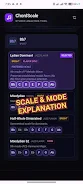
Chord Scale Studio puts a practical jazz theory reference in your pocket: within seconds it analyzes chords and suggests compatible scales so you can focus on improvisation and performance. Chord Scale Studio was built by a professional jazz guitarist and educator to be a fast, low-friction tool for practice, rehearsal and live use. The first screen is intentionally uncluttered so you get immediate results—enter a chord symbol, pick a root, or paste a progression and the app highlights scale options and common voicings without forcing you through menus.
Key features
The app provides instant scale lookup for single chords and short progressions, with visual guides that map suggested scales onto both a fretboard and a keyboard view. These visual aids clarify where scale tones sit relative to chord tones and show example voicings to help bridge theory and playing. Chord Scale Studio supports progression analysis in the free version for up to three chords and extends that window to longer sequences in the Pro upgrade. Performance is a priority: the app is lightweight, launches quickly, and responds instantly to edits so it can be used on stage or between takes.
How it works and controls
Entering chords is straightforward: type a chord symbol, select from a common-chords list, or tap the root and quality from a compact picker. The interface uses simple gestures—tap to reveal scale choices, swipe to browse alternatives, and pinch to zoom the fretboard or keyboard view. Suggested scales appear alongside explanations of why they fit (shared chord tones, altered extensions, or modal relationships), so you can make musical decisions with context rather than guesswork. Save frequently used chords or progressions to a local library for quick recall during practice sessions.
Progression support and learning flow
Progression handling is designed around practical rehearsal needs: the free tier analyzes short sequences so you can experiment with reharmonization and substitution ideas, while the Pro mode expands the analysis window for longer arrangements. Use the progression editor to audition different scale choices across a sequence, hear how options relate from chord to chord, and iterate on voicings. This workflow makes it easier to develop comping patterns, create solos that respect harmonic motion, and internalize common reharmonization techniques over time.
Visual style and customization
The app embraces a minimalist visual style to reduce distraction—clean typography, high-contrast highlights for scale tones, and an uncluttered display of chord symbols and suggested scales. You can customize display options to suit your instrument and reading preference: choose between guitar neck and piano keyboard views, switch accidental naming between sharps and flats, and toggle notation density to show fewer or more suggested voicings. These adjustments help the tool match your rehearsal environment, whether you prefer a compact on-stage view or a more detailed practice layout at home.
Practice, replay value and user experience
Although not a game in the traditional sense, the app offers strong replay value by encouraging repeated experimentation: try different scale substitutions, compare tonal colors across voicings, and save variations for future practice. The educational visuals and concise explanations shorten the path from theory to application, helping students and professionals alike spend less time theorizing and more time playing. The interface is optimized for short, focused interactions so you can get answers in the middle of rehearsal or while learning a new tune.
Accessibility, offline use and limitations
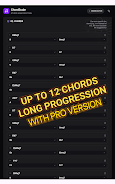
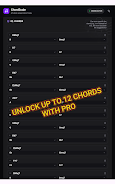
Chord Scale Studio is designed to work offline for core lookup features so you can use it without connectivity on stage or in the studio. Accessibility considerations include adjustable text size and color-contrast-friendly highlights to aid readability. Note the free version limits progression analysis to sequences of up to three chords; upgrading to Pro extends that capability up to 12 chords and unlocks additional convenience features. The app focuses on practical, immediate guidance rather than exhaustive academic analysis, which keeps it approachable for everyday use.
Who will get the most from this app
Students studying reharmonization, gigging musicians needing fast harmonic reference, and educators who want a compact demonstration tool will find Chord Scale Studio especially useful. It provides clear chord-to-scale relationships, quick voicing references, and an efficient workflow for testing ideas—helping users make more confident musical choices without interrupting the creative flow.
Information
 Google Play
User Comments
Hex MIDI - Isomorphic Keyboard turns your phone or tablet into a playable isomorphic keyboard that preserves chord shapes and scale patterns across every key, making it easier to transfer fingerings and improvise without relearning positions. The app replaces piano-style keys with a geometric grid so learning a single shape lets you play the same chord anywhere; it supports multiple popular layouts and connects to MIDI gear for studio use. Musicians looking to explore alternate fingering systems, adapt guitar knowledge to a touch interface, or speed up pattern-based playing will find Hex MIDI - Isomorphic Keyboard a compact, flexible tool.

Chord Scale Studio puts a practical jazz theory reference in your pocket: within seconds it analyzes chords and suggests compatible scales so you can focus on improvisation and performance. Chord Scale Studio was built by a professional jazz guitarist and educator to be a fast, low-friction tool for practice, rehearsal and live use. The first screen is intentionally uncluttered so you get immediate results—enter a chord symbol, pick a root, or paste a progression and the app highlights scale options and common voicings without forcing you through menus.
Radios de Oaxaca México brings the sounds of Oaxaca to your phone, letting you stream live radio from the state's eight regions wherever you are. The app collects stations from the Central Valleys, Sierra Juárez, the coast and the Isthmus so listeners can enjoy traditional sones and jarabes, regional music, pop and rock, plus local news and festival coverage like the Guelaguetza. If you want an easy way to stay connected to Oaxacan culture and current events while traveling or living abroad, this streaming player delivers clear audio and a colorful, simple interface.
MusiX Pro Offline Music Player puts your entire music library at your fingertips, letting you browse and enjoy favorite songs directly on Android without an internet connection. The app focuses on reliable local playback, fast access to stored tracks, and a compact install size that keeps your device light. If you prefer an uncomplicated player for offline listening, MusiX Pro Offline Music Player is a sensible choice for devices running Android 7.0 and up, offering straightforward playback and broad device compatibility for users who want music without streaming.

MyMusik is an offline music player that turns your personal audio files into a searchable, private music library you can carry across devices. It supports MP3, FLAC, WAV and other formats, imports whole folders quickly, and keeps cover art, lyrics and metadata editable. Use it to listen offline or stream from your own collection, sync libraries between Android, Windows, Linux and the browser, and control playback with natural-language AI commands. If you prefer owning files to subscribing, MyMusik offers file-level control, privacy, and tools to organize and edit music the way collectors expect.

Music X Player-Music Streaming puts a vast library of songs and curated playlists in one easy-to-use app, combining on-demand streaming with personalized recommendations so you can play favorites, discover new artists, and build playlists for every mood. The interface focuses on quick search, curated collections from top artists, and convenient playlist management, while letting you save tracks for offline listening and catch new releases and trends. If you want a single app for streaming millions of tracks, following artists, and getting weekly discoveries tailored to your taste, Music X Player-Music Streaming is designed to simplify listening and discovery.