
 X
X
 facebook
 WhatsApp
 Email
Email

Introduction
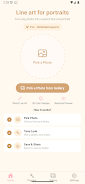
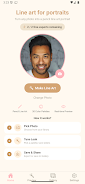
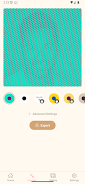
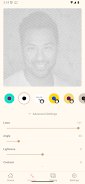
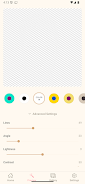
Line art for portraits turns any face photo into elegant pencil-style line drawings in seconds. The app strips away complexity: pick a portrait, choose a palette, tweak four simple sliders (Lines, Angle, Lightness, Contrast) and watch the image redraw itself as parallel lines, dots or stylised strokes. No artistic skill or account required. Outputs include high-resolution PNG/JPEG, vector SVG and printable A4 PDF, making it useful for profile photos, wall prints or tattoo references. Everything runs on-device so photos remain private, and projects are saved locally for quick re-editing.
Key Features
⭐ Line art for portraits converts portrait photos to pencil-style line art in real time, so you see adjustments instantly.
⭐ Multiple stylised modes including parallel lines, dots and custom stroke symbols let you change the look from subtle to bold.
⭐ Custom dot shapes and symbol brushes and curated color palettes — from classic mono to bold duotone — for varied aesthetics.
⭐ Four precise sliders (Lines, Angle, Lightness, Contrast) give fine control over texture and tone.
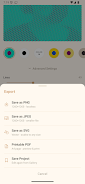
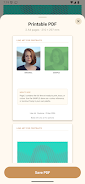
⭐ Export high-resolution PNG/JPEG up to 2520×2520 px, vector SVG for infinite scaling and printable A4 PDF.
⭐ Save projects to the device gallery with auto-save on export and do all processing offline to protect privacy.
Advantages
✅ On-device processing keeps photos private; nothing is uploaded, collected or shared.
✅ Simple, focused interface — no signup required and edits appear instantly for fast iteration.
✅ Line art for portraits offers a one-time Pro unlock that enables all palettes, high-res 2× export, SVG/PDF and unlimited projects without a subscription.
✅ Fast results suitable for profile pictures, wall prints, tattoo references or quick creative experiments.
Disadvantages
❎ Free version limits include only the first two color palettes and standard-resolution exports.
❎ Advanced outputs such as vector SVG, printable A4 PDF and high-resolution 2× exports require the Pro one-time purchase.
❎ The app is optimised for portraits, so results may be less effective on landscapes or other non-face photos.
Information
 Google Play
User Comments

Lumy - AI Video Generator helps creators turn short text prompts and images into easy-to-edit short videos using simple editing tools and straightforward export options; it includes templates, scene controls and voice options to refine clips and is intended for creators who want fast previews and predictable export workflows.

Line art for portraits turns any face photo into elegant pencil-style line drawings in seconds. The app strips away complexity: pick a portrait, choose a palette, tweak four simple sliders (Lines, Angle, Lightness, Contrast) and watch the image redraw itself as parallel lines, dots or stylised strokes. No artistic skill or account required. Outputs include high-resolution PNG/JPEG, vector SVG and printable A4 PDF, making it useful for profile photos, wall prints or tattoo references. Everything runs on-device so photos remain private, and projects are saved locally for quick re-editing.

Enter Ghost is an audio‑visual walking experience by artist Swoosh Lieu that stages a site‑specific narrative along cemetery paths using your smartphone and headphones. As you follow a set route the app plays layered sound and visuals tied to graves, crossings and landscapes, connecting listeners with the voices of FLINTA individuals—some grounded in documentary material and others presented as speculative fiction. The walk takes about 70 minutes on average and editions are available for the Frankfurt Main Cemetery and Ohlsdorf Cemetery in Hamburg.

LT Fest is an event companion app that helps attendees browse schedules, view maps, and receive real-time updates for festivals and gatherings. LT Fest organizes stage times, artist profiles, and venue maps in a single interface to simplify planning. The LT Fest app supports offline access for saved schedules and provides customizable notifications.

Mahuwa Creatives is a banner and poster design app created for politicians and businesses in Nepal, helping users design, customize and share professional visual content quickly. The app focuses on making social media posts, promotional banners and other campaign or marketing materials with simple, easy-to-use tools so non-designers can produce polished graphics fast.
AI Invitation Maker Card Maker helps you design polished invitations and greeting cards in seconds using AI-powered tools. Whether you're preparing a birthday, wedding, baby shower, or small party invite, the app combines ready-made templates, an AI design assistant for text and layout ideas, and simple photo editing such as one-tap background removal so you can create, customize, and share high-quality invitations directly from your phone with minimal effort.