

 X
X
 facebook
 WhatsApp
 Email
Email
Introduction
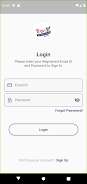
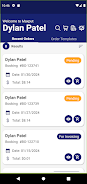
TBS Shop is a mobile application that provides controlled, account-based access to a retailer's ordering system and is intended only for customers who have been registered and approved by the store owner. The TBS Shop app ties every mobile purchase to a corresponding account in the store's web application so that buying privileges, pricing, and order history remain consistent across platforms. This introduction explains how the app structures access, how users interact with the interface, and what to expect when joining a permissioned storefront.
How the system works
Access to the app begins with registration and an approval process administered by the retailer. Once a prospective buyer registers, the store owner reviews the request on the web application and either approves or denies the account for mobile ordering. Approved accounts gain the ability to browse product catalogs, create carts, and place orders through the mobile interface, while all purchase permissions and restrictions are enforced by the linked web account. The approval gate centralizes control for businesses that need to limit who can place orders on behalf of a company, private group, or curated customer list.
User interface and controls
The interface emphasizes clear navigation and simple controls suited to handheld use. Browsing follows familiar patterns: searchable product listings, category filters, and product detail views that reflect the store’s catalog. The cart and order submission flow mirror the web application rules so users maintain the same permissions and available actions on mobile. Account settings and the current approval status are visible in the profile area so users always understand whether they can complete a purchase or must wait for retailer authorization.
Account progression and approval states
Rather than a game-like progression system, TBS Shop implements a straightforward approval workflow that governs user privileges. Typical states include pending review, approved, or rejected; some stores may use additional status notes to communicate limits or expiration dates on purchasing rights. This predictable progression helps businesses manage onboarding and ensures that only vetted accounts can complete transactions, reducing fraud and off-channel ordering.
Catalog structure and order flow
The app reflects the store's existing catalog organization so users encounter the same categories, SKUs, and product metadata that are maintained on the web application. Product pages show essential information and any permissions that affect ordering. When an approved user places an order, the mobile request is linked back to the web account where fulfillment and payment processing occur under the store's rules. Because purchasing is always tied to the store account, the app does not present an anonymous or guest checkout option.
Customization, permissions, and user experience
Customization for the buyer primarily comes from account-level settings controlled through the store's web application; preferences, price tiers, and allowed product lists apply on mobile when an account is linked. The mobile UX focuses on efficient repeat ordering: consistent catalog layout, visible account status, and a straightforward cart review that emphasizes any limitations imposed by the merchant. This makes the app suitable for business users, private customer programs, and situations where the retailer needs to vet purchasers before granting access.
Offline behavior and accessibility
Because order submission must respect the store's web account rules, completing purchases requires an online connection to validate credentials and record the order. The app, however, can cache recently viewed catalog content and order history for quick reference when connectivity is intermittent; cached information is for browsing and planning rather than finalizing transactions. TBS Shop also follows common Android accessibility practices to work with screen readers and system font size settings so that it can be used by a wider range of customers.
Security, limits, and known restrictions
The primary limitation of this model is that buying through the app is only possible after registration and explicit store-owner approval; users without a linked web application account cannot complete purchases. That limitation is intentional and central to the app's purpose: to give merchants precise control over who can access pricing and order capabilities. The linkage between mobile activity and the web account also improves traceability and reduces the risk of unauthorized purchases because each action is associated with a verified account.
Setup and practical scenarios
TBS Shop is most suitable for retailers who run permissioned storefronts—examples include private wholesale customers, corporate procurement lists, curated subscription services, and businesses that prefer to approve accounts manually. For end users, the onboarding experience is straightforward: register, wait for store approval, and then use the app to browse and place orders as granted by the merchant. For store owners, the app serves as a mobile front-end that enforces the same rules and account relationships already established in their web application.
Information
User Comments
Rocco's Pizzeria To Go puts the restaurant's ordering system on your phone, letting you browse the menu, place pickup or delivery orders and track them in real time. Designed for speed and savings, the app shows the best available prices, applies discounts and coupons, and lets you earn rewards points toward free food. If you order directly through Rocco's Pizzeria To Go you avoid extra fees and get accurate pickup or delivery windows so your meals arrive when expected. The interface also stores past orders for fast re-ordering and sends order status updates from kitchen to your device.
Sourdough Calculator & Journal is a focused baking companion that takes the arithmetic, timing and record-keeping out of making reliable sourdough so you can concentrate on the oven. The app pairs a live baker's percentage engine with hydration and starter-build calculations, a simple starter manager with feeding logs and reminders, a timeline planner for multi-step bakes, recipe scaling and a photo journal to document progress. Sourdough Calculator & Journal is designed for home bakers who want predictable fermentation, accurate percentages and an uncluttered, offline workflow without account sign-in.

Caffebo puts a modern café experience on your phone, letting you browse coffees, desserts and a calm, curated menu with the clarity of a well-organized menu board. The app is built for people who value fresh ingredients, thoughtful bean selection and the feeling of a quiet coffee break; within the first screen Caffebo highlights daily-updated items, explains ingredient sources and offers one-tap ordering to speed up an in-person pickup.

CookingTimerPro is a compact utility that helps you manage multiple dishes at once, making it easier to coordinate a weeknight dinner or a multi-course meal without constantly watching the clock. With CookingTimerPro you can create several independent timers, assign each one a custom name and set its duration, then get clear alerts when a timer finishes. The app keeps timing chores organized so you can focus on prepping and plating instead of juggling stove and oven schedules. It's a practical tool for anyone who wants reliable timing when cooking multiple items simultaneously.

Clean Plate is a mobile tool that uses AI to help you make healthier choices when dining out by analyzing photos of restaurant menus and highlighting better options. Point your camera at any menu and the app instantly breaks down each dish with health scores, estimated calories and macro counts, and tailored recommendations for dietary needs like vegetarian, keto, gluten-free or allergies. The result is a faster, less-guesswork way to pick meals that fit your goals; a 7-day free trial lets you test the features before committing.
Basta Middle puts the restaurant's ordering and rewards system in your pocket, letting you browse the menu, place orders, and earn points without extra steps. The app streamlines pickup and delivery by sending orders straight to the kitchen and provides real-time tracking so you know when to collect or expect your meal. Customers who want to save money will appreciate in-app pricing, exclusive discounts and coupons, and reduced fees when ordering directly. If you frequent Basta Middle, the app makes re-ordering favorites fast and keeps rewards and secure payment options all in one place.