
 X
X
 facebook
 WhatsApp
 Email
Email
Introduction
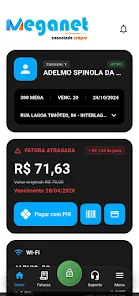
MEGA FIBRA MG is the official mobile app for MEGA NET subscribers that centralizes broadband account management, home Wi‑Fi controls and billing so you can complete common tasks from your phone without calling support. The app presents account balances, invoices and connection status on a straightforward dashboard, and it makes routine operations such as paying with PIX or a bank slip, running a speed check, or opening a support ticket fast and transparent.
Key features and everyday workflows
The main dashboard gives a concise view of pending invoices, payment history and upcoming due dates so you can prioritize actions. Payments can be made using PIX or a bank slip and the app lets you confirm receipts and view payment confirmations once transactions clear. Contract and plan details are grouped for quick review, and switching between active connections is handled from the same account view. For subscribers who manage several lines, each contract shows its plan, renewal or expiration data and quick actions like paying the invoice or starting a support request for that particular connection.
User interface, controls and accessibility
The interface emphasizes clear controls and large touch targets for common tasks. Navigation follows a predictable structure with a dashboard, billing area, contracts screen, Wi‑Fi settings and a support center. Buttons, form fields and status indicators are labeled plainly and provide immediate feedback so users know when an action completed successfully. Accessibility considerations include readable font sizes, high-contrast elements on critical screens and consistent focus order for assistive technologies, making MEGA FIBRA MG usable for people with varying levels of familiarity with smartphones.
Network management, diagnostics and challenge handling
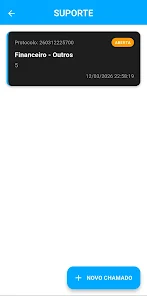
Wi‑Fi settings let you rename your router network, update passwords and inspect a current device list with friendly labels so you can identify phones, smart TVs or other equipment quickly. Built‑in speed tests measure download, upload and latency and capture diagnostic snapshots that can be attached to support tickets to accelerate troubleshooting. The app includes guided challenge workflows for common problems—step‑by‑step reconnection instructions, recommended reboot procedures and basic cabling checks—that reduce unnecessary technician visits by resolving frequently encountered issues at home.
Progression, customization and account management
Account setup walks you through identity verification and linking active contracts so progression from signup to full management is smooth and transparent. Once accounts are linked you can manage multiple router profiles, store friendly device names, and set notification preferences for invoice reminders, maintenance windows and service alerts. Customization is practical rather than cosmetic: organize devices, create distinct Wi‑Fi names for guest networks, and choose how and when you receive billing notices to match your daily routines.
Performance monitoring and replay value
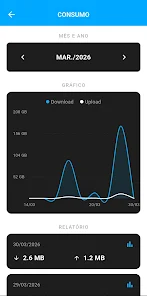
Regular use of MEGA FIBRA MG is driven by practical, repeatable tasks—checking daily usage, confirming payments and monitoring connection performance—which gives the app ongoing utility. Performance monitoring tools provide immediate feedback and historical context so you can compare speed test results over time and notice trends that matter. This practical repeat value encourages frequent checks and helps users keep their accounts and home networks in good working order.
Offline behavior, compatibility and limitations
Certain screens cache recent invoices and device lists for offline viewing, but actions that require provider validation—payments, contract changes or opening new support tickets—need an internet connection. Functionality is tied to the subscriber’s active MEGA NET service; users without an active contract will see limited options. The app supports typical Android device capabilities and performs best when the device has a stable internet connection for full feature access and real‑time diagnostics.
Security, privacy and developer information
MEGA FIBRA MG uses standard security measures to protect account credentials and payment information, and sensitive controls such as password changes are gated behind verification steps. Diagnostic logs and attachments sent with support tickets are handled with privacy considerations and used only to speed up issue resolution. The app is developed by NIO HUB Tecnologia as the mobile interface for MEGA NET services, and its permissions are limited to the features required to manage billing, network settings and support workflows for subscribers.
Information
 Google Play
This collection of TV apps offers users several options for free streaming, featuring high-definition media players compatible with television. With these apps, you can easily watch your favorite shows without hassle. The platform boasts a vast library of video content, organized into clear categories for quick access. High-quality videos are just a click away, ensuring you never miss out on anything. If you're interested, download and start enjoying the experience today!




User Comments
Alright Voice Recorder is a privacy-focused audio app that lets you capture clear voice notes, lectures, and interviews with minimal fuss. Alright Voice Recorder opens quickly from a home-screen widget or a notification quick tile so you can start recording within a single tap, and it keeps every recording on your device by default — no ads, no trackers, and no automatic cloud uploads.
MEGA FIBRA MG is the official mobile app for MEGA NET subscribers that centralizes broadband account management, home Wi‑Fi controls and billing so you can complete common tasks from your phone without calling support. The app presents account balances, invoices and connection status on a straightforward dashboard, and it makes routine operations such as paying with PIX or a bank slip, running a speed check, or opening a support ticket fast and transparent.

Joker's Carousel is a compact text-processing utility that turns complex, unstructured text into usable structured data. Enter any source text and a matching pattern, and the app will instantly locate and extract the fields you need, updating results automatically as you edit. With flexible separators and easy copy functions, the tool streamlines repetitive text extraction tasks and saves time for developers, analysts, designers, students and anyone who works with large text sources. If you need a quick way to parse logs, reports or layouts into tidy snippets, this utility offers a fast, low-friction toolset.

Nitrox Essentiels is a compact, purpose-built tool for recreational and technical Nitrox divers who need fast, reliable gas planning and verification on the surface or at the dive site. Nitrox Essentiels places the core calculators and planning helpers within a simple interface so you can determine PMU and MOD from FO2 and maximum PpO2 quickly, estimate optimal mixes for a target depth, and model common refill workflows that combine pure oxygen and air. The app is designed to be a practical companion for pre-dive checks, training drills, and on-site verification alongside your instruments.
Explorer 2026 - Task Manager is a privacy-focused file manager that gives you complete control over files, apps and media on your Android device. It combines everyday file operations with intelligent tools—browse internal storage, SD cards and OTG drives, compress and encrypt archives, back up APKs and play media—while avoiding subscriptions, ads and tracking. Users who want a fast, modern utility will appreciate offline image analysis, OCR, duplicate detection and network access (SMB/FTP/SFTP), plus an integrated multimedia player and PDF reader. Core features work offline and optional AI tools add natural-language search and smart cleaning suggestions.

Bestek helps field technicians find, accept and manage pre-paid installation workorders across the U.S. The Bestek app connects technicians to paid assignments generated when consumers buy products plus installation on ecommerce sites, then handles registration, scheduling and job completion from a single mobile interface. Technicians can view detailed scopes of work, contact information, certification requirements and attached files, upload photos, collect digital signatures and confirm completion to trigger payment. If you install appliances, electronics or home services and want a streamlined way to pick up nearby, pre-paid gigs and manage them on the go, Bestek is designed for that workflow.
Look no further than Cast to TV - Screen Mirroring, Cast For Chromecast! This powerful app allows you to effortlessly broadcast your Android screen and audio in real-time speed, giving you the opportunity to enjoy movies and videos with friends and family on larger TV screens. With features like Smart View & Screen Share and control for Roku TV, this app ensures a seamless and stable screen mirroring experience. Say goodbye to small screens and hello to a whole new level of entertainment with Cast to TV!
With Screen Share With TV - Mirror Screen, you can easily mirror your Android device's screen on any smart TV, laptop, tablet, or other devices without the need for additional dongles or cables. Simply start the app, connect to the same Wi-Fi network as your TV, and begin sharing videos, music, photos, and more with just a click. This powerful app allows you to broadcast your screen and audio in real time, making it perfect for sharing content with friends and family. Try out Screen Share With TV - Mirror Screen today and enjoy seamless screen mirroring on your Samsung smart TV.
Control your TV effortlessly with WiFi TV Remote! This user-friendly app allows you to easily manage your network-enabled TV from the convenience of your phone. Simply ensure both your TV and phone are connected to the same wireless network, enter the IP address of your TV in the app settings, and voila! You'll be able to change channels, adjust volume, and more with just a few taps. Please note, this app is not a universal remote and has been tested on Fox 32LE7000T2 LED Surf TV. It may also work on other TVs made in China and sold under local brands.
Control all of your favorite TVs with just one app - TV Remote Control for Sanyo TV! Whether you have a Samsung, Vizio, Sony, LG, or any other brand of TV, this universal remote control app has got you covered. With infrared technology, you can easily navigate and control your TV from the convenience of your phone. Say goodbye to multiple remote controls cluttering your space. Simplify your TV-watching experience with TV Remote Control for Sanyo TV. Get ready to take control and enjoy your favorite shows and movies hassle-free. Please note that this app requires an IR blaster.
Look no further than AIR Remote PRO for Apple TV, an innovative app that allows you to easily control your Apple TV using your Android phone. No need to jailbreak your Apple TV, as AIR Remote utilizes default infrared codes to seamlessly replace or extend your remote. Compatible with a variety of Android devices with built-in infrared support, as well as certain Mac products with an infrared receiver, AIR Remote offers all essential functions and even additional features like swipe gestures.
Experience the convenience of controlling your FPT TV directly from your mobile with FPT TV Remote. Say goodbye to traditional remotes and hello to a seamless user experience with the ability to search for the best films and entertainment programs with just the sound of your voice. Easily access your personalized favorites list stored in the cloud and sync it with your FPT TV device. The app offers a simple registration process, quick connectivity to any FPT TV device, accurate search functionality, and personalized recommendations.