

 X
X
 facebook
 WhatsApp
 Email
Email
Introduction
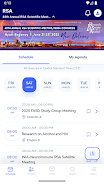
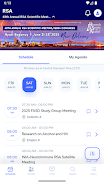
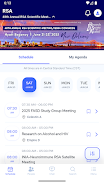
RSA/ISBRA 2025 is the official companion app for the Annual Scientific Meeting, created to present the full event program, speaker information and session structure in a compact, searchable format for researchers and attendees. The app puts the conference schedule, evening reception details and day-by-day programming within easy reach, helping users prepare for the Saturday opening reception and the main scientific program that runs Sunday through Wednesday.
Program overview and practical coverage
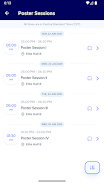
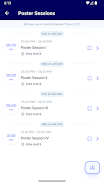
The app provides an organized program overview that lists plenary lectures, symposia, workshops, roundtables, poster sessions and award events such as the Enoch Gordis Award and Doctoral Student Small Grants presentations. Each session entry includes scheduled times, room locations, presenter names and short abstracts when available, enabling attendees to assess relevance quickly. The program view groups items by day and by session type so users can scan the Saturday reception separately from the Sunday–Wednesday academic schedule and avoid timing conflicts.
Navigation, controls and interaction mechanics
RSA/ISBRA 2025 uses familiar touch interactions and consistent on-screen controls to make navigation predictable and efficient. Tap to open session detail pages, swipe horizontally to move between days in the calendar, and use the top search bar to filter by keyword, presenter or topic. Interaction mechanics emphasize speed and clarity: long-press bookmarking, one-tap calendar export, and tactile feedback where the device supports it. These design choices reduce friction for first-time users and allow quick edits to a personal agenda while moving between rooms or poster halls.
Personal agenda, progression and customization systems
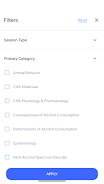
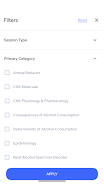
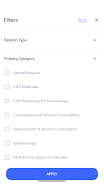
The app supports a clear progression system for personal planning. Attendees can bookmark sessions, add short private notes to individual entries and mark sessions as attended to track their own learning over the course of the meeting. Saved filters let researchers highlight clinical, epidemiologic, basic science or policy content; these filters persist between app launches so users return to a familiar view. Calendar export integrates scheduled sessions into the device calendar for reminders, and the app records simple progression metrics such as number of bookmarked sessions and sessions attended, which helps users evaluate how well they met their conference goals.
Session detail, content structure and post-meeting value
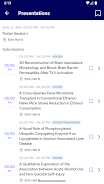
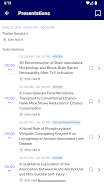
Each session page groups metadata useful for scholarly follow-up: session type, learning objectives, presenter bios, abstracts and paper titles when available. This structure makes it possible to preview sessions before committing time and to revisit saved abstracts and personal notes after the meeting. Because the app caches program text and saved annotations for offline review, it becomes a reference for post-conference planning and literature follow-up, which increases replay value beyond the live event.
Visual style, accessibility and readability
The interface favors legibility and compact information density appropriate for academic users: consistent typography, ample contrast and concise labels reduce visual clutter while keeping key data visible. Accessibility features include adjustable text sizes, screen reader compatibility and high-contrast display modes when supported by the device. These accommodations aim to make the program usable by attendees with different visual or cognitive needs and support an inclusive conference experience.
Offline access, reliability and update handling
To address connectivity issues common at busy venues, the app caches the program and saved session details for offline use so attendees can consult schedules without network access. Offline caching also preserves bookmarks and personal notes locally. Updates to the program are pushed when organizers publish revisions and the app clearly indicates when changes have been applied, showing timestamps or version notes so users can tell whether their local copy matches the current official schedule.
Program committee role and content balance
The app includes explanatory text about the Program Committee’s role in shaping topics and maintaining balance across disciplines, describing how proposals are reviewed and grouped. That transparency helps attendees understand why certain sessions were prioritized and how thematic fits and peer review inform the final program, providing useful context for researchers planning which talks to attend.
Practical advantages and known limits
The app consolidates the Annual Scientific Meeting into a single, portable reference tailored to alcohol research professionals, supporting efficient navigation and personal planning. Its strengths are searchability, offline access and persistent customization, while limitations stem from the program’s dependence on submitted proposals and committee decisions; not every topic will be represented and session availability reflects what was accepted into the meeting. For attendees seeking a focused, reliable tool to manage their conference experience, RSA/ISBRA 2025 provides an information-dense, accessible companion before, during and after the meeting.
Information
Other Games by the Same MetaPort Systems, LLC


User Comments

Аптека is a mobile pharmacy app (Good Day Pharmacy) that helps you find, reserve and manage medicines and health products from pharmacies across Ukraine. The app lets you search nearby locations, check product availability, and book items for immediate redemption, saving time and unnecessary visits. Аптека also integrates a digital loyalty program with a virtual bonus card, shows your bonus balance and purchase history, and delivers personal offers and medication reminders. With information on opening hours, contacts and detailed product instructions for thousands of SKUs, Аптека aims to simplify routine pharmacy tasks on your phone.
Navi Radiography Pro is a compact, offline radiography reference designed to put an interactive atlas and step-by-step exposure guidance into the palm of your hand. The app combines matched 3D visualizations of X-ray beam direction, patient positioning and synchronized skin, bone and radiograph overlays so that radiologic technologists, radiographers, radiologists and students can quickly clarify projection geometry and expected image appearance during clinical work or study. This editor’s introduction highlights how the interface, visual models and study workflow are arranged to support practical learning and on-shift decision making.

My Derm is a free, clinician-developed app that helps people with inflammatory skin conditions monitor symptoms, manage treatments, and access trusted educational resources to support daily wellbeing. Built with input from patients and dermatology professionals, My Derm brings personal health records, medication and appointment reminders, symptom and lifestyle tracking, and a curated educational feed together in a single, easy-to-use mobile experience designed to support long-term self-management and better conversations with clinicians.
Centro Médico is a mobile application designed for members of the Salto Medical Center that centralizes appointment scheduling, test results, diagnostic images and medication records on a smartphone. The app streamlines routine healthcare tasks—book consultations with specialists, view laboratory and imaging reports, and keep track of prescriptions—so patients can manage their care without unnecessary calls or visits. Users seeking faster access to medical information and clearer communication with clinicians will find Centro Médico useful for staying informed and handling appointments and treatments from anywhere with an intuitive, patient-focused interface.
Mammakarzinom onkowissen is a clinical reference app created for oncology professionals who require clear, practical guidance on metastatic breast cancer at the point of care. The Mammakarzinom onkowissen interface consolidates diagnostic pathways, subtype-specific therapy algorithms and concise drug information into a mobile-oriented layout so clinicians can quickly find evidence-informed options for HR+, HER2+ and triple-negative disease.
CVA Flow is a secure clinical communication app designed to streamline time-sensitive stroke workflows and support coordinated decision-making across EMS crews, emergency departments and remote specialists. This editor introduction explains how CVA Flow organizes cases, the controls and progression tools clinicians rely on during urgent events, and the practical balance it strikes between usability and strict privacy controls for regulated healthcare settings.