

 X
X
 facebook
 WhatsApp
 Email
Email
Introduction
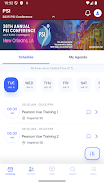
PSI 2025 is the official companion app for the annual PSI conference, created to help clinicians, researchers, advocates, and other professionals working with perinatal mood and anxiety disorders (PMADs) connect, learn, and coordinate during the event and beyond. The app collects schedules, attendee interactions, learning resources, and practical announcements into a single interface so users can plan sessions, arrange meetings, and capture ideas while preserving easy access to follow-up information after the conference concludes. PSI 2025 places priority on clear event navigation and practical tools that support real-world clinical and advocacy work rather than replacing the depth of in-person conversations.
Features
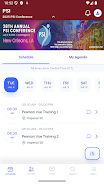
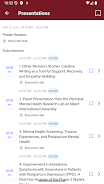
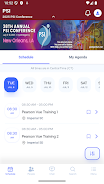
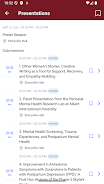
The app offers structured session schedules, configurable personal agendas, and announcement feeds that keep attendees informed of last-minute room changes and program updates. Tools to connect with other participants allow users to request introductory meetings, save contact details, and record brief follow-up notes in a private profile area. Shared learning spaces in the app host session summaries and discussion prompts so attendees can continue conversations raised during panels. PSI 2025 also centralizes resource attachments and slide materials where presenters permit sharing, so users can bookmark and revisit materials related to clinical approaches, screening protocols, and advocacy strategies.
Navigation and Controls
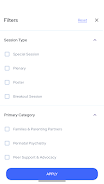
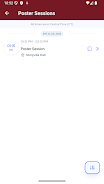
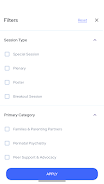
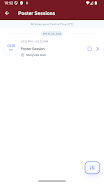
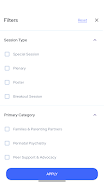
The interface focuses on simple controls and predictable navigation so busy professionals can find what they need quickly. Main screens present the day-by-day schedule with one-tap access to session descriptions, speaker bios, and room locations; tapping a session adds it to a personal agenda and creates a reminder. Meeting arrangements use straightforward forms to propose times and exchange contact information without exposing private email addresses publicly. Search and filter controls let you narrow sessions by track, topic, or speaker, while in-app notifications highlight urgent announcements and schedule changes. These controls are built to minimize cognitive overhead during crowded conference days.
Progression, Personalization and Goal Tracking
Rather than a game-like progression, the app supports a professional learning progression: users can mark sessions as planned, attended, or reviewed to track continuing learning across the conference. Personalization options include tailored session recommendations based on selected interests and saved searches, plus the ability to prioritize tracks such as clinical practice, research methods, or advocacy programming. Simple checklist tools let attendees create personal learning goals—such as completing specific sessions, meeting a set number of colleagues, or collecting resource materials—and then mark progress as the conference proceeds. These lightweight progression features help attendees convert conference activity into sustained professional development.
Visual Style and Accessibility
The visual design emphasizes readability and calm organization: high-contrast text, clear typographic hierarchy for session titles and times, and generous spacing to reduce visual clutter during rapid lookups. Speaker photos and concise bios provide human context without overwhelming the schedule view. Accessibility options include adjustable text sizes, clear color contrasts, and keyboard-friendly controls where supported by the device. PSI 2025 aims to accommodate attendees with diverse needs so that navigation and content consumption remain efficient for clinicians balancing clinical workloads and conference participation.
Offline Access, Content Storage and Replay Value
Recognizing that conference venues sometimes limit connectivity, the app caches essential schedule data and resource attachments for offline viewing so users can consult session times and downloaded slides even without a network connection. After the event, stored materials and saved notes offer replay value: attendees can revisit session summaries, review saved resources, and refresh follow-up plans. Because the app aggregates contacts and personal notes, it becomes a practical reference tool between annual meetings and supports continuity of collaboration until the next conference cycle.
Limitations and Practical Tips
The app is purpose-built to support the annual conference, so some features are most valuable during the active event period; full functionality may be limited when there are no ongoing conference activities. PSI 2025 facilitates connections and shared learning but cannot replace the depth of extended in-person collaboration or formal clinical training. For best results, use the app to plan sessions in advance, download materials for offline access, and make brief, focused notes for post-event follow-up—these small practices will help turn conference attendance into sustained professional impact.
Information
Other Games by the Same MetaPort Systems, LLC


User Comments

Аптека is a mobile pharmacy app (Good Day Pharmacy) that helps you find, reserve and manage medicines and health products from pharmacies across Ukraine. The app lets you search nearby locations, check product availability, and book items for immediate redemption, saving time and unnecessary visits. Аптека also integrates a digital loyalty program with a virtual bonus card, shows your bonus balance and purchase history, and delivers personal offers and medication reminders. With information on opening hours, contacts and detailed product instructions for thousands of SKUs, Аптека aims to simplify routine pharmacy tasks on your phone.
Navi Radiography Pro is a compact, offline radiography reference designed to put an interactive atlas and step-by-step exposure guidance into the palm of your hand. The app combines matched 3D visualizations of X-ray beam direction, patient positioning and synchronized skin, bone and radiograph overlays so that radiologic technologists, radiographers, radiologists and students can quickly clarify projection geometry and expected image appearance during clinical work or study. This editor’s introduction highlights how the interface, visual models and study workflow are arranged to support practical learning and on-shift decision making.

My Derm is a free, clinician-developed app that helps people with inflammatory skin conditions monitor symptoms, manage treatments, and access trusted educational resources to support daily wellbeing. Built with input from patients and dermatology professionals, My Derm brings personal health records, medication and appointment reminders, symptom and lifestyle tracking, and a curated educational feed together in a single, easy-to-use mobile experience designed to support long-term self-management and better conversations with clinicians.

Centro Médico is a mobile application designed for members of the Salto Medical Center that centralizes appointment scheduling, test results, diagnostic images and medication records on a smartphone. The app streamlines routine healthcare tasks—book consultations with specialists, view laboratory and imaging reports, and keep track of prescriptions—so patients can manage their care without unnecessary calls or visits. Users seeking faster access to medical information and clearer communication with clinicians will find Centro Médico useful for staying informed and handling appointments and treatments from anywhere with an intuitive, patient-focused interface.

Mammakarzinom onkowissen is a clinical reference app created for oncology professionals who require clear, practical guidance on metastatic breast cancer at the point of care. The Mammakarzinom onkowissen interface consolidates diagnostic pathways, subtype-specific therapy algorithms and concise drug information into a mobile-oriented layout so clinicians can quickly find evidence-informed options for HR+, HER2+ and triple-negative disease.
CVA Flow is a secure clinical communication app designed to streamline time-sensitive stroke workflows and support coordinated decision-making across EMS crews, emergency departments and remote specialists. This editor introduction explains how CVA Flow organizes cases, the controls and progression tools clinicians rely on during urgent events, and the practical balance it strikes between usability and strict privacy controls for regulated healthcare settings.