
 X
X
 facebook
 WhatsApp
 Email
Email
Introduction
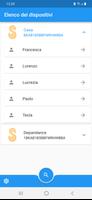
Slc (Securho Local Controller) is a companion mobile app built to give households straightforward, local control of a compatible Securho security device. Slc (Securho Local Controller) provides quick access to core alarm functions such as arming, disarming and power off from a simple interface, plus the ability to send an SOS alert to trigger the device’s configured emergency procedures. Designed for families and homeowners who want hands-on control without complex device-side configuration, this app centralizes everyday security tasks while keeping the vendor’s central administration tools in place.
Key Features
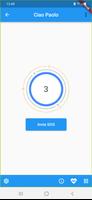
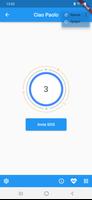
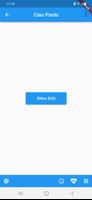
The app uses clear, single-tap controls for the most common actions and confirmation dialogs to reduce accidental changes. Slc (Securho Local Controller) displays the current device state (armed, disarmed or powered off) and a small set of context-aware actions on the main screen so you can check status and act in seconds. SOS alerting is integrated into the interface and will relay the alarm to the associated device, following whatever emergency handling the device has been configured to perform.
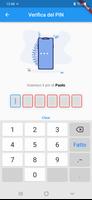
Personalization centers on assignable badges and permission profiles. Each household member can have an individual badge and a tailored permission set so everyone uses their own credentials while admins retain oversight. The app is designed to support an unlimited number of users for larger homes or multi-resident situations, and it surfaces recent activity so administrators can review who performed which action and when.
How It Works
Core device interactions occur locally between the phone and the compatible Securho hardware, which helps reduce latency and keeps basic functions available when network conditions are limited. The initial account and role creation, including global permission templates and some advanced user management, must be completed through the vendor’s online dashboard; the mobile app then reflects those settings and lets day-to-day operations be performed on the go. Routine tasks like arming, disarming and checking device health are completed from the app without reconfiguring the hardware itself.
User Roles, Progression and Auditability
Slc (Securho Local Controller) is organized around a small set of role levels that define what each person can do: admin, standard user, and guest-style profiles. Administrators set permission templates via the vendor portal and then assign badges to household members; within the app users follow a straightforward onboarding flow to accept badges and learn the available actions. Activity logs and status timestamps are surfaced to help resolve changes made by multiple people and to provide a basic audit trail for household security events.
Controls, Customization and Visual Style
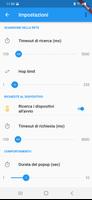
The interface favors minimalism: large, clearly labeled buttons, color-coded state indicators, and concise feedback messages that explain what happened after every action. Customization is focused on practical items such as permission assignments, visual badge names, and notification preferences. Small animations and state transitions improve clarity without adding clutter, and the layout is intended to be usable on a wide range of screen sizes.
Offline Use and Reliability
Because primary commands are executed locally, the app keeps essential control available in constrained network environments; if the phone is on the same local network or connected through the supported pairing method, basic arming and SOS functions remain responsive. For tasks that require vendor-side changes — for example creating new permission templates or responding to certain administrative alerts — the vendor dashboard remains the authoritative tool, so administrators should plan to use both interfaces as part of regular maintenance.
Accessibility, Maintenance and Long-Term Use
The app is built with accessibility considerations in mind: readable typography, high-contrast states for quick recognition, and intentional labeling to support assistive technologies. Routine maintenance is minimal; once badges and permissions are set up, daily interaction is mostly monitoring and occasional state changes. Slc (Securho Local Controller) aims to be a practical, long-term companion for local security management rather than a replacement for the device’s vendor-provided administration features.
Compatibility and Limitations
The most important limitation to be aware of is hardware compatibility: this mobile app only works with supported Securho devices and is not a standalone alarm system. Additionally, some advanced configuration steps and user role creation must be completed through the vendor’s online portal rather than entirely within the app. If you rely on centralized vendor administration for complex deployments, plan your onboarding sequence so that admins prepare permission templates before household members begin using the mobile controls.
Information
User Comments
Slc (Securho Local Controller) is a companion mobile app built to give households straightforward, local control of a compatible Securho security device. Slc (Securho Local Controller) provides quick access to core alarm functions such as arming, disarming and power off from a simple interface, plus the ability to send an SOS alert to trigger the device’s configured emergency procedures. Designed for families and homeowners who want hands-on control without complex device-side configuration, this app centralizes everyday security tasks while keeping the vendor’s central administration tools in place.

coin dash: jump quest is a fast-paced platformer built for short, focused play sessions where timing and reflexes matter. In this colorful runner you guide a nimble character through a variety of compact stages, jumping over gaps, dodging spinning traps and moving hazards, and collecting coins scattered across each level. The game emphasizes smooth touch controls and quick retries so players can practice specific sections repeatedly and hone their timing. Whether you play to gather every coin or to shave seconds off a run, coin dash: jump quest delivers a bright, replayable arcade experience.

Tasky transforms simple reminders into actionable notifications you can snooze or mark as done directly from your device's notification shade. The app focuses on lightweight, notification-driven task management, restoring any snoozed items the following morning so nothing slips through the cracks. Subscribers can create groups of tasks and assign custom notification times to those groups, while snoozed items can be revived at any time for immediate attention. If you prefer to keep your to-dos out of a separate app and rely on timely, interruptive reminders, Tasky offers a minimal, focused approach to staying on top of small tasks and routines.

Futemax Futebol Ao Vivo is a media player built to deliver smooth, high-performance playback and straightforward playlist management for anyone using M3U or Xtream Codes (XC) lists. The app emphasizes a modern, intuitive interface and responsive navigation to keep channel browsing simple and reliable, so you can focus on watching rather than configuring. If you rely on IPTV-style playlists and want a stable player that organizes your channels and keeps streams fluid, Futemax Futebol Ao Vivo offers a clean, no-nonsense utility to load, organize and play your own lists.

CrispBoost is a lightweight utility that scans your phone for duplicate media and documents and helps you reclaim storage by identifying redundant files. It inspects videos, pictures, audios and documents across your device, surfacing copies that take up unnecessary space so you can tidy your file system more efficiently. With both day and night display modes that you can switch between freely, CrispBoost aims to make file cleanup comfortable at any time of day. If you want a no-nonsense tool to simplify organization and reduce clutter, CrispBoost streamlines the process into a few easy steps.

VTX Proxy gives you fast, secure access to the open internet while keeping the interface simple and the learning curve shallow. The app combines encrypted connections with a global network of servers so you can browse, stream, or use apps with fewer geographic restrictions and reduced exposure on public Wi‑Fi. Built around a one‑tap connection model, VTX Proxy is intended for everyday use: it hides your IP address, maintains stable sessions during brief network changes, and presents clear connection status so even non‑technical users understand when their traffic is protected.
Look no further than Cast to TV - Screen Mirroring, Cast For Chromecast! This powerful app allows you to effortlessly broadcast your Android screen and audio in real-time speed, giving you the opportunity to enjoy movies and videos with friends and family on larger TV screens. With features like Smart View & Screen Share and control for Roku TV, this app ensures a seamless and stable screen mirroring experience. Say goodbye to small screens and hello to a whole new level of entertainment with Cast to TV!

With Screen Share With TV - Mirror Screen, you can easily mirror your Android device's screen on any smart TV, laptop, tablet, or other devices without the need for additional dongles or cables. Simply start the app, connect to the same Wi-Fi network as your TV, and begin sharing videos, music, photos, and more with just a click. This powerful app allows you to broadcast your screen and audio in real time, making it perfect for sharing content with friends and family. Try out Screen Share With TV - Mirror Screen today and enjoy seamless screen mirroring on your Samsung smart TV.
Control your TV effortlessly with WiFi TV Remote! This user-friendly app allows you to easily manage your network-enabled TV from the convenience of your phone. Simply ensure both your TV and phone are connected to the same wireless network, enter the IP address of your TV in the app settings, and voila! You'll be able to change channels, adjust volume, and more with just a few taps. Please note, this app is not a universal remote and has been tested on Fox 32LE7000T2 LED Surf TV. It may also work on other TVs made in China and sold under local brands.
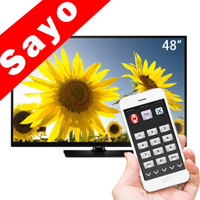
Control all of your favorite TVs with just one app - TV Remote Control for Sanyo TV! Whether you have a Samsung, Vizio, Sony, LG, or any other brand of TV, this universal remote control app has got you covered. With infrared technology, you can easily navigate and control your TV from the convenience of your phone. Say goodbye to multiple remote controls cluttering your space. Simplify your TV-watching experience with TV Remote Control for Sanyo TV. Get ready to take control and enjoy your favorite shows and movies hassle-free. Please note that this app requires an IR blaster.
Look no further than AIR Remote PRO for Apple TV, an innovative app that allows you to easily control your Apple TV using your Android phone. No need to jailbreak your Apple TV, as AIR Remote utilizes default infrared codes to seamlessly replace or extend your remote. Compatible with a variety of Android devices with built-in infrared support, as well as certain Mac products with an infrared receiver, AIR Remote offers all essential functions and even additional features like swipe gestures.
Experience the convenience of controlling your FPT TV directly from your mobile with FPT TV Remote. Say goodbye to traditional remotes and hello to a seamless user experience with the ability to search for the best films and entertainment programs with just the sound of your voice. Easily access your personalized favorites list stored in the cloud and sync it with your FPT TV device. The app offers a simple registration process, quick connectivity to any FPT TV device, accurate search functionality, and personalized recommendations.