

 X
X
 facebook
 WhatsApp
 Email
Email
Introduction
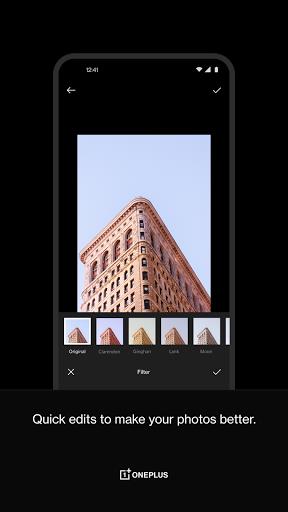
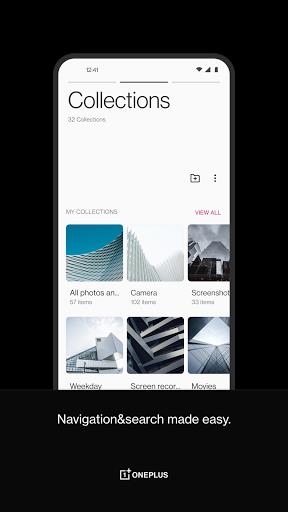
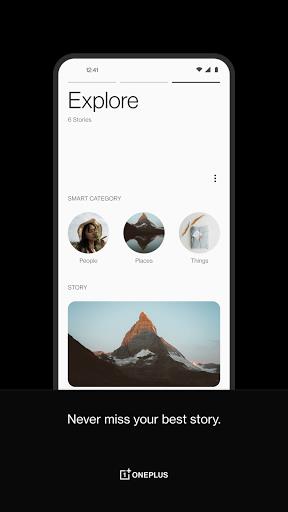
Introducing OnePlus Gallery, the ultimate photo organization app for OnePlus device users. With a clear timeline layout and seamless photo management, this app makes browsing through your best shots a breeze. Not only can you easily edit and enhance your photos with advanced tools and filters, but you can also curate your favorite memories into collections for easy access and sharing. While OnePlus Gallery may not be a full alternative to Google Photos, it offers a user-friendly interface and essential photo editing functions. Join the millions of users who have already decluttered their photo collection and turned chaotic camera roll moments into beautifully organized memories!
Features of OnePlus Gallery:
- Daily Delights: OnePlus Gallery offers a feature where you can experience the joy of reliving beautiful moments every day. This daily dose of nostalgia is sure to brighten up your day and make you appreciate the little moments in life.
- Organized Memories: With OnePlus Gallery, you can easily sort your photos chronologically to highlight the most memorable days. Say goodbye to scrolling through a disorganized camera roll - now you can easily find and reminisce about your favorite memories with just a few taps.
- Memory Lane Grouping: Curate your favorite memories into collections for easy access and sharing with others. Whether it's a family vacation, a birthday celebration, or a special event, you can create personalized collections to keep your most cherished moments organized and easily accessible.
- Swift and Advanced Editing: OnePlus Gallery offers robust tools to adjust lighting, contrast, and color, along with 16 unique filters to enhance your photos and videos. Whether you're a casual photographer or a seasoned pro, you can take your editing skills to the next level and make your memories truly shine.
- Worldly Adventures: Track your global journey with personalized traveler badges marking your footprints across different locations. Whether you're a frequent traveler or just love exploring new places, this feature allows you to look back on all the amazing destinations you've visited and create a virtual travel diary.
Playing tips:
Take advantage of the Daily Delights feature to start your day on a positive note by reliving a beautiful memory from the past.
Use the Memory Lane Grouping feature to create themed collections of your favorite photos, making it easier to share them with friends and family.
Experiment with the advanced editing tools to enhance your photos and videos, and make them truly stand out from the rest.
Keep track of your travel adventures by collecting traveler badges and creating a visual record of all the amazing places you've explored.
Conclusion:
OnePlus Gallery offers a range of features to help you organize, edit, and share your photos and videos with ease. While it may not be a direct alternative to Google Photos, it has its own unique capabilities that cater to the needs of OnePlus device users. With features like Daily Delights, Memory Lane Grouping, and advanced editing tools, OnePlus Gallery allows you to turn your chaotic camera roll moments into beautifully organized memories. So why wait? Download OnePlus Gallery today and start decluttering your photo collection and sharing memories with others effortlessly.
Information
What would it be like to download video software for free? In this collection, you can find various video software that interests you, whether it’s video players or video editors—everything you need is here. All of it is provided for free, allowing you to download with ease and without any worries.





User Comments

Emotion Tree - Find Your Why is a reflective journaling app that helps you map feelings, track patterns, and trace emotions back to their root causes. Emotion Tree - Find Your Why converts recurring moods into a living visual tree so you can observe how small daily states accumulate into longer trends, and it places the app name at the center of a calm, structured practice that supports personal insight. The first interactions are simple: record a feeling, choose a color for its tone, and follow guided prompts that help you move beyond surface reactions.

Do1 is a habit-building app that applies the Kaizen idea of continuous improvement to daily routines, turning tiny actions into measurable long-term gains. Do1 helps you break large goals into micro-tasks, delivers focused daily missions, and visualizes progress so you can see incremental growth without designing complicated routines yourself. The app is aimed at people who want sustainable study, fitness, creative, or work habits and prefer consistency and clear feedback over intensity.

Place,Us is a map-centered couple diary that helps partners record and revisit shared memories tied to real places. Place,Us makes it easy to pin the exact cafés, parks, travel stops and everyday meetups you share, attach photos and short written notes, and then explore those moments as a visual map and timeline of your relationship.
Logic Grid Puzzles: Brain Game is a focused logic-puzzle utility that delivers 100 unique, ad-free brain teasers with graduated difficulty to help users practice deductive reasoning and pattern recognition. The app supports multiple grid sizes—from compact 3×4 puzzles to larger 4×7 boards—and includes Smart Hints that analyze your current grid and explain which clue applies next (requires internet). With features like Auto-X for faster entry, multi-level undo, adjustable text size and Dark Mode, Logic Grid Puzzles: Brain Game is suited for newcomers learning logic puzzles and for experienced solvers seeking steady brain training.

TriviaMaker is a versatile quiz and gameshow builder designed for teachers, presenters, and event hosts who want to create interactive trivia experiences quickly. The app places question categories, timers, scoring rules, images and video into a single editor so you can assemble a complete session and present it on a screen in minutes. TriviaMaker balances an approachable setup with options for professional presentation, letting you use templates for a fast start or customize every detail for a classroom review, corporate training exercise, or community trivia night.

Prophecology is the official companion app for members of Zoe Ministries, created to make participation in church programs and events simple and predictable. Prophecology places program details, maps and schedules in one place so members can quickly find upcoming activities, update profile information, and receive timely reminders without switching between systems.