

 X
 facebook
 WhatsApp
 Email
Introduction
Pavone is a modern productivity app that centralizes notes, to-dos, and project timelines into a clean, easy-to-navigate workspace. It blends fast local editing with secure cloud synchronization and collaboration tools, helping individuals and small teams stay organized without clutter or complicated setup.
Core Features
Pavone focuses on practical tools that accelerate daily workflows. You get nested notes, checklist support, rich-text formatting, and file attachments. Built-in reminders and customizable labels make prioritizing simple, while automatic syncing ensures updates appear on phones and tablets without manual export. Encryption and passcode locks protect sensitive entries.
Interface and Workflow
The interface is deliberately minimal: a left-hand navigation for notebooks and tags, a central editor for content, and a compact toolbar for quick actions. Pavone’s editor supports markdown-like shortcuts, inline images, and drag-and-drop attachments so creating structured notes or quick outlines takes only a few taps. Templates let you start recurring workflows such as meeting notes, shopping lists, or sprint planning.
Collaboration and Sharing
Collaboration is lightweight and flexible. Share individual notes or entire folders with view or edit permissions, invite collaborators by email, and comment directly on items. Changes are tracked with a simple history log so you can revert edits. For teams that need more control, folder-level permissions and read-only links are available.
Offline Use and Sync
Pavone caches data locally so you can continue working without an internet connection. Edits made offline are queued and synchronized automatically once connectivity returns. Sync settings can be adjusted per account to conserve mobile data, and selective sync lets you keep only important notebooks on a particular device.
Customization and Integrations
Personalization is straightforward. Choose dark or light themes, configure font sizes, and pin frequently used notes to the top of lists. Pavone connects with calendar apps for deadline reminders and supports export to common formats including PDF and plain text. If you rely on other productivity tools, the app provides integrations or import options to help migrate existing content quickly.
Performance and Compatibility
Engineered for responsiveness, Pavone loads large notebooks without lag and optimizes battery usage during background syncs. The app runs well on a wide range of Android devices and maintains consistent behavior across versions. Regular updates target performance improvements and add compatibility for the latest Android APIs.
Security and Privacy
Security is built into Pavone’s foundation. User data at rest and in transit is protected with industry-standard encryption. Optional biometric unlocking and a local passphrase keep casual access secure. Privacy controls let you manage what information is shared when exporting or linking notes externally.
How to Get Started
Begin by creating an account or signing in with an existing email. Create your first notebook, add a few sample notes, and try out templates to see how organization structures fit your routine. Use the mobile widget to surface one-touch access to your most important lists. Within minutes you’ll have a working setup that mirrors your productivity needs.
Why Users Choose Pavone
Many users appreciate Pavone’s balance of power and simplicity: it offers advanced features like collaboration and offline sync without overwhelming interfaces. The application scales from solo note-taking to small team coordination, making it a versatile addition to everyday workflows.
Tips for Maximizing Productivity
- Use tags and nested notebooks to create a predictable filing system.
- Pin and favorite high-priority notes for instant access from the home screen.
- Leverage templates to reduce repetitive setup for meetings or checklists.
- Enable selective sync to keep device storage optimized.
Pavone aims to be an unobtrusive companion for organization—powerful when you need it, quiet when you don’t. Whether you are managing daily tasks, tracking project milestones, or collaborating with others, the app provides a coherent, fast foundation to keep work moving forward.
Information
User Comments

entascan is a compact skin-care companion that combines a handheld moisture meter with a smartphone app to turn hydration readings into clear, practical guidance. Designed for people who want to monitor skin moisture without clinical equipment, entascan connects to your device via Bluetooth to record measurements, generate readable reports, and offer personalized recommendations you can apply in daily routines at home, in the office, or while traveling.

moz5 Apps is a compact Android utility suite designed to simplify daily tasks and streamline app management on mobile devices. It bundles a selection of practical tools into a lightweight package, focusing on speed, clarity, and compatibility for users who want straightforward functionality without unnecessary complexity.

C.Kamura is the official mobile app from renowned Brazilian stylist Celso Kamura that brings salon booking, service details and client management directly to your phone. Designed for clients who want straightforward scheduling and access to Kamura’s salons in São Paulo, Campinas and Rio de Janeiro, the app lets users book appointments, receive reminders, view service history and unlock app-only offers. Whether you seek routine maintenance or a bold new look guided by an experienced team, C.Kamura simplifies appointment management and feedback while preserving the creative standards associated with his salons and fashion collaborations.
Are you in need of some self-care and pampering? Look no further than BEWA, the ultimate platform for all things beauty and wellness. With BEWA, you can easily book appointments at barbers, hair stylists, wellness centers, spas, and beauty professionals in your area, all from the convenience of your smartphone. Say goodbye to the hassle of calling around for availability and let BEWA take care of it all for you. Discover new professionals, manage your appointments, and start your journey to wellness today by downloading the app. Treat yourself to some much-needed relaxation and rejuvenation with BEWA.
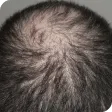
Hair Fall Home Remedies helps users address hair loss with a practical, natural toolkit that fits into daily routines. The app compiles easy-to-follow home treatments using common ingredients and delivers clear, step-by-step instructions so non-experts can try remedies at home. Designed for both men and women, it emphasizes simple guidance, personalized tips based on hair type, and an uncluttered interface that makes finding suitable solutions quick and straightforward. If you prefer affordable, do-it-yourself alternatives to salon appointments and complex products, Hair Fall Home Remedies provides a convenient reference to explore options that may support healthier, fuller-looking hair over time.

Skin Expert: all about aesthet is an innovative application that connects cosmetologists, dermatologists and patients through secure chat and video consultations while helping clinics and practitioners manage daily workflows. The app centralizes doctor and clinic profiles, services and pricing so patients can compare options and access exclusive offers, and it gives professionals tools to build patient dossiers, store treatment photos and plan courses of care. For clinics, the platform helps automate routine tasks and improve resource allocation to deliver more personalized care. Users who want streamlined communication and consolidated practice management will find this app useful.