
 X
X
 facebook
 WhatsApp
 Email
Email
Introduction
Text Repeater Tool is a compact utility that helps you generate repeated text patterns, apply stylistic transformations, and create decorative or invisible messages for sharing, testing, or development tasks. Text Repeater Tool places commonly needed text-manipulation functions within a single, easy-to-use interface so you can produce repeated lines for UI testing, craft stylized social posts, or insert zero-width placeholders for layout experiments with minimal effort.
Key features
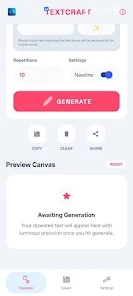
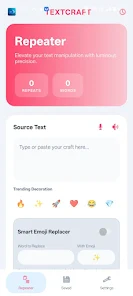
The app combines a powerful repetition engine with quick styling utilities. You can generate between 1 and 1,000 repetitions of any string using either numeric input or a synced slider, and you can insert custom dividers or line breaks between items. Built-in speech-to-text lets you dictate input when typing is inconvenient, and text-to-speech can read back generated output for proofreading or accessibility checks. A smart emoji replacer enables automatic substitution of selected words with icons, while Unicode font styling offers bold, italic, and script-like output that works across many messaging and social platforms. Live metrics update in real time to show repeat counts, characters, words and lines, and a history system saves your most recent generations for quick reuse.
Controls and workflows
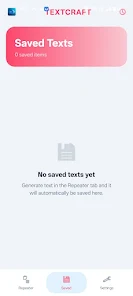
Controls are designed for speed: direct numeric fields and a synced slider let you set repetition counts precisely or rapidly, one-tap copy and share actions put output into the clipboard or into other apps, and templates and quick actions speed up recurring tasks. The history tray stores the last 50 generations so you can revisit previous outputs, edit them, and re-export without rebuilding from scratch. For developers and testers, zero-width characters and configurable dividers make it easy to create placeholder content or bulk input samples. Workflows are intentionally linear and transparent, making it simple to build, preview and export results in a few taps.
Customization and visual style
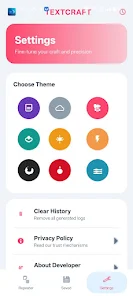
The interface follows a Material Design 3-inspired layout with clean spacing, intuitive controls and smooth transitions. Nine professional themes let you choose a color palette that suits your environment, and a glass-styled dashboard presents live statistics at a glance. You can adjust font sizes and choose compact or spacious layouts to match your reading preference. Theme and layout choices persist across sessions so the app adapts to your daily use patterns, whether you prefer a high-contrast scheme for readability or a subtle theme for long editing sessions.
Usage scenarios and progression
Text Repeater Tool supports a variety of practical scenarios that extend beyond a single task. Use it to generate long test strings for UI stress testing, assemble repeated templates for social posts, create decorative separators for messages, or build zero-width placeholders for layout tuning. As you work, you can evolve outputs by applying style presets, chaining emoji replacements and font transformations, and saving intermediate versions in the history. This step-by-step progression makes it straightforward to move from a basic repeat to a fully styled and shareable piece of text without losing earlier iterations.
Accessibility, privacy and offline use
Accessibility is considered throughout: speech-to-text and text-to-speech provide alternative input and output methods, adjustable font sizes and multiple themes aid readability, and the UI emphasizes large tap targets for easier interaction. Privacy is preserved by local processing; core text generation and transformations are handled entirely on device so your content stays private. The app requires minimal network permission to display ads, but the main features work offline and do not transmit personal text to external servers.
Performance limits and practical considerations
To keep performance predictable, the app enforces a repetition cap of 1,000 copies per generation and stores up to 50 history entries locally. These limits protect battery and memory on a wide range of devices while still covering most practical needs. Ads are present to support development but are implemented with minimal network overhead. If you create very large outputs, the app displays live metrics and warnings to help you avoid excessive processing on small or older devices.
Why it fits into your toolkit
Whether you are a developer, designer, social media creator, or someone who frequently formats and replicates text, Text Repeater Tool brings together efficient controls, useful styling options and privacy-minded operation in a lightweight package. Its combination of repeat mechanics, smart replacements, Unicode styling and one-tap sharing makes common text tasks faster to complete and easier to integrate into your everyday workflows.
Information
 Google Play
Social networking apps have become essential tools in everyday life, making communication with others more convenient. These apps allow you to easily stay in touch with old friends while also providing opportunities to meet new people, helping to expand your social network beyond its usual boundaries. This page features a handpicked selection of the best social apps, making it your go-to choice for mobile socializing!



User Comments
Text Repeater Tool is a compact utility that helps you generate repeated text patterns, apply stylistic transformations, and create decorative or invisible messages for sharing, testing, or development tasks. Text Repeater Tool places commonly needed text-manipulation functions within a single, easy-to-use interface so you can produce repeated lines for UI testing, craft stylized social posts, or insert zero-width placeholders for layout experiments with minimal effort.
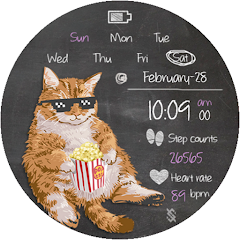
BFF146- Blackboard Art Cat is a customizable watch face that blends a playful chalkboard aesthetic with practical on-wrist information, giving users a distinctive look while keeping time, date, activity and battery status immediately accessible.
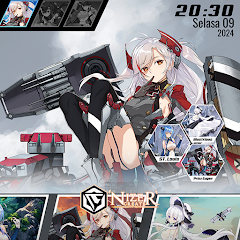
Azur Theme is a KLWP-based homescreen theme pack that transforms Android launchers with polished, animated layouts and tailored widgets, ideal for anyone who wants a distinctive look for their device. Designed by Nizer Create, Azur Theme bundles several configurable setups—ranging from minimalist to anime, cyberpunk, and high-contrast action styles—and focuses on interactive elements and smooth behavior. Note that Azur Theme requires the KLWP Pro app to function and cannot be used on its own; if you enjoy customizing icons, gestures, and live wallpapers, this theme offers ready-made starting points to build a personalized homescreen.

Prabhas Wallpaper brings a curated gallery of high-resolution images of the star Prabhas directly to your phone, letting fans browse and apply HD, Full HD and 4K wallpapers from his biggest films. The app collects official posters, movie stills, behind-the-scenes shots and fan edits from Baahubali, Saaho, Radhe Shyam, Salaar, Adipurush and the upcoming Kalki 2898 AD so you can quickly personalize home and lock screens with dramatic, romantic or mythological looks. If you want a simple way to keep fresh Prabhas imagery on your device, this app makes browsing, saving and setting wallpapers fast and straightforward.

Doggies Dreamland is an all-in-one mobile app designed to centralize services and purchases for dog owners, combining veterinary clinic access, an in-app pet store, dog sales listings, boarding facility arrangements, training resources, and consultancy into a single convenient interface. Users may want Doggies Dreamland because it gathers common care needs and professional services in one place, making it easier to discover options, compare providers, and keep track of care-related information without switching between multiple tools. The app suits busy pet parents who prefer a unified, organized utility for routine care and occasional needs.
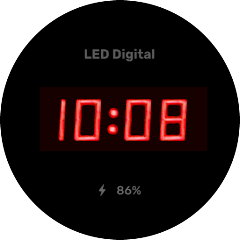
Digital Watch Face 05 is a retro-minimalist watch face for smartwatches that emphasizes a clean digital readout and practical information at a glance. It shows the time in a 12-hour format while keeping visual clutter to a minimum, and includes a battery indicator and customizable invisible complication slots for users who want extra data without disrupting the aesthetic. If you prefer a classic digital look with modern simplicity, Digital Watch Face 05 provides a streamlined interface that blends vintage cues with contemporary utility, making it a good choice for everyday wear.