
 X
X
 facebook
 WhatsApp
 Email
Email
Introduction
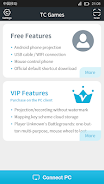
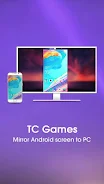
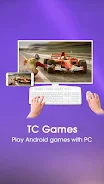
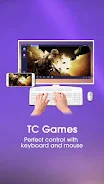
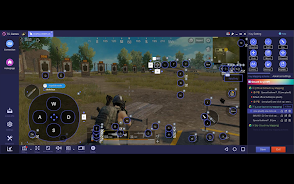
TC Games lets you mirror your Android screen to a Windows PC so you can run mobile apps and play games with a keyboard and mouse. The app supports both USB and Wi-Fi connections, prioritizes low CPU usage and high-quality projection, and bundles practical tools like customizable keymapping, screen recording, cloud-saved profiles and clipboard sharing. Whether you want to type from a physical keyboard, livestream mobile gameplay, or capture footage without extra software, TC Games provides a straightforward way to use your phone on a larger display with stable performance and flexible controls.
Key Features
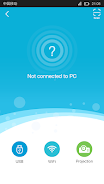
⭐ TC Games mirrors your Android display to PC over USB or Wi-Fi with optimized, low-CPU encoding for smooth playback.
⭐ Control your phone from the computer: move and lock the mouse on screen, type with a keyboard and share the clipboard between devices.
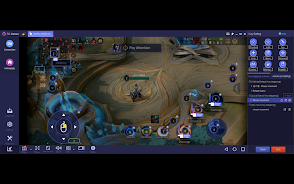
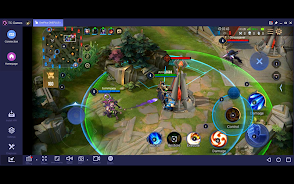
⭐ Create and download keymaps: official pre-configured maps, custom mappings, cloud save, macro keys and smartkey image search for precise input.
⭐ Built-in screen recording and screenshot capture plus the ability to livestream gameplay to popular streaming services.
⭐ Fast QR-code connection, power-saving screen-off control, brightness/contrast adjustment and options to remove the app watermark.
Advantages
✅ Smooth, low-CPU mirroring makes extended play and productivity sessions feasible without overloading your PC.
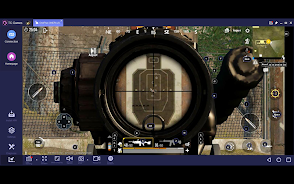
✅ Play mobile games with keyboard and mouse support, using TC Games' pre-configured controls or your own custom mappings.
✅ Record, capture and stream mobile content directly from the PC client without relying on separate capture tools.
✅ Cloud backup for keymaps and multi-profile saving helps you switch setups between devices quickly.
Disadvantages
❎ Official keymapping downloads are available only for select games, so some titles require manual configuration.
❎ USB connection requires enabling USB debugging on the Android device, which may be unfamiliar to casual users.
❎ The desktop client targets Windows 7, 8 and 10, so other operating systems are not supported.
Development Team
TC Games is developed by Sigma-RT, a company focused on screen-mirroring and streaming utilities; the team provides updates and user support through its official channels.
Information
 Google Play
Old Versions
Other Games by the Same



User Comments
Yandex Browser (beta) is a testing release of Yandex's Android browser that delivers experimental features and regular updates for evaluation. It focuses on privacy, efficient page loading and built-in protections against malicious sites while remaining compatible with standard web content and common web apps. This beta build includes synchronization with a Yandex account so bookmarks, open tabs and settings stay consistent across devices.

TC Games lets you mirror your Android screen to a Windows PC so you can run mobile apps and play games with a keyboard and mouse. The app supports both USB and Wi-Fi connections, prioritizes low CPU usage and high-quality projection, and bundles practical tools like customizable keymapping, screen recording, cloud-saved profiles and clipboard sharing. Whether you want to type from a physical keyboard, livestream mobile gameplay, or capture footage without extra software, TC Games provides a straightforward way to use your phone on a larger display with stable performance and flexible controls.
واتس اب بدون انترنت makes it possible to compose messages, place voice calls and share files on your device when mobile data or Wi‑Fi are unavailable. The app lets you activate an account locally and keeps conversations and media stored on the device until a network connection becomes available for delivery.
Guarding Vision provides reliable remote monitoring for home and small business. Guarding Vision connects to IP cameras and supports live view, recorded clips, and real-time alerts for motion and sound.
Krashak helps smallholder farmers manage crops, track activities, and access localized weather and market data. Krashak organizes field records, input schedules, and harvest estimates in a simple interface that works on low-end devices.
Tiker helps drivers find nearby gas stations quickly, compare fuel types and amenities, and navigate there efficiently by using geolocation to show real-time stations around you and to filter by fuel types such as regular, premium, diesel or eco options.
Look no further than Cast to TV - Screen Mirroring, Cast For Chromecast! This powerful app allows you to effortlessly broadcast your Android screen and audio in real-time speed, giving you the opportunity to enjoy movies and videos with friends and family on larger TV screens. With features like Smart View & Screen Share and control for Roku TV, this app ensures a seamless and stable screen mirroring experience. Say goodbye to small screens and hello to a whole new level of entertainment with Cast to TV!
With Screen Share With TV - Mirror Screen, you can easily mirror your Android device's screen on any smart TV, laptop, tablet, or other devices without the need for additional dongles or cables. Simply start the app, connect to the same Wi-Fi network as your TV, and begin sharing videos, music, photos, and more with just a click. This powerful app allows you to broadcast your screen and audio in real time, making it perfect for sharing content with friends and family. Try out Screen Share With TV - Mirror Screen today and enjoy seamless screen mirroring on your Samsung smart TV.
Control your TV effortlessly with WiFi TV Remote! This user-friendly app allows you to easily manage your network-enabled TV from the convenience of your phone. Simply ensure both your TV and phone are connected to the same wireless network, enter the IP address of your TV in the app settings, and voila! You'll be able to change channels, adjust volume, and more with just a few taps. Please note, this app is not a universal remote and has been tested on Fox 32LE7000T2 LED Surf TV. It may also work on other TVs made in China and sold under local brands.
Control all of your favorite TVs with just one app - TV Remote Control for Sanyo TV! Whether you have a Samsung, Vizio, Sony, LG, or any other brand of TV, this universal remote control app has got you covered. With infrared technology, you can easily navigate and control your TV from the convenience of your phone. Say goodbye to multiple remote controls cluttering your space. Simplify your TV-watching experience with TV Remote Control for Sanyo TV. Get ready to take control and enjoy your favorite shows and movies hassle-free. Please note that this app requires an IR blaster.
Look no further than AIR Remote PRO for Apple TV, an innovative app that allows you to easily control your Apple TV using your Android phone. No need to jailbreak your Apple TV, as AIR Remote utilizes default infrared codes to seamlessly replace or extend your remote. Compatible with a variety of Android devices with built-in infrared support, as well as certain Mac products with an infrared receiver, AIR Remote offers all essential functions and even additional features like swipe gestures.
Experience the convenience of controlling your FPT TV directly from your mobile with FPT TV Remote. Say goodbye to traditional remotes and hello to a seamless user experience with the ability to search for the best films and entertainment programs with just the sound of your voice. Easily access your personalized favorites list stored in the cloud and sync it with your FPT TV device. The app offers a simple registration process, quick connectivity to any FPT TV device, accurate search functionality, and personalized recommendations.