
 X
X
 facebook
 WhatsApp
 Email
Email
Introduction
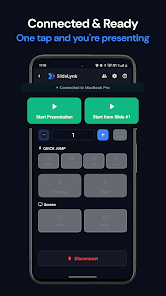
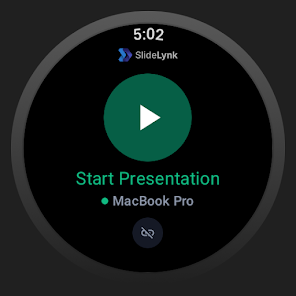
SlideLynk: Presentation Remote turns your phone and Wear OS smartwatch into a wireless presentation controller that connects to your desktop over WiFi, letting you control PowerPoint and Keynote from anywhere in the room without dongles, Bluetooth pairing or line-of-sight.
Key Features
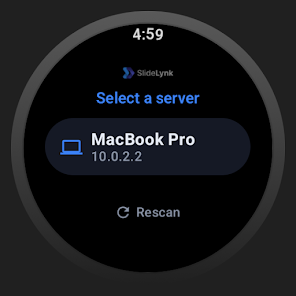
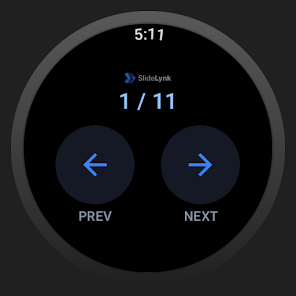
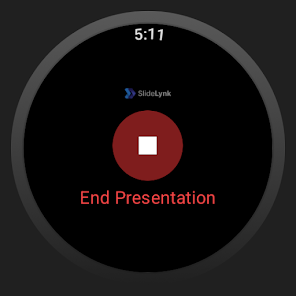
SlideLynk: Presentation Remote supports Wear OS smartwatches for next/previous slide, start/stop presentation and a real-time slide number on compatible devices.
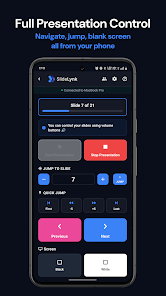
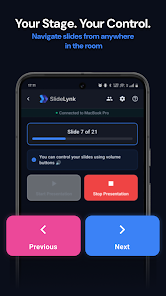
Large, easy-to-tap phone controls include jump-to-slide, start/stop, screen blanking (black/white), a live slide counter and a progress bar to help you stay on track.
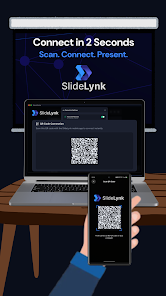
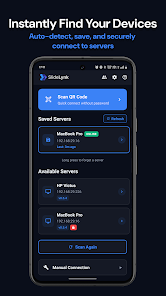
Multiple connection options are available: one-tap QR code pairing, automatic discovery, manual IP entry and mobile hotspot support so you can present from different environments.
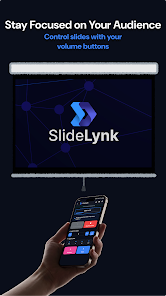
Navigation also works via volume and hardware buttons, and saved passwords can sync automatically across your devices for quicker reconnects.
Saved servers show real-time online/offline status and the app provides a free desktop companion for Windows, macOS and Linux to bridge your phone with presentation software.
Advantages
The setup is fast and removes the need for dongles or Bluetooth pairing, allowing presenters to move freely around the room while controlling slides.
All communication stays on your local network and presentation content is not sent to external servers, which helps protect privacy and security when presenting.
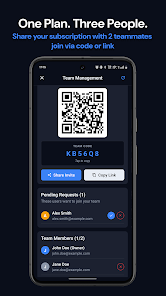
SlideLynk: Presentation Remote supports Wear OS 3+ watches (such as Pixel Watch and Galaxy Watch 4) for hands-free control, and team sharing lets you share Pro features with up to two teammates for co-presenting scenarios.
Disadvantages
The app requires a free desktop companion app on Windows, macOS or Linux to connect to PowerPoint or Keynote.
Some advanced controls such as volume-button navigation, screen blanking and unlimited saved servers are included in Pro, which starts with a one-month free trial and requires a subscription afterward.
Wear OS functionality requires a compatible Wear OS 3+ smartwatch, and one-device-per-account restrictions can limit simultaneous use by multiple controllers in some setups.
Information
 Google Play

The Remote App Tool collection includes many Android apps that allow remote control. With the growing number of smart devices, it's easy to misplace remotes. These apps solve that problem, offering a convenient, free way to control your devices. They provide great convenience for your daily life!



User Comments
Nudge – ADHD Planner & Focus is a minimalist productivity app designed for people with ADHD, helping them cut through overwhelm and focus on one task at a time. It combines AI-powered suggestions, a voice-friendly brain dump, and short focus sessions so you always know the next actionable step instead of staring at an intimidating to‑do list. If you struggle with decision paralysis, time blindness or constant distractions, this app offers structure, gentle reminders and social body-doubling rooms to make starting and sustaining tasks easier.
SlideLynk: Presentation Remote turns your phone and Wear OS smartwatch into a wireless presentation controller that connects to your desktop over WiFi, letting you control PowerPoint and Keynote from anywhere in the room without dongles, Bluetooth pairing or line-of-sight.

Atila is an Android utility for organizing and managing APK files and app installations. Atila offers a clear interface to browse installed applications, manage downloaded packages, and create backups while keeping privacy and device security in mind.
SmartView PDF Pro is a mobile document tool that combines reading, editing and conversion into a single app for professionals and students who need fast, private handling of files. The app opens PDFs, Word, Excel and PowerPoint quickly, lets you annotate and sign documents by hand, and converts photos into high-quality PDFs while preserving layout. Designed for on-device processing, SmartView PDF Pro avoids server uploads so sensitive files stay private and under your control.
atc+ is an application designed for managing and reporting work and material reports for contractors, site supervisors and operations staff. atc+ centralizes documentation, captures job-level details and compiles clear reports so managers can monitor progress and material usage. Many teams choose atc+ to replace fragmented spreadsheets or paper forms with a consistent reporting workflow.

Bamberg Connect is a community app that helps residents and visitors find local services, events, and transportation information in Bamberg. It provides current notices, maps of public venues, and contact details for city services in a clear, local directory.

Do you enjoy word games and puzzles? The کلمه ساز فارسی با حروف الفبا is perfect for you! Whether you're stuck on a level or just looking to expand your vocabulary, simply enter the letters you have into the app and quickly find the correct answers. With features like learning new Persian words, displaying words based on letter count, and categorizing meaningful words by number of letters, this app is both educational and entertaining.
Say goodbye to the stress and confusion with our Step By Step Math Problem Solver & Graph Solver. Our math equation solver not only provides quick results, but also guides you through the solution step by step. From integrals to algebra, limits to trigonometry, our app has got you covered. With features like graphing calculator, algebra calculator with fractions, and easy-to-understand steps, you'll be acing math in no time. Save time and energy by downloading our free math solver app today and watch your math skills soar.

With Nexpart, you have all the key features of the platform right at your fingertips. Secure access allows you to log in easily to any Nexpart-enabled parts supplier, while also being able to switch between parts sellers effortlessly. Searching for parts is a breeze with options to stock check, search by part number, or scan a VIN with your mobile device. Ordering parts is just as convenient - you can place live orders to multiple locations within the same seller and everything syncs seamlessly between your mobile and desktop devices.
Laudate is the ultimate Catholic app for those seeking to deepen their faith and spirituality. With a wide range of features available in multiple languages, including daily Mass readings, prayers, podcasts, meditations, and more, this app is a one-stop hub for all your spiritual needs. Whether you're looking to follow along with the liturgy, pray the Rosary, or reflect on the daily Bible verse, Laudate has you covered. With the ability to customize and save your own prayers, this app is a personal tool for spiritual growth and reflection.
Introducing the Kundalik.com o'quvchi for students on the go - a convenient, easy-to-use mobile app designed to make accessing emaktab.uz a breeze. With this app, you can quickly and effortlessly navigate through the website's resources, making studying and learning more efficient than ever before. Say goodbye to the hassle of searching for information on a desktop - now you can have everything you need right at your fingertips. Download the app today and experience the convenience and ease of learning on the go with emaktab.uz's mobile app.

With real-time tracking, insightful stats, and personalized reading suggestions, Bookly: Book & Reading Tracker Mod will help you read more efficiently and develop a consistent reading habit. Set goals, track your reading speed, and generate detailed reports for each book to stay motivated and engaged. Organize your library, scan ISBN barcodes, and never lose a book again with the book lending feature. Whether you want to read more books, improve your reading speed, or simply have fun while reading, Bookly has got you covered. Download now and start your reading journey!