
 X
 facebook
 WhatsApp
 Email
Introduction
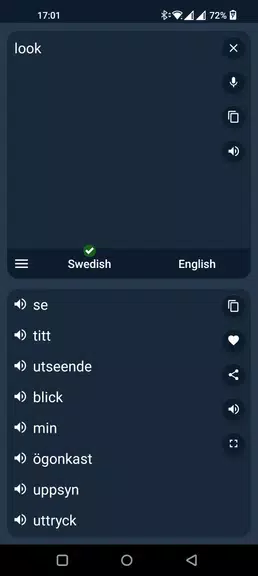
Swedish - English Translator is a compact, fast translation tool designed for travelers, students, and professionals who need accurate Swedish-English conversions on the go. It combines offline dictionaries, voice input, and contextual suggestions to speed up writing, reading, and speaking in everyday situations and study sessions.
Overview of the app
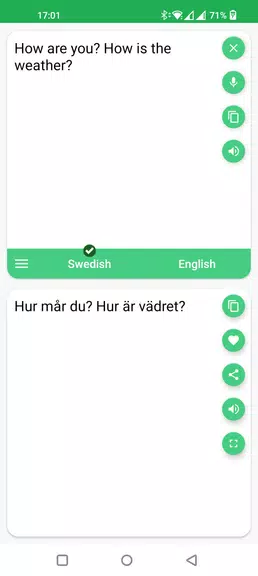
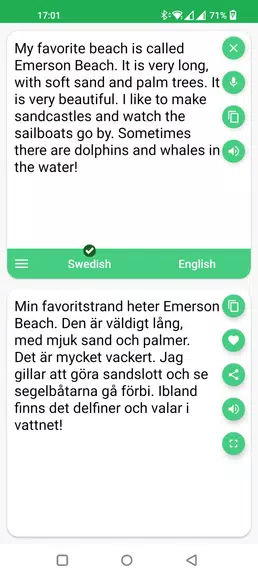
Built around simplicity and accuracy, the app focuses on practical translations rather than bloated feature sets. Users can look up single words, full phrases, or entire paragraphs. The interface keeps core actions visible: type, speak, or paste text and receive instant feedback. Frequent lookups are saved so common phrases become easier to reuse.
What sets it apart
While many translators rely on raw machine output, this app highlights context-aware suggestions, example sentences, and part-of-speech labels. That makes translations more useful for writing emails, reading articles, or having short conversations. The offline dictionary is compact but covers common vocabulary and phrases relevant for travel, study, and business contexts.
Key functions and tools
- Two-way translation: Translate from Swedish to English and vice versa with a single tap.
- Voice input: Speak to translate when typing isn’t convenient; useful for pronunciation practice.
- Phrasebook: Save frequently used translations and categorize them for quick access.
- Example sentences: See words used in context to avoid literal or awkward translations.
- Offline mode: Access basic translations without an internet connection for travel use.
How it works in daily use
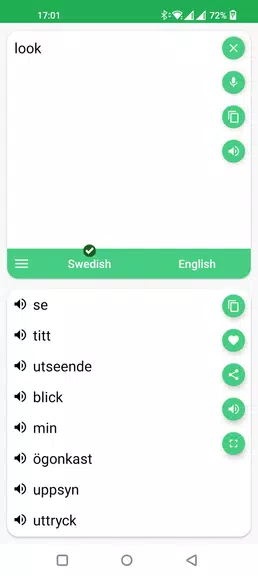
Enter a word, phrase, or sentence and the app returns a ranked list of possible translations. Tapping an entry expands related meanings, synonyms, and example sentences. When the voice input is used, the app shows both the recognized text and the translated result, allowing corrections before finalizing. The combination of recognition and context helps reduce errors common in short-phrase translation.
Interface and performance
The design follows modern mobile conventions: large input area, clear results list, and easy access to saved phrases. Performance is tuned for responsiveness — lookups feel instantaneous on recent devices. The app is lightweight and avoids heavy background processes, which helps conserve battery life during long trips. Font sizes and contrast are adjustable to accommodate different reading conditions.
User workflow and productivity
For learners and professionals, the app supports a simple workflow: discover a word, review examples, save to a phrasebook, then practice via voice mode. That feedback loop turns lookup activity into active learning. The phrasebook and history features serve as a quick study list without needing separate flashcard software.
Tips for beginners
- Start with short phrases to test voice recognition quality before trying long sentences.
- Use example sentences to learn how words change with context rather than relying on first translation only.
- Save common travel phrases to the phrasebook before departure for offline access.
- Adjust audio settings if pronunciation playback is too fast or too slow.
New users find Swedish - English Translator intuitive because the essential actions are obvious from the first screen. The app helps bridge gaps in reading comprehension and spoken exchanges with minimal setup.
Practical scenarios where it helps
Business travelers can quickly convert short emails or subject lines. Students gain a handy reference for homework and reading assignments. Tourists value offline phrase access when roaming without data. Language learners benefit from example sentences and the ability to compare multiple translation options before choosing the best phrasing.
Getting started and installation
Download and open the app, grant microphone permission for voice features, and optionally download the offline dictionary pack. The onboarding tour highlights input modes and saving mechanics. After a few lookups, personalize settings for text size, audio speed, and default language direction to streamline daily use.
Careful attention to clarity and quick feedback makes Swedish - English Translator a practical companion for anyone handling Swedish-English tasks. Whether for travel, study, or work, the app provides focused tools to translate with context and confidence.
Information
 Google Play
Other Games by the Same Suvorov-Development
User Comments

Lotus Chess is an opening-focused chess trainer that uses machine learning to analyze your games and deliver short, targeted practice designed to improve your results from move one. Lotus Chess studies recurring patterns in how you respond to common opening choices, then creates daily exercises that reinforce practical ideas and reactions rather than rote memorization.
AYT Coğrafya is a focused study application created to help Turkish high-school students prepare for the AYT Geography exam by combining clear lessons, visual material and practice tests into a single, mobile-friendly tool. AYT Coğrafya places curriculum-aligned topics into concise, step-by-step modules so learners can study in short sessions or longer blocks depending on their schedule, track improvements over time and concentrate revision on the areas that need the most attention.

Plantale blends casual farming simulation with light puzzle mechanics to create a relaxed yet strategic experience. In Plantale you cultivate a variety of hybrid plants, manage limited space, and solve seasonal challenges while unlocking new seeds and tools. Its approachable systems make it easy to enjoy short sessions or longer campaigns.

Finlit.uz is a mobile application that gathers the educational content and interactive services of the Central Bank of the Republic of Uzbekistan’s financial literacy website into a single, easy-to-use platform. It delivers articles, videos, practical tools and structured training designed for schoolchildren, students, entrepreneurs and retirees who want to improve their personal finance skills. Available in three language versions—Uzbek (Cyrillic and Latin) and Russian—the app covers budgeting, loans, deposits, financial markets and currency regulation, and includes calculators, assessments and a personal results journal to track learning progress.

PRESIDENT OF THE PHILIPPINES is an educational trivia app that helps users learn about the country's presidents and vice presidents through carefully written questions and chronological coverage. It tests your recall of the 17 presidents of the Philippines, from the current officeholder back to the earliest leaders, and highlights key events, policies, and milestones from each administration. Users may want it as a compact reference and study aid to refresh historical facts, understand political transitions, and explore how different presidencies shaped national policy. The interface focuses on quizzes and informative prompts to make review efficient and engaging.

PIANO FARM is an educational music app that helps children explore piano basics through a bright, playful interface. It combines interactive instrument sounds, simple visual theory and three learning modes to keep lessons engaging and accessible for young learners. Parents and educators may want it because it turns abstract concepts into tangible actions—using color-coded notes, familiar animal sounds and an easy keyboard layout—so beginners can practice listening, hand coordination and note recognition without pressure. The app is designed as a learning tool rather than a game, suitable for early music education and casual practice sessions.