

 X
X
 facebook
 WhatsApp
 Email
Email
Introduction
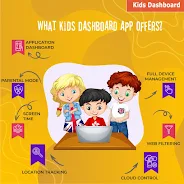
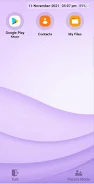
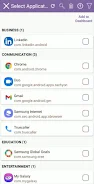
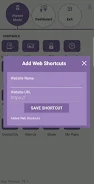
Kids Dashboard converts any Android phone or tablet into a secure kids mode that lets parents restrict apps, block settings, and manage screen time to reduce e-addiction and protect privacy. With a single tap the device becomes a child-friendly dashboard that prevents access to personal apps and app stores, keeps lockdown active after reboot, and supports remote management via an online account. The interface is customizable and ad-free, so caregivers can set schedules, enable countdown timers, extend sessions with a password, and present a simpler, safer device experience for children.
Key Features
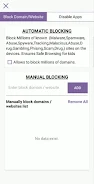
⭐ App lockdown/KIOSK — Kids Dashboard lets parents choose which apps appear on the child dashboard, block app store access, restrict calls, and keep lockdown active through reboots.
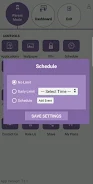
⭐ Screen time controls — Set daily time limits, schedule weekly usage, show a countdown timer, and allow parents to extend time with a password.
⭐ One-tap transformation — Enter kids mode instantly by launching the Kids Dashboard app for quick, reliable activation.
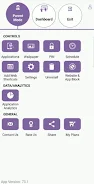
⭐ Analytics & AI — Per-app usage statistics with date filters help monitor how children use the device.
⭐ Customization — Change wallpaper, add custom text or a serial number, enable a clock, modify icon backgrounds, and show or hide exit/settings icons.
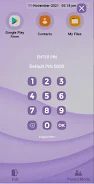
⭐ Security & system controls — Settings are protected by a password (enter via five taps), Android settings and notifications are blocked, and application settings can be exported and imported.
Advantages
✅ Kids Dashboard delivers an ad-free parental control tool with a comprehensive feature set.
✅ Persistent lockdown that remains in effect even after device reboots improves safety.
✅ Simple setup and one-click activation make daily use fast and convenient for caregivers.
✅ Remote management via an online account plus per-app analytics helps parents make informed decisions.
✅ Export/import of app settings is handy when resetting or migrating a device.
Disadvantages
❎ Kids Dashboard requires Device Administrator and Accessibility permissions to operate, which some users may consider intrusive.
❎ Uninstalling the app requires deactivating it as a device administrator first, adding extra steps to removal.
❎ The parental password screen times out after five seconds of inactivity, which can be inconvenient during certain tasks.
Information
Other Games by the Same






The Remote App Tool collection includes many Android apps that allow remote control. With the growing number of smart devices, it's easy to misplace remotes. These apps solve that problem, offering a convenient, free way to control your devices. They provide great convenience for your daily life!





User Comments

My Abilities Centre is a versatile mobile app that combines scheduling, contactless check-ins, notifications and fitness tracking into a single, easy-to-use interface for people who want to manage daily activities and stay informed without juggling multiple services.

My Drama is an app that delivers original short dramas and micro-films designed for busy viewers who want a rich storytelling experience in short bursts. Each story runs roughly a minute, making this a great choice for commutes, coffee breaks, or relaxed moments at home or while dining. The collection highlights high-definition productions adapted from novels and is updated regularly, giving users fresh, polished content on every visit. With a mix of contemporary and legendary themes, My Drama provides an easy way to enjoy complete, satisfying narratives without a long time commitment.

RADIOS GUIDE WORLD is a user-friendly radio directory that lets listeners and broadcasters find and stream stations from across the globe. The app collects local and international channels in a searchable, easy-to-navigate interface so you can discover music, news and talk shows from many countries. Broadcasters can publish their station for free through the app's distribution system, reaching a wider audience without heavy technical setup. With broad format and protocol support the app aims to deliver reliable playback on a variety of devices, making RADIOS GUIDE WORLD a practical choice for casual listeners and station owners alike.

Avatar creator is a flexible avatar design tool that lets you build a personalized digital identity with full control over appearance, clothing, and accessories. Use Avatar creator to design a fun or professional representation of yourself from scratch, adjusting hairstyles, eye color, facial features and outfits to match your personal style. The app also makes it easy to share creations with friends or display them inside the app, and it supports ordering custom products featuring your avatar so you can turn digital designs into real-world items like T-shirts, phone cases, or posters.

Anime Browser puts a fast, clean interface on top of a popular tracking service so you can manage your anime and manga collections without opening a web browser. Anime Browser helps fans keep episode and chapter counts accurate, update statuses and ratings, and take personal notes from a mobile-friendly layout that supports light and dark themes. The app is built for quick list editing and discovery: you can jump between seasonal charts, your personal library, and newly added titles in just a few taps.

Melody Wallpaper brings the charming world of My Melody to your phone or tablet with a curated library of more than 150 wallpapers, images and animated GIFs designed for easy preview and application. Melody Wallpaper places high-resolution static art and animated backgrounds in one simple interface so fans can personalize home screens and lock screens with pastel, kawaii and character-pairing designs that work across different device sizes. The app makes it straightforward to browse themed collections, preview how an image will look on a device, and apply or save artwork without a steep learning curve.
