

 X
X
 facebook
 WhatsApp
 Email
Email
Introduction
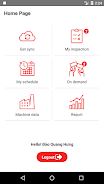
InspectPro is a factory inspection tool that helps teams locate equipment, monitor machine status, and improve maintenance planning. With InspectPro, technicians can quickly scan to find the right assets to inspect, reduce time spent onsite, and convert informal checks into a predictable, auditable workflow that supports better scheduling and repairs.
Core features and how they work
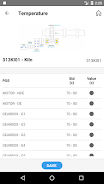
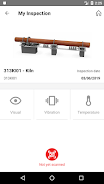
InspectPro centers on fast asset identification and data capture. Scanning options support camera-based QR and barcode reads, and where devices permit, NFC interactions to jump directly to an asset record. Each inspection screen presents a concise checklist for the selected asset, lets users attach photos and short notes, and records timestamps and operator IDs so every result is traceable. Machine status flags are visible at a glance and update as technicians complete checks, which helps teams prioritize follow-up work and understand equipment health over time.
User controls and mobile workflow
The app is designed for simple on-device controls that match typical mobile habits: a single scan button launches the camera reader, inline controls let you navigate checklist items, and filters help you sort assets by area, status, or priority. Forms use clear, labeled fields with dropdowns and short-entry text so data entry is fast and consistent. InspectPro minimizes screen clutter and makes it easy to resume an inspection if interrupted, saving the last-incomplete state and allowing technicians to pick up where they left off.
Progression, task management, and inspections cadence
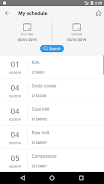
Inspections are organized into templates and cycles so teams can maintain repeatable routines. Each template tracks completion percent, required versus optional checks, and provides a simple pass/fail or severity rating per item. Supervisors and planners can view inspection histories to see trends for a specific machine or production line, helping inform maintenance windows and parts procurement. Built-in timestamps and status markers make it straightforward to run audits or review how quickly issues were detected and resolved.
Visual style and on-floor readability
The interface prioritizes clarity under factory conditions: large type, high-contrast status indicators, and clear sectioning make it easier to read in bright or dim environments. Color-coded badges show normal, attention-needed, or critical states, while photo attachments and short notes provide visual context that supports faster decision-making. The visual approach reduces ambiguity so technicians can act on inspection results without wading through unnecessary detail.
Customization and reporting
InspectPro supports customizable checklists and fields so you can adapt inspections to specific equipment types or regulatory requirements. Templates can include required fields, optional observations, and standard failure codes, helping standardize data across users and shifts. Summary reports surface inspection counts, common failure categories, and asset-level histories; these outputs are suitable for sharing with maintenance planners or exporting in common formats for integration with other tools.
Offline capability, synchronization, and reliability
The app is built to work where connectivity is inconsistent: technicians can perform inspections offline and store results locally until a connection is available for synchronization. This ensures inspections continue even in remote or shielded areas of a facility. Reliability depends on consistent scanning and accurate entries by staff, and initial setup of asset records and templates will speed adoption; Administrators should plan a short rollout with training to reach full benefit.
Accessibility, replay value, and practical limits
Accessibility features such as scalable fonts, clear contrast, and simplified navigation make InspectPro useful for a range of users. Because inspection tasks are inherently repeatable, the app offers strong replay value: recurring cycles produce trend data that becomes more valuable the more consistently checks are performed. Limitations include dependence on device hardware for advanced scanning and the need for disciplined data entry practices; InspectPro performs best when teams commit to regular scanning and follow defined inspection routines.
Who will benefit
InspectPro is suited to production supervisors, maintenance technicians, and operations teams that want a practical, low-friction way to standardize inspections and make maintenance planning more predictable. It reduces time spent searching for assets, improves the accuracy of inspection records, and helps organizations present a more organized, professional approach to equipment care without introducing unnecessary complexity.
Information
 Google Play

The Remote App Tool collection includes many Android apps that allow remote control. With the growing number of smart devices, it's easy to misplace remotes. These apps solve that problem, offering a convenient, free way to control your devices. They provide great convenience for your daily life!





User Comments
FleetDocs is a mobile document management app that helps trucking fleets capture, submit, and organize paperwork using a smartphone camera. FleetDocs puts common driver tasks — photographing bills of lading, scanning receipts, combining multiple pages and sending them to an administrator — into a simple, repeatable workflow designed for fast processing and less paper handling.

InterForum is the official mobile app for attendees of InterForum conferences, designed to simplify planning, participation, and networking at live and virtual events. It centralizes agendas, official programs and session details so users can browse schedules, track updates, and build a personalized timetable that fits their interests. The app also supports live interaction with speakers, real-time polls, and in-app messaging to help attendees stay informed and connected. If you attend InterForum events regularly or are a first-time participant, this app streamlines event logistics and boosts opportunities to learn, ask questions, and meet other professionals.

Visit UIC is a compact guide to the University of Illinois Chicago's annual Open House, offering a clear overview of the September 16 event and why it matters for prospective students, families, and community visitors. The app summarizes what to expect—over 100 sessions, faculty talks, lab and studio demonstrations, hands-on activities on the quad, and practical sessions on admissions and financial aid—so you can quickly see whether UIC's academic programs, facilities, and urban campus culture match your interests before attending in person.

msgKarriere is a mobile career companion designed to help candidates and employees discover job opportunities, follow industry trends, and manage professional development from any location. In the first moments after opening msgKarriere you can search curated listings, read firsthand employee 'Job Stories', and start an application with a streamlined workflow that reduces friction between finding a role and applying. The app centralizes company profiles, event details, and project summaries in a compact, user-focused layout so users can make informed choices about roles and workplace culture on the go.

Dhaka Share Bazar puts Bangladesh's stock market into a compact, mobile-friendly interface so you can check live quotes, indices and company information on the go. Dhaka Share Bazar is designed for anyone who needs concise market reference — from experienced traders who review intraday moves to investors and students who study company filings and sector trends. The app focuses on delivering exchange-sourced data in a clear layout that reduces time spent navigating multiple websites and gives a single place to consult prices, charts and corporate summaries.

政府職缺快找 is a streamlined app that helps users discover and manage government job vacancies in one place. The app aggregates the latest public-sector openings, lets you filter searches, save favorites, and view full job details so you can prepare applications with fewer steps. Job seekers, career changers, and recent graduates will appreciate the ability to create tailored search conditions and receive deadline reminders via calendar sync. If you want a single dashboard for monitoring official vacancy announcements and organizing potential applications, 政府職缺快找 offers the basic tools to simplify the process.