

 X
X
 facebook
 WhatsApp
 Email
Email


Introduction
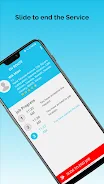
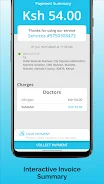
Weys Provider is a telemedicine app designed to connect doctors, nurses and allied healthcare professionals with patients for secure virtual consultations, electronic prescriptions and streamlined follow‑up care. The app centralizes scheduling, patient records and prescription workflows so clinicians can extend services beyond a brick‑and‑mortar clinic while preserving familiar clinical routines. Weys Provider places emphasis on fast appointment management, confidential recordkeeping and a simple interface that helps independent practitioners and small clinic teams offer remote consultations without overhauling their daily practice.
Key features
The core capabilities include secure video consultations with encrypted audio and video streams, an integrated appointment system that supports availability settings and booking controls, and an electronic prescription module that records issued medications directly in the patient file. Patient histories, clinical notes and prescriptions are stored in encrypted form to support continuity of care, and the app supports multiple specialties so general practitioners, therapists and nurses can adapt workflows to their scope of practice. The design favors short, focused interactions: clinicians can triage, advise and issue prescriptions during a single virtual visit while administrative tasks such as billing, receipts or manual record updates are reduced.
How it works and interaction flow
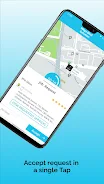
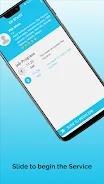
Booking a visit follows a straightforward interaction model: a provider publishes available slots, a patient requests or books a time, and both sides receive confirmations and reminders. During a consultation, the interface exposes primary controls for camera and microphone toggles, chat messaging, prescription issuance and note taking so clinicians can move through the visit without switching screens. Providers complete a verification and profile setup before accepting patients; that onboarding sequence is the main progression step for new clinicians and unlocks the ability to manage schedules and receive bookings.
User experience and visual style
The visual style is intentionally clean and functional: high‑contrast text, clear action buttons and a minimal color palette focus attention on clinical content rather than decorative elements. Patient records are presented in a timeline that groups visits, prescriptions and notes so clinicians can scan history quickly. The interface scales to phones and tablets and keeps primary controls within thumb reach for comfortable single‑hand operation during on‑the‑go consultations.
Customization and progression
Providers can customize their availability, consultation lengths and fee settings to match personal schedules and practice policies, while notification preferences allow clinicians to filter alerts during off hours. Profile completeness and verification status represent the app’s progression model for providers: as you complete credential verification, link payment details and set service parameters, your ability to accept and manage patients becomes fully active. For patients, progression is reflected in richer health records and faster repeat bookings once basic registration is complete.
Care pathways and level structure
Clinical interactions are organized into clear stages: pre-visit triage and scheduling, the virtual consultation itself, prescription or referral actions at the point of care, and post‑visit follow‑up messaging. This level structure helps teams design standard operating procedures: quick advice visits, extended assessments, or scheduled follow‑ups can each be mapped to different appointment types and durations so workflows remain consistent across encounters.
Replay value and continuity of care
The app’s replay value derives from repeatable, longitudinal care rather than entertainment: patients return for follow‑ups, chronic disease reviews and medication adjustments, while clinicians benefit from consolidated records that make subsequent visits more efficient. Templates for common visit types and the ability to clone past visit notes reduce repetition for clinicians and encourage ongoing engagement for patients who require continuing care.
Accessibility and offline considerations
Weys Provider aims to be accessible on a range of devices and supports adjustable text sizing and straightforward navigation for users with differing needs. While live consultations require an internet connection, the app provides limited offline access to previously viewed patient summaries and scheduled appointment information so clinicians can review essential details when connectivity is intermittent. Audio‑only calls are supported where bandwidth is constrained to preserve access to care.
Challenges and practical limitations
Remote consultations depend on reliable internet and compatible devices, so video quality and continuity can vary with network conditions. Provider verification is necessary before accepting patients, which introduces a brief set‑up delay but helps maintain clinical safety. The app is built for remote assessment and advice but does not replace hands‑on examinations or urgent in‑person care when those are clinically indicated.
Security, privacy and target users
Data protection uses industry standard encryption for stored records and in‑call streams, and role‑based access controls let clinics manage team permissions. Weys Provider is suited to independent practitioners, small clinic teams and specialists looking to expand access, reduce travel, and provide structured follow‑ups while keeping the clinical workflow familiar and auditable.
Information
Other Games by the Same Weys Med Solutions


The Remote App Tool collection includes many Android apps that allow remote control. With the growing number of smart devices, it's easy to misplace remotes. These apps solve that problem, offering a convenient, free way to control your devices. They provide great convenience for your daily life!






What would it be like to download video software for free? In this collection, you can find various video software that interests you, whether it’s video players or video editors—everything you need is here. All of it is provided for free, allowing you to download with ease and without any worries.



User Comments

BrandSafer2 is a mobile authentication app designed to help shoppers and brand teams verify product authenticity quickly using a smartphone camera. BrandSafer2 reads a visually distinctive Hybrid Tag engineered with special materials and printing techniques, runs anti-counterfeit checks, and returns clear pass/fail feedback so users can make informed decisions at the point of purchase. The app is intended for consumers, retailers, and brand partners who need an easy, reliable way to confirm provenance and report suspicious tags.

Anarkali Fashion Style is a focused visual reference that brings curated Anarkali suit designs to your device, presenting traditional and contemporary looks in a single, easy-to-browse gallery. Whether you are researching outfits for a wedding, planning a party look, or simply exploring everyday styles, Anarkali Fashion Style shows floor-length and mid-length silhouettes, embroidery techniques, color palettes, and accessory suggestions alongside clear photos and short descriptive notes. The app is designed to be a quick source of inspiration: high-resolution images, clean navigation, and a small set of organizational tools keep the focus on design details rather than shopping or booking services.

Marina Bay Sands Singapore puts the resort's promotions, dining and shopping information, and rewards program into a single mobile companion so guests and visitors can discover offers and manage benefits on the go. The app lets you browse the latest promotions, explore more than 170 luxury and premium boutiques, and find over 80 dining options and award-winning attractions, all from your phone. You may want this app if you frequent the property or plan a visit, because it simplifies tracking Sands Rewards Dollars, signing up for complimentary membership and redeeming perks such as parking instantly through the Sands Rewards e-Card.

CoVince is a software application that lets users join Metaverse Parks to experience shared virtual spaces and collaborate with others in real time. The app highlights collective experience, community growth, and cooperative activities that bring people together in park-like digital environments, making it useful for social meetups, team collaboration, and community building. CoVince focuses on connecting participants, facilitating shared sessions, and supporting ongoing interaction so groups can explore, collaborate and grow together within accessible virtual venues.

Living Spiritual Masters Daily is an app that delivers carefully selected daily quotes from contemporary spiritual teachers to inspire personal practice and reflection. It presents short teachings from living masters to remind users about surrender, self-realization and the power of direct guidance, while offering tools to weave those teachings into everyday routines. Users may download it to receive daily prompts, set alarms, choose background tunes, and keep favorite sayings for study or sharing. The design aims to be a gentle companion—helpful for anyone seeking daily spiritual focus without replacing personal mentorship.
e-Diyet Teknoloji Diyeti is a lightweight digital wellbeing app designed to help you take back control of everyday phone use by automatically tracking screen time, analyzing which apps occupy your attention, and sending gentle reminders when usage exceeds the limits you set. From the first run the app records app-by-app activity and produces readable summaries so you can quickly see where your minutes go; e-Diyet Teknoloji Diyeti is built to support gradual habit change rather than enforce harsh blocks.