

 X
X
 facebook
 WhatsApp
 Email
Email


Introduction
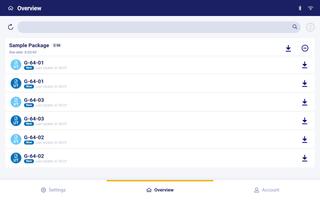
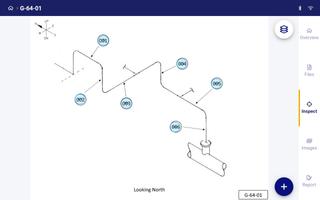
Inspection Project Manager brings a fully digitized inspection workflow to field teams and site managers, streamlining how inspections are executed, recorded and signed off while remaining usable in offline environments. The app converts paper-based forms and checklists into structured digital tasks so installers, safety officers and supervisors can complete field work using a touch-friendly interface, track progress in real time and retain a clear audit trail for compliance and reporting.
How the core workflow works
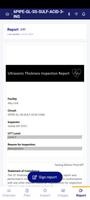
The application centers on repeatable, structured inspection workflows: each inspection uses configurable templates made of fields such as checkboxes, numeric inputs, short and long text entries and date controls. As users enter data the system generates an auto-updating report that reflects findings immediately, reducing transcription errors and accelerating sign-off. Digital sign-off is supported through an electronic acceptance step so supervisors can verify completion and lock entries. The inspection workflow emphasizes clarity: required fields, contextual help and inline validation guide technicians to consistent results across teams and sites.
Controls and user interface
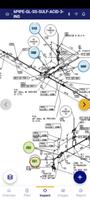
Controls are designed for practical field use: large tappable elements, concise labels and progressive disclosure to keep each screen focused on the task at hand. Data entry is optimized for speed and accuracy with pre-filled options where appropriate, searchable pick lists for standard codes or items, and quick navigation between sections of an inspection. The layout adapts to phones and tablets so field technicians can work with one hand, and common gestures like back/forward and save checkpoints reduce the chance of lost input during busy shifts.
Progression, statuses and project structure
Inspection Project Manager models inspections as hierarchical projects with sites, inspection rounds and tasks so progress can be viewed at multiple levels. Tasks move through defined statuses — for example pending, in progress, remedial action required and complete — allowing supervisors to filter work by urgency and follow up efficiently. The app records timestamps and operator IDs for each transition, creating an auditable history that helps teams demonstrate compliance and measure performance over time.
Customization, templates and initial setup
Templates and form layouts can be adapted to match an organization’s existing procedures, enabling teams to preserve familiar terminology and acceptance criteria. Administrators can set required fields, failure conditions and conditional logic so later sections open only when relevant items are flagged. While this flexibility increases long-term efficiency, it may require initial configuration to align digital forms and workflows with an organization’s inspection procedures and terminology; some staff training and change management is typically needed for smooth adoption.
Offline operation and synchronization
Inspection Project Manager is built for connectivity variance common on worksites: users can perform inspections, update fields and execute sign-offs without an internet connection, then synchronize changes when a connection is restored. Synchronization merges completed records into a central report repository and preserves the audit trail; where conflicts occur the app surfaces differences for a supervisor to resolve. Offline capability helps minimize delays for remote teams and reduces the risk of lost paperwork during travel between sites.
Validation, challenge systems and auditability
To reduce rework and improve reliability, inspection routines support validation rules and pass/fail criteria that flag inconsistent or missing information before an inspection is finalized. Supervisors can require additional evidence or corrective notes for failed items and record follow-up actions in the same workflow. These challenge and verification systems strengthen accountability by linking issues directly to responsibilities and timelines, creating a linear record of discovery, remediation and final acceptance.
Accessibility and operator experience
The app emphasizes an inclusive user experience with readable type sizes, clear contrast, and simplified navigation to support diverse field teams and varying light conditions. In-app guidance and contextual tips help new users learn the workflow while still allowing experienced technicians to move quickly. Frequent checkpoints, autosave and concise reporting output reduce cognitive load so users can focus on safety and accuracy rather than administrative overhead.
Deployment, replay value and ongoing use
Once configured, Inspection Project Manager becomes a reusable tool for recurring inspections, seasonal audits and one-off site checks, offering strong replay value through consistent templates and standardized reporting. Organizations will see benefits in faster inspections, consolidated records and better traceability for audits. Adoption typically improves as teams refine templates and validation rules to match real-world conditions, turning the app into a dependable operational asset rather than a short-term experiment.
Information

The Remote App Tool collection includes many Android apps that allow remote control. With the growing number of smart devices, it's easy to misplace remotes. These apps solve that problem, offering a convenient, free way to control your devices. They provide great convenience for your daily life!





User Comments

FleetDocs is a mobile document management app that helps trucking fleets capture, submit, and organize paperwork using a smartphone camera. FleetDocs puts common driver tasks — photographing bills of lading, scanning receipts, combining multiple pages and sending them to an administrator — into a simple, repeatable workflow designed for fast processing and less paper handling.

InterForum is the official mobile app for attendees of InterForum conferences, designed to simplify planning, participation, and networking at live and virtual events. It centralizes agendas, official programs and session details so users can browse schedules, track updates, and build a personalized timetable that fits their interests. The app also supports live interaction with speakers, real-time polls, and in-app messaging to help attendees stay informed and connected. If you attend InterForum events regularly or are a first-time participant, this app streamlines event logistics and boosts opportunities to learn, ask questions, and meet other professionals.
Visit UIC is a compact guide to the University of Illinois Chicago's annual Open House, offering a clear overview of the September 16 event and why it matters for prospective students, families, and community visitors. The app summarizes what to expect—over 100 sessions, faculty talks, lab and studio demonstrations, hands-on activities on the quad, and practical sessions on admissions and financial aid—so you can quickly see whether UIC's academic programs, facilities, and urban campus culture match your interests before attending in person.

msgKarriere is a mobile career companion designed to help candidates and employees discover job opportunities, follow industry trends, and manage professional development from any location. In the first moments after opening msgKarriere you can search curated listings, read firsthand employee 'Job Stories', and start an application with a streamlined workflow that reduces friction between finding a role and applying. The app centralizes company profiles, event details, and project summaries in a compact, user-focused layout so users can make informed choices about roles and workplace culture on the go.

Dhaka Share Bazar puts Bangladesh's stock market into a compact, mobile-friendly interface so you can check live quotes, indices and company information on the go. Dhaka Share Bazar is designed for anyone who needs concise market reference — from experienced traders who review intraday moves to investors and students who study company filings and sector trends. The app focuses on delivering exchange-sourced data in a clear layout that reduces time spent navigating multiple websites and gives a single place to consult prices, charts and corporate summaries.
政府職缺快找 is a streamlined app that helps users discover and manage government job vacancies in one place. The app aggregates the latest public-sector openings, lets you filter searches, save favorites, and view full job details so you can prepare applications with fewer steps. Job seekers, career changers, and recent graduates will appreciate the ability to create tailored search conditions and receive deadline reminders via calendar sync. If you want a single dashboard for monitoring official vacancy announcements and organizing potential applications, 政府職缺快找 offers the basic tools to simplify the process.