
 X
X
 facebook
 WhatsApp
 Email
Email
Introduction
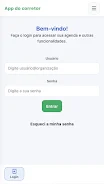
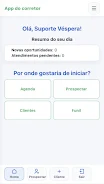
Contro.la is a mobile app built for real estate brokers and teams who need to organize their sales routine with greater speed and control. Contro.la centralizes daily operations so agents can view a concise summary of tasks, check new opportunities and pending appointments, and prioritize where to start the day. Designed to integrate with an agency environment, the app surfaces client records, calendars and a visual sales funnel that helps teams keep follow-ups consistent and move leads toward closing.
Key features
The app provides secure login tied to your agency account so access and permissions remain controlled by the brokerage. A daily calendar view highlights today’s appointments and immediate next actions, while a monthly overview supports broader planning and appointment oversight. Customer records include editable contact and address fields, search and pagination for quick queries, and an active prospecting module to register and follow new contacts. Sales opportunities are displayed in a Kanban-format funnel with stages, cards and a visible history; this layout makes responsibility, status and next steps clear to brokers and managers. Integration with the agency ERP brings relevant sales journey data into one place, reducing gaps between field activity and back-office records.
User interaction and controls
Contro.la keeps interaction simple and task-focused: card-based funnel tiles respond to tap and drag gestures for quick status changes, while forms use straightforward input fields and date pickers for appointments. Navigation emphasizes minimal taps to reach client history, upcoming commitments and responsible team members. Search, filters and pagination help you narrow large contact lists, and contextual actions on each card let agents call, message or schedule follow-ups without leaving the app. The interface is organized around common broker workflows so routine actions become repeatable and efficient.
Progression and workflow
The app models the sales journey as a progression of stages so teams can see where a lead sits at a glance and what actions are needed to advance it. Each transition generates a history entry so managers can review who made changes and why. Workflows can be used to assign responsibility, set expected next steps and create a clear sequence from prospecting to negotiation and closure. This structure supports predictable handoffs and reduces the chance that promising leads get lost between appointments and administrative follow-up.
Customization and visual style
Contro.la favors a clean, information-dense visual style that emphasizes legibility and quick scanning: color-coded stages, compact card summaries and expandable details let users control how much information they see at a glance. View filters and sort options allow teams to focus on priority segments such as high-value prospects or imminent appointments. Where agencies allow it, basic display settings and default sorting can be tuned to match internal processes so the tool fits existing habits rather than forcing a single rigid layout.
Daily use, replayability and productivity
The app is designed for repetitive daily use: a broker’s morning routine can start with the Contro.la summary screen and follow through scheduled visits, callbacks and new registrations. That habitual loop — review, act, update — gives the app real replay value for professionals who revisit their pipeline multiple times per day. Over weeks, consistent use builds a clearer historical record that helps forecast workload, prioritize follow-ups and measure conversion trends at the agency level.
Accessibility and offline considerations
Ease of use is emphasized with large touch targets, clear typography and a workflow that minimizes deep menu navigation, which helps users operate the app in the field. Depending on agency configuration, some recently viewed items may be cached for short-term offline reference, but full functionality typically requires connection to the agency environment for authentication and updated ERP data. Teams should plan device policies around connectivity to ensure reliable syncing of appointments and client changes.
Limitations and adoption
Contro.la is optimized for use within an agency ecosystem and therefore requires access to the brokerage’s environment and credentials; it is not intended for independent use without an account. Because several core capabilities depend on integration with the agency ERP, some features will be limited when that connection is unavailable. Finally, teams may need time and training to adopt a Kanban-based sales flow and align internal processes to the app’s structure, although the payoff is faster daily routines and clearer accountability once established.
Who benefits
Real estate brokers, team leaders and operations managers will find Contro.la useful for consolidating field activity and back-office records into a single workflow. By providing visibility of opportunities at each stage and clear next actions, the app helps brokers prioritize time and resources, while giving managers the tools to monitor progress and maintain consistent follow-up across the agency.
Information
 Google Play
User Comments

Contro.la is a mobile app built for real estate brokers and teams who need to organize their sales routine with greater speed and control. Contro.la centralizes daily operations so agents can view a concise summary of tasks, check new opportunities and pending appointments, and prioritize where to start the day. Designed to integrate with an agency environment, the app surfaces client records, calendars and a visual sales funnel that helps teams keep follow-ups consistent and move leads toward closing.
VR MKT is a marketing task management app that helps teams plan campaigns, assign tasks, track deadlines and monitor progress in real time. Built for agencies, in-house marketing teams and independent professionals, it centralizes communication and provides a clear view of priorities and results so projects stay on schedule. Users who want better coordination and measurable productivity gains will find its marketing-focused tools and intuitive interface useful for turning ideas into executable campaigns. The app emphasizes visibility across projects, making it easier to spot bottlenecks and keep stakeholders aligned without extra overhead.

SafeOS is a focused password manager that lets you securely store, organize and protect all your login credentials in a single encrypted vault. It emphasizes privacy and simplicity, offering PIN or biometric access, automatic locking when idle, and a clean dark-mode interface so managing accounts is quick and unobtrusive. SafeOS also includes a configurable password generator, organized categories and search to find entries fast, plus encrypted cloud backup and restore so you can transfer your data when switching devices. If you want a straightforward tool to improve your digital security, SafeOS delivers core password-management features without unnecessary complexity.

Filezy. Filezy. Filezy. is a focused document preservation tool built to keep important files stored safely and securely without changing their original appearance or content. Designed for users who prioritize fidelity over editing or collaboration, this app preserves scans, contracts, receipts and other document types in their native form so text, layout and image detail remain intact after storage. The interface stays intentionally simple so anyone can import documents, verify file integrity and retrieve originals quickly when they are needed.

شوارعنا is a straightforward local discovery app designed to help you find services, businesses and community activities near you quickly and reliably. From small shops and home-based professionals to events posted by neighborhood users, شوارعنا aggregates listings in a single searchable interface so you can compare options, read ratings and contact providers without switching between multiple apps. The app emphasizes simple search, secure contact methods and user feedback to make everyday decisions—like where to eat, who to hire or which local event to attend—easier and faster.

RideAlong is a driver management and support app designed for Delivery Service Providers (DSPs) and their delivery teams. It centralizes fleet oversight, performance tracking, and on-demand support so managers and drivers can work with clearer real-time insights. Teams may want RideAlong to monitor delivery metrics, respond faster to issues, and keep vehicles and personnel coordinated without juggling multiple tools. The app focuses on practical tools for both drivers and DSP managers, offering a straightforward interface to access performance data, instant support channels, and fleet-level visibility that helps daily operations run more smoothly.
Look no further than Cast to TV - Screen Mirroring, Cast For Chromecast! This powerful app allows you to effortlessly broadcast your Android screen and audio in real-time speed, giving you the opportunity to enjoy movies and videos with friends and family on larger TV screens. With features like Smart View & Screen Share and control for Roku TV, this app ensures a seamless and stable screen mirroring experience. Say goodbye to small screens and hello to a whole new level of entertainment with Cast to TV!

With Screen Share With TV - Mirror Screen, you can easily mirror your Android device's screen on any smart TV, laptop, tablet, or other devices without the need for additional dongles or cables. Simply start the app, connect to the same Wi-Fi network as your TV, and begin sharing videos, music, photos, and more with just a click. This powerful app allows you to broadcast your screen and audio in real time, making it perfect for sharing content with friends and family. Try out Screen Share With TV - Mirror Screen today and enjoy seamless screen mirroring on your Samsung smart TV.

Control your TV effortlessly with WiFi TV Remote! This user-friendly app allows you to easily manage your network-enabled TV from the convenience of your phone. Simply ensure both your TV and phone are connected to the same wireless network, enter the IP address of your TV in the app settings, and voila! You'll be able to change channels, adjust volume, and more with just a few taps. Please note, this app is not a universal remote and has been tested on Fox 32LE7000T2 LED Surf TV. It may also work on other TVs made in China and sold under local brands.
Control all of your favorite TVs with just one app - TV Remote Control for Sanyo TV! Whether you have a Samsung, Vizio, Sony, LG, or any other brand of TV, this universal remote control app has got you covered. With infrared technology, you can easily navigate and control your TV from the convenience of your phone. Say goodbye to multiple remote controls cluttering your space. Simplify your TV-watching experience with TV Remote Control for Sanyo TV. Get ready to take control and enjoy your favorite shows and movies hassle-free. Please note that this app requires an IR blaster.
Look no further than AIR Remote PRO for Apple TV, an innovative app that allows you to easily control your Apple TV using your Android phone. No need to jailbreak your Apple TV, as AIR Remote utilizes default infrared codes to seamlessly replace or extend your remote. Compatible with a variety of Android devices with built-in infrared support, as well as certain Mac products with an infrared receiver, AIR Remote offers all essential functions and even additional features like swipe gestures.
Experience the convenience of controlling your FPT TV directly from your mobile with FPT TV Remote. Say goodbye to traditional remotes and hello to a seamless user experience with the ability to search for the best films and entertainment programs with just the sound of your voice. Easily access your personalized favorites list stored in the cloud and sync it with your FPT TV device. The app offers a simple registration process, quick connectivity to any FPT TV device, accurate search functionality, and personalized recommendations.