
 X
X
 facebook
 WhatsApp
 Email
Email

Introduction
MyIPNow is a compact network toolkit for Android that puts essential diagnostic tools in your pocket; MyIPNow bundles IP and DNS inspectors, WHOIS, blacklist checks and ping/speed tests, and MyIPNow also includes ASN/subnet utilities plus a password generator for quick troubleshooting and secure credential creation.
Overview
Designed for IT professionals, network engineers, system administrators and knowledgeable power users, this editor-focused introduction describes how the app consolidates several common utilities into a single, focused experience. You can inspect public or remote IP addresses and domains, confirm DNS records, query WHOIS information, test connectivity and bandwidth, validate networks with ASN and subnet calculations, and generate passwords for administrative tasks. The app emphasizes clear technical output so results are easy to interpret, document and share with colleagues.
Key features and tools
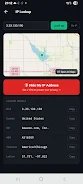
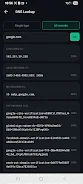
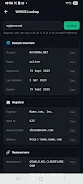
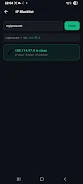
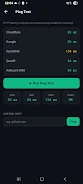
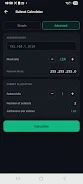
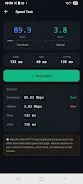
Each tool is accessible from the main toolbar with a compact, form-driven workflow: enter an IP address or hostname, choose the query type and tap to run. The Instant IP lookup shows your device's public IPv4 and IPv6 addresses, estimated geolocation, ISP/ASN data, timezone and coordinates. The DNS tool supports A, AAAA, MX, TXT, NS, CNAME, SOA and PTR queries and can request a single record type or all records; raw JSON responses are available for automation or archival. WHOIS queries return registrar, registrant, nameservers, registration and expiry dates and DNSSEC status across common TLDs and IP WHOIS sources. Blacklist checks probe 80+ major blocklist databases and present a concise listed/clean summary with a progress indicator and links to source details. Ping tests measure latency and packet loss against public endpoints or any custom host, reporting min/avg/max and loss statistics. The subnet calculator offers simple and advanced modes to compute masks, ranges, broadcast addresses and usable host counts and includes a binary breakdown to assist network planning. A lightweight password generator helps produce secure credentials for temporary accounts or device access.
User experience and controls
MyIPNow follows a touch-first layout that keeps inputs and results on the same screen for fast iteration. Common controls include clear input fields, dropdowns for record types, toggles for advanced options and a run/stop control for long queries such as blacklist scans. Results present both a human-readable summary and an optional raw JSON view for technical audiences. The interface is intentionally uncluttered so frequent tasks take a few taps; advanced reports and technical fields are visible when needed without hiding basic functions.
Performance, offline use and dependencies
Most of the app's diagnostic tools execute locally to minimize latency and preserve basic privacy, but several lookups require remote queries. IP geolocation lookups are performed via the app's servers, and DNS, ASN and some other lookups depend on public APIs and DNS-over-HTTPS services, so availability and detail can vary with upstream providers. Network-dependent functions like blacklist checks and speed tests require an active connection and may be impacted by transient conditions; when offline, local tools such as some ping variants and subnet calculations remain usable for planning and basic validation.
Accessibility and readability
The app emphasizes clear, technical output designed for rapid troubleshooting: results are displayed in structured text with timestamps and basic metadata so you can record and compare runs. Fonts and spacing prioritize legibility for long result lists, and the JSON view preserves formatting for developers and auditors. Input labels and result headings are explicit so users with screen readers or assistive technologies can navigate common tasks; the simple workflow reduces cognitive load when diagnosing urgent connectivity problems.
Privacy, data handling and transparency
No account is required to use MyIPNow and the app does not store personal data on your device. Queries that require external data use public APIs or the app's servers; this behavior is described in-app so administrators can decide which features to run. Routine operations that run locally keep query surface area small, and the app surfaces the source of each external lookup so you can verify where results originate. Clear technical logs and raw data views support auditing and documentation of network investigations.
Limitations and troubleshooting
Be aware that some features depend on third-party services: geolocation resolution uses the app's servers and DNS/ASN lookups may rely on DNS-over-HTTPS or public API providers, so results can vary or be temporarily unavailable. Blacklist scans can return transient listings that require cross-checking with source details; the app provides links and raw responses to help confirm findings. Network conditions will affect speed tests and remote pings, and occasional upstream rate limits may change query behavior during heavy use.
Who should install it
This toolkit is well suited for network professionals who need a compact, phone-accessible set of diagnostic utilities, engineers who must triage connectivity while away from a workstation, and power users who want transparent, technical outputs for domain and IP inspection. MyIPNow is not a replacement for full desktop suites but provides a practical, mobile-first complement for on-the-go diagnostics and basic network planning.
Information
 Google Play

The Remote App Tool collection includes many Android apps that allow remote control. With the growing number of smart devices, it's easy to misplace remotes. These apps solve that problem, offering a convenient, free way to control your devices. They provide great convenience for your daily life!



User Comments

MyIPNow is a compact network toolkit for Android that puts essential diagnostic tools in your pocket; MyIPNow bundles IP and DNS inspectors, WHOIS, blacklist checks and ping/speed tests, and MyIPNow also includes ASN/subnet utilities plus a password generator for quick troubleshooting and secure credential creation.

CardVault: Card Manager is a privacy-first card and ID organizer that stores your payment cards, loyalty and gift cards, IDs and transport passes locally on your device. CardVault: Card Manager places encryption and user control at the center of the experience, using AES-256 with SQLCipher so sensitive information does not leave your phone, and it offers biometric unlock, OCR scanning and encrypted transfer options for secure portability.

OneLC Action Line puts Lake Charles city services in your pocket and makes it straightforward to report non-emergency issues, track progress, and find municipal resources. OneLC Action Line offers a clear workflow for submitting requests about potholes, cracked sidewalks, overgrown lots and other neighborhood concerns, and it combines photo attachments, descriptive notes, and status updates into a single app so residents can see how requests move from submission to resolution.

Autenticador is a compact time-based one-time password app designed to produce short-lived numeric codes that work as a secondary factor for two-step login. Autenticador generates rotating TOTP codes that change every few seconds so you can add an extra verification layer to your existing website and app sign-ins without replacing passwords or changing how you normally log in. This description explains how Autenticador operates, what to expect during setup, and how the app helps reduce the risk of unauthorized access and brute-force attacks.

PDFEssence is a lightweight mobile utility that converts photos and images into ready-to-share PDF documents quickly and without fuss. With this app you can pick multiple pictures from your gallery, make simple edits to each image and then merge them into a high-quality PDF file that can be saved or shared instantly. Users who need a fast, no-frills document creation tool will appreciate PDFEssence's focus on simplicity and efficiency; it avoids cluttered menus and delivers a straightforward workflow for scanning receipts, assembling reports, or archiving images on the go.

Koi Mend Idle Slow is a focused expense and resource-tracking utility designed for operators who need a compact, auditable way to monitor mission-critical spending across Fuel, Cargo and Repair categories. Koi Mend Idle Slow records each transaction locally with timestamps and notes, enforces budget limits, and presents real-time utilization so teams can spot overspend quickly. The app targets users who prefer a lightweight, persistent local archive and a clear visual summary of logistical costs rather than a full accounting suite.
Look no further than Cast to TV - Screen Mirroring, Cast For Chromecast! This powerful app allows you to effortlessly broadcast your Android screen and audio in real-time speed, giving you the opportunity to enjoy movies and videos with friends and family on larger TV screens. With features like Smart View & Screen Share and control for Roku TV, this app ensures a seamless and stable screen mirroring experience. Say goodbye to small screens and hello to a whole new level of entertainment with Cast to TV!

With Screen Share With TV - Mirror Screen, you can easily mirror your Android device's screen on any smart TV, laptop, tablet, or other devices without the need for additional dongles or cables. Simply start the app, connect to the same Wi-Fi network as your TV, and begin sharing videos, music, photos, and more with just a click. This powerful app allows you to broadcast your screen and audio in real time, making it perfect for sharing content with friends and family. Try out Screen Share With TV - Mirror Screen today and enjoy seamless screen mirroring on your Samsung smart TV.

Control your TV effortlessly with WiFi TV Remote! This user-friendly app allows you to easily manage your network-enabled TV from the convenience of your phone. Simply ensure both your TV and phone are connected to the same wireless network, enter the IP address of your TV in the app settings, and voila! You'll be able to change channels, adjust volume, and more with just a few taps. Please note, this app is not a universal remote and has been tested on Fox 32LE7000T2 LED Surf TV. It may also work on other TVs made in China and sold under local brands.
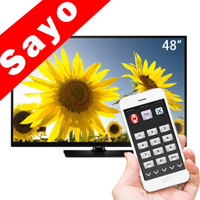
Control all of your favorite TVs with just one app - TV Remote Control for Sanyo TV! Whether you have a Samsung, Vizio, Sony, LG, or any other brand of TV, this universal remote control app has got you covered. With infrared technology, you can easily navigate and control your TV from the convenience of your phone. Say goodbye to multiple remote controls cluttering your space. Simplify your TV-watching experience with TV Remote Control for Sanyo TV. Get ready to take control and enjoy your favorite shows and movies hassle-free. Please note that this app requires an IR blaster.
Look no further than AIR Remote PRO for Apple TV, an innovative app that allows you to easily control your Apple TV using your Android phone. No need to jailbreak your Apple TV, as AIR Remote utilizes default infrared codes to seamlessly replace or extend your remote. Compatible with a variety of Android devices with built-in infrared support, as well as certain Mac products with an infrared receiver, AIR Remote offers all essential functions and even additional features like swipe gestures.
Experience the convenience of controlling your FPT TV directly from your mobile with FPT TV Remote. Say goodbye to traditional remotes and hello to a seamless user experience with the ability to search for the best films and entertainment programs with just the sound of your voice. Easily access your personalized favorites list stored in the cloud and sync it with your FPT TV device. The app offers a simple registration process, quick connectivity to any FPT TV device, accurate search functionality, and personalized recommendations.