
 X
X
 facebook
 WhatsApp
 Email
Email
Introduction
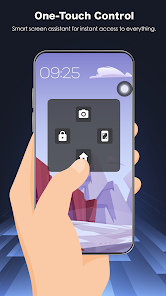
Assistive Touch 2026 provides a customizable floating shortcut panel for Android that speeds navigation on large phones and helps when physical buttons are worn. The app places a small, movable on-screen button that opens quick controls for Home, Back, Recent apps, volume, screenshots and common settings so you can operate your device one-handed or avoid using power and volume keys.
Key Features
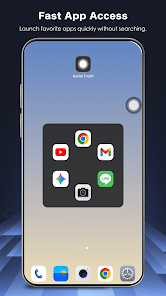
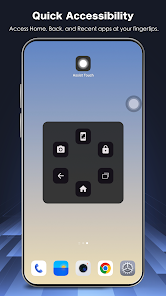
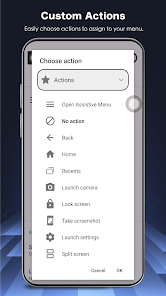
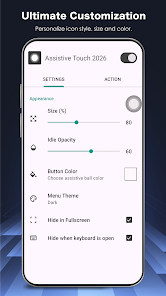
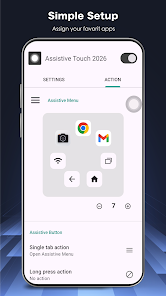
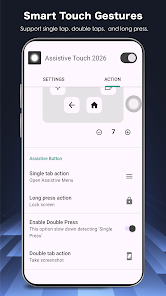
Assistive Touch 2026 provides one-touch Home, Back and Recent tasks, virtual volume controls, quick lock and other global actions accessible from the floating panel. Direct toggles for Wi-Fi, Bluetooth, flashlight, screen rotation, brightness control, location (GPS), airplane mode and screenshot capture are available from the panel. Quick-launch shortcuts let you add favorite apps to the panel for instant access from any screen. Visual customization includes multiple icon styles, panel colors and adjustable size and transparency so the button fits your setup. The app is designed to be lightweight with low latency and minimal battery impact so the overlay stays responsive.
Advantages
Assistive Touch 2026 reduces wear on physical buttons by offering virtual alternatives to power, volume and home keys. It makes one-handed use easier on large phones by keeping common controls within thumb reach. Privacy is considered: the Accessibility Service is used only to perform global actions and the app does not collect, store or share personal data. The interface is configurable so you can match the look and behavior to your preferences.
Disadvantages
The app requires enabling the Accessibility Service API to perform actions like Back, Home, Recent Apps and device lock, which grants a system-level permission. The floating button can obscure content or be tapped accidentally until you adjust its size, position or transparency to suit your workflow.
Information
 Google Play
User Comments
Assistive Touch 2026 provides a customizable floating shortcut panel for Android that speeds navigation on large phones and helps when physical buttons are worn. The app places a small, movable on-screen button that opens quick controls for Home, Back, Recent apps, volume, screenshots and common settings so you can operate your device one-handed or avoid using power and volume keys.
Zax Snaxx is a casual arcade game about collecting snacks while avoiding obstacles, designed for short play sessions and straightforward controls.

Toad Ace Wren Ember is a specialized academic planner that helps students organize exams and study missions in one place, making it easier to map test dates and plan study sessions ahead of time.

Robox Counter : RBX Calc is a lightweight counter and calculator for tracking counts, scores and simple arithmetic in everyday tasks. The app supports multiple counters with custom labels and adjustable step values, and includes increment, decrement, reset and merge actions alongside a built-in calculator for quick sums and basic conversions.

Koala Swift Pass Ignite helps teams manage daily sessions and operational shifts with precision and clarity. The app tracks start and end times for each session, categorizes units by subject, location and instructor, and surfaces upcoming events through a real-time diagnostic header. Users who need to keep schedules synchronized, deploy sessions quickly, or review weekly performance metrics will find it useful. Interactive shift progression and a log-style schedule view make it easier to visualize status at a glance, while weekly summaries report total hours and subject counts to support simple productivity reviews.

Miscrits Engine is a lightweight game engine and toolkit designed to run creature-collection battles, provide mod support, and host community maps for compatible APKs. Miscrits Engine focuses on stable combat mechanics, configurable rulesets, and offline play options while remaining modular for user-created content.
Look no further than Cast to TV - Screen Mirroring, Cast For Chromecast! This powerful app allows you to effortlessly broadcast your Android screen and audio in real-time speed, giving you the opportunity to enjoy movies and videos with friends and family on larger TV screens. With features like Smart View & Screen Share and control for Roku TV, this app ensures a seamless and stable screen mirroring experience. Say goodbye to small screens and hello to a whole new level of entertainment with Cast to TV!
With Screen Share With TV - Mirror Screen, you can easily mirror your Android device's screen on any smart TV, laptop, tablet, or other devices without the need for additional dongles or cables. Simply start the app, connect to the same Wi-Fi network as your TV, and begin sharing videos, music, photos, and more with just a click. This powerful app allows you to broadcast your screen and audio in real time, making it perfect for sharing content with friends and family. Try out Screen Share With TV - Mirror Screen today and enjoy seamless screen mirroring on your Samsung smart TV.
Control your TV effortlessly with WiFi TV Remote! This user-friendly app allows you to easily manage your network-enabled TV from the convenience of your phone. Simply ensure both your TV and phone are connected to the same wireless network, enter the IP address of your TV in the app settings, and voila! You'll be able to change channels, adjust volume, and more with just a few taps. Please note, this app is not a universal remote and has been tested on Fox 32LE7000T2 LED Surf TV. It may also work on other TVs made in China and sold under local brands.
Control all of your favorite TVs with just one app - TV Remote Control for Sanyo TV! Whether you have a Samsung, Vizio, Sony, LG, or any other brand of TV, this universal remote control app has got you covered. With infrared technology, you can easily navigate and control your TV from the convenience of your phone. Say goodbye to multiple remote controls cluttering your space. Simplify your TV-watching experience with TV Remote Control for Sanyo TV. Get ready to take control and enjoy your favorite shows and movies hassle-free. Please note that this app requires an IR blaster.
Look no further than AIR Remote PRO for Apple TV, an innovative app that allows you to easily control your Apple TV using your Android phone. No need to jailbreak your Apple TV, as AIR Remote utilizes default infrared codes to seamlessly replace or extend your remote. Compatible with a variety of Android devices with built-in infrared support, as well as certain Mac products with an infrared receiver, AIR Remote offers all essential functions and even additional features like swipe gestures.
Experience the convenience of controlling your FPT TV directly from your mobile with FPT TV Remote. Say goodbye to traditional remotes and hello to a seamless user experience with the ability to search for the best films and entertainment programs with just the sound of your voice. Easily access your personalized favorites list stored in the cloud and sync it with your FPT TV device. The app offers a simple registration process, quick connectivity to any FPT TV device, accurate search functionality, and personalized recommendations.