

 X
X
 facebook
 WhatsApp
 Email
Email

Introduction
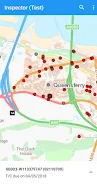
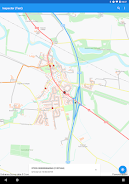
Inspector is a purpose-built mobile client designed for registered SRWR users to record Inspection Result transactions directly into the SRWR. Inspector offers a focused, work-oriented interface that matches the SRWR workflow so professionals can capture and submit official inspection outcomes without switching between multiple tools. The app requires SRWR account access and credentials that are provisioned by the SRWR Hosted Support team; there is no public in-app registration.
Key features and scope
The Inspector app concentrates on a narrow but critical task: entering, validating and submitting Inspection Result transactions to the SRWR ledger. It ties each transaction to the authenticated SRWR account of the person submitting results, ensuring traceability. The core features emphasize form-based entry, required-field validation, clear submission status, and a direct link to the official SRWR data model rather than free-form record keeping.
How it works: workflow mechanics
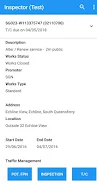
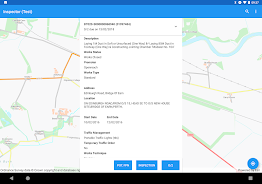
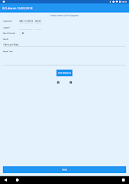
Inspector guides users through a step-by-step workflow that mirrors common inspection processes: identify the record or asset to be inspected, complete a results form that captures mandatory fields, review entries for completeness, and submit the transaction to the SRWR system. This staged approach reduces errors by prompting for missing information before final submission and keeps the flow consistent with organizational inspection protocols.
Controls and interface
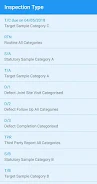
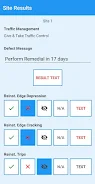
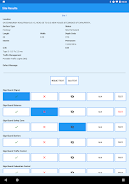
The user interface in Inspector is intentionally minimal and task-focused: labeled input fields, dropdown selectors for standardized codes, date and time pickers for scheduling and result timestamps, and clear action buttons for Save, Validate and Submit. The design minimizes navigation depth so an inspector can complete entries with a small number of taps. Inline help text clarifies field expectations and any SRWR-specific formatting rules that must be followed.
Progression, record structure and history
Progression inside Inspector reflects the lifecycle of an inspection transaction rather than gamified levels: draft, validated, submitted, and linked to SRWR transaction history. Drafts allow users to pause and return to incomplete entries, while the submit step pushes the validated result into the official SRWR workflow where it becomes part of the permanent inspection record. Because transactions are recorded against authenticated accounts, audit trails and historical context are preserved by the SRWR back end.
Customization and configuration
Inspector respects the SRWR schema and any field configurations defined by the SRWR administration. Rather than offering broad end-user customization, the app displays the form structure and required fields as provisioned by the Hosted Support team so entries remain compliant with agency rules. This approach reduces ambiguity and ensures that submitted inspection results meet the expected format for downstream processing.
User experience and accessibility
Usability is prioritized for field professionals who often work in constrained environments: controls are large enough for gloved use, text contrasts follow accessibility best practices, and the layout emphasizes the most commonly used fields first. The app uses clear, plain-language labeling and provides inline validation messages to reduce rework. For organizations that require it, the SRWR Hosted Support team can advise on accessibility considerations during onboarding.
Data integrity and validation
Inspector implements validation logic to catch missing or inconsistent entries before submission. Validation rules align with SRWR requirements so that common issues are flagged immediately, reducing the need for follow-up corrections. Because transactions are associated with registered SRWR accounts, accountability and data provenance are maintained throughout the inspection lifecycle.
Support, onboarding and limitations
Access to Inspector is restricted: registration and credentialing are handled exclusively by the SRWR Hosted Support team. New users should contact that team to be granted the necessary SRWR privileges and to receive any organization-specific instructions. Inspector does not provide general-purpose inspection management beyond entering Inspection Result transactions to SRWR; other workflows remain outside the app’s intended scope.
Why organizations choose Inspector
Organizations that adopt Inspector benefit from a concentrated tool specifically built to integrate with SRWR transactions, reduce paperwork, and increase the consistency of official inspection records. By aligning the mobile entry process with SRWR expectations and centralizing submission paths, Inspector helps maintain clean data and a reliable audit trail while freeing field staff to focus on inspection work rather than recordkeeping logistics.
Information
User Comments

FleetDocs is a mobile document management app that helps trucking fleets capture, submit, and organize paperwork using a smartphone camera. FleetDocs puts common driver tasks — photographing bills of lading, scanning receipts, combining multiple pages and sending them to an administrator — into a simple, repeatable workflow designed for fast processing and less paper handling.

InterForum is the official mobile app for attendees of InterForum conferences, designed to simplify planning, participation, and networking at live and virtual events. It centralizes agendas, official programs and session details so users can browse schedules, track updates, and build a personalized timetable that fits their interests. The app also supports live interaction with speakers, real-time polls, and in-app messaging to help attendees stay informed and connected. If you attend InterForum events regularly or are a first-time participant, this app streamlines event logistics and boosts opportunities to learn, ask questions, and meet other professionals.

Visit UIC is a compact guide to the University of Illinois Chicago's annual Open House, offering a clear overview of the September 16 event and why it matters for prospective students, families, and community visitors. The app summarizes what to expect—over 100 sessions, faculty talks, lab and studio demonstrations, hands-on activities on the quad, and practical sessions on admissions and financial aid—so you can quickly see whether UIC's academic programs, facilities, and urban campus culture match your interests before attending in person.

msgKarriere is a mobile career companion designed to help candidates and employees discover job opportunities, follow industry trends, and manage professional development from any location. In the first moments after opening msgKarriere you can search curated listings, read firsthand employee 'Job Stories', and start an application with a streamlined workflow that reduces friction between finding a role and applying. The app centralizes company profiles, event details, and project summaries in a compact, user-focused layout so users can make informed choices about roles and workplace culture on the go.

Dhaka Share Bazar puts Bangladesh's stock market into a compact, mobile-friendly interface so you can check live quotes, indices and company information on the go. Dhaka Share Bazar is designed for anyone who needs concise market reference — from experienced traders who review intraday moves to investors and students who study company filings and sector trends. The app focuses on delivering exchange-sourced data in a clear layout that reduces time spent navigating multiple websites and gives a single place to consult prices, charts and corporate summaries.

政府職缺快找 is a streamlined app that helps users discover and manage government job vacancies in one place. The app aggregates the latest public-sector openings, lets you filter searches, save favorites, and view full job details so you can prepare applications with fewer steps. Job seekers, career changers, and recent graduates will appreciate the ability to create tailored search conditions and receive deadline reminders via calendar sync. If you want a single dashboard for monitoring official vacancy announcements and organizing potential applications, 政府職缺快找 offers the basic tools to simplify the process.