
 X
X
 facebook
 WhatsApp
 Email
Email

Introduction
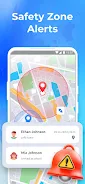
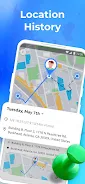
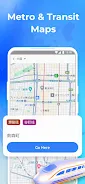
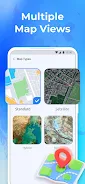
Phone Tracker GPS Tracker helps you share live location securely with people you trust for meetups, family coordination, or simple check-ins. The app displays your position on clear maps (standard, satellite, hybrid, terrain), highlights nearby places like restaurants or ATMs, and shows transit or metro maps where available. Sharing begins only with mutual consent and is protected by unique connection codes so both parties must agree before any live tracking. You can create safety zones (home, work, school), receive entry/exit alerts, review recent location history, and pause or stop sharing at any time to protect your privacy.
Key Features
⭐ Phone Tracker GPS Tracker uses secure, unique codes and mutual consent to start any live location sharing.
⭐ Multiple map modes: standard, satellite, hybrid and terrain for clearer context.
⭐ Nearby places and points of interest shown at a glance to help plan meetups or errands.
⭐ Transit and metro maps in supported cities to understand routes and surroundings.
⭐ Real-time GPS updates and a recent location history for coordination and quick reviews.
Advantages
✅ Phone Tracker GPS Tracker prioritizes privacy and control — pause or stop sharing instantly whenever you choose.
✅ Clear, easy-to-read maps and nearby place discovery simplify navigation and meetups.
✅ Custom safety zones with entry/exit alerts help you monitor important locations like home or school.
✅ Mutual consent plus secure connections reduce the risk of unintended or unauthorized tracking.
Disadvantages
❎ Location sharing requires mutual consent, so you cannot view someone’s live location without their agreement.
❎ Transit and metro map support is limited to certain cities and may not be available everywhere.
❎ The app stores only recent location history rather than long-term archival records.
Information
 Google Play
User Comments

Phone Tracker GPS Tracker helps you share live location securely with people you trust for meetups, family coordination, or simple check-ins. The app displays your position on clear maps (standard, satellite, hybrid, terrain), highlights nearby places like restaurants or ATMs, and shows transit or metro maps where available. Sharing begins only with mutual consent and is protected by unique connection codes so both parties must agree before any live tracking. You can create safety zones (home, work, school), receive entry/exit alerts, review recent location history, and pause or stop sharing at any time to protect your privacy.

Frydum - Driver helps professional drivers manage trips, tasks, and earnings with a focused interface. The app provides route guidance, clear job details, in-app messaging with dispatch, and accessible trip records and receipts.
Forager Friend: Foraging Map helps outdoor enthusiasts locate and document wild plants, mushrooms and other foraged resources. Forager Friend: Foraging Map provides offline maps, a searchable species database with reference images and seasonal guidance to support safer outings. Forager Friend: Foraging Map lets you mark locations, add photos and notes, and view community observations.

Rydeu Airport Transfers helps you book private airport transfers, taxis and chauffeur services around the world, making door-to-door travel straightforward for business or leisure. Use the app to reserve airport pickups and drop-offs, city and intercity rides, hourly chauffeur hire or private sightseeing tours with fixed pricing and professional drivers, with options for minibuses or coach hire for groups.

Vroom brings fast, on-demand ride delivery and transportation services to get you where you need to go quickly and safely. Designed for users who value speed and simplicity, Vroom connects you with nearby drivers, lets you book in seconds, and provides real-time tracking so you can follow your vehicle's progress. Whether you're commuting across town or need a dependable trip at odd hours, Vroom streamlines the process with straightforward pricing and a clean interface. The app focuses on speed, driver reliability, and round-the-clock availability to minimize waits and keep journeys predictable.
GpXfer is a compact Android utility that moves GPX files from your phone straight to handheld GPS units over USB, eliminating the need for a PC, internet connection, or online account. With GpXfer you can plug a GPS into an OTG cable, choose a GPX file and tap Send to transfer waypoints, routes or tracklogs in seconds. GpXfer remembers USB permissions, reconnects automatically and supports multiple devices connected through a USB hub, while providing map previews and conversion tools so you can prepare and validate files offline before copying them to your device.