

 X
 facebook
 WhatsApp
 Email

Introduction
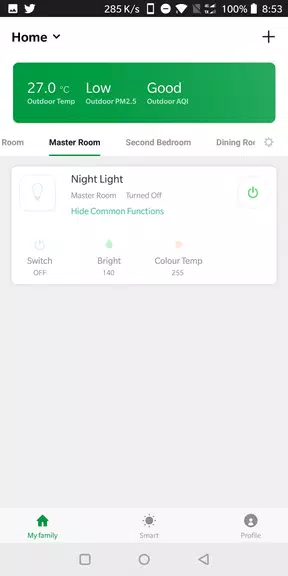
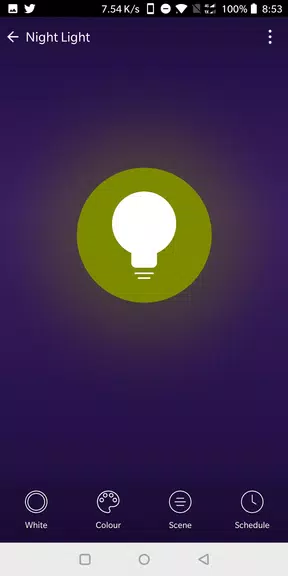
GreenDot Smart Home brings intuitive control and automation to your household devices through a clean mobile interface. This app centralizes lighting, climate, security cameras and energy monitoring, enabling schedules, scenes and remote access. It supports voice assistants and provides notifications and usage insights to simplify daily routines.
What GreenDot Smart Home Does
GreenDot Smart Home connects disparate smart devices into a single dashboard so you can manage them from one place. Use the app to create routines that trigger multiple devices, check real-time status for sensors and cameras, and receive alerts when unusual activity is detected. The emphasis is on streamlined daily management and energy-conscious automation.
Core Features at a Glance
The app offers a toolkit designed around convenience and control. Highlights include:
- Centralized Device Management — add, group and control lights, thermostats, locks and cameras.
- Custom Schedules and Scenes — program time-based or event-based routines for hands-free behavior.
- Remote Monitoring — view live camera feeds, sensor states and power consumption from anywhere.
- Voice Assistant Integration — compatible with popular voice platforms for hands-free commands.
- Usage Reports and Insights — track energy trends and get suggestions to lower consumption.
How Automation and Rules Work
Automation in GreenDot Smart Home is rule-driven and easy to configure. You can set triggers such as motion detection, temperature thresholds, or specific times of day, then assign actions like turning on lights, adjusting the thermostat, or sending notifications. The rule builder supports conditional logic, so you can create multi-step routines that adapt to changing conditions.
Integrations and Device Compatibility
Compatibility is a strong point: GreenDot Smart Home supports Wi-Fi, Z-Wave and Zigbee devices through native drivers and hubs. The app includes a searchable device directory and automatic discovery tools that speed up setup. Third-party integrations let you link platforms for streaming, security services and smart appliances, expanding the ecosystem without adding clutter.
User Interface and Daily Workflow
The interface prioritizes clarity: a customizable home screen provides fast access to favorite devices and scenes, while a dedicated activity feed records recent events and alerts. Managing devices is drag-and-drop simple, and the scene editor gives immediate visual feedback. For households that share control, multi-user access with role levels ensures guests and family members see only what they need.
Performance, Reliability and Power Use
GreenDot Smart Home is optimized for low-latency control and minimal background battery drain on mobile devices. Local control capabilities mean essential automations continue to run even if the cloud connection drops. The app also includes power-saving modes and energy dashboards that show which devices consume the most electricity, helping you prioritize efficiency improvements.
Privacy and Security Measures
Security features include encrypted device communication, two-factor authentication for account access, and configurable camera privacy settings. Data retention policies are transparent within the app, allowing users to manage logs and delete historical records. Alerts for firmware updates and suspicious activity help keep the system protected without overwhelming notifications.
Getting Started with GreenDot Smart Home
Setup is guided step-by-step: create an account, allow the app to detect local devices, and follow prompts to add controllers and cameras. Templates and prebuilt scenes help you get basic automations running in minutes, while advanced users can explore conditional rules and API hooks for custom integrations. Regular updates expand device compatibility and refine user experience.
Who Benefits Most
GreenDot Smart Home fits homeowners and renters who want a consolidated approach to smart living. It scales from a single-room setup to whole-home automation, making it suitable for tech-savvy users who like customization as well as those seeking straightforward out-of-the-box convenience. The combination of monitoring tools, scheduling and energy insights provides practical value every day.
Information
 Google Play

The Remote App Tool collection includes many Android apps that allow remote control. With the growing number of smart devices, it's easy to misplace remotes. These apps solve that problem, offering a convenient, free way to control your devices. They provide great convenience for your daily life!






User Comments

archstore: AI Interior Design is a mobile design assistant that transforms room photos into polished interior plans using artificial intelligence. It helps users visualize furniture layouts, materials, and color schemes quickly, offering editable 3D previews and shopping links for a streamlined home renovation or decorating workflow.

Gates designs , Front gates is a design reference and idea tool that helps homeowners explore and select front gate styles to improve curb appeal and functionality. The app organizes curated collections of steel, iron and wooden gates, ranging from simple modern panels to ornate wrought-iron entries and space-saving sliding solutions. Users turn to it to compare materials, finishes and proportions, discover small steel gate options for narrow openings, and gather customization ideas before consulting builders or fabricators. Clear categories and visual examples make it easy to find a gate that matches a home's architecture and personal taste.
English is a mobile app designed to help learners build vocabulary, grammar, listening, and speaking skills through short lessons and interactive practice. It combines bite-sized exercises, speech recognition, and progress tracking to keep study sessions focused and productive for beginners and intermediate users aiming to improve everyday communication.

초록도시AR – 3D로 즐기는 식물 배치 미리보기, 초록도시AR – 3D로 즐기는 식물 배치 미리보기, 초록도시AR – 3D로 즐기는 식물 배치 미리보기 brings practical augmented reality plant styling to your phone and helps you preview real items in your own rooms before you buy. This editor introduction describes how the app helps you check scale, test pot and plant combinations, and save design ideas so you can make confident decorating choices without guessing how a plant will fit or look in a particular corner.

Consultar precios is a practical shopping utility that helps you track and compare product prices across stores and locations so you can make smarter buying decisions. The app focuses on clear, actionable data: build personal lists of frequently bought items, set target prices, and receive timely alerts when costs change. Consultar precios combines real-time market updates with community reports to reveal trends and local bargains without forcing you to visit every shop or sift through dozens of ads.

Desman is the official app for Desman smart door locks, designed to let you manage your lock directly from a smartphone. It delivers keyless, password-free access and aims to replace cumbersome traditional locks with a lighter, easier-to-install smart alternative. With the Desman app you can control your lock, monitor access, and simplify everyday entry without carrying keys or remembering codes. The app focuses on making life more comfortable by modernizing door access and providing a mobile interface for routine security tasks, so users can handle locks quickly and intuitively.