

 X
 facebook
 WhatsApp
 Email
Introduction
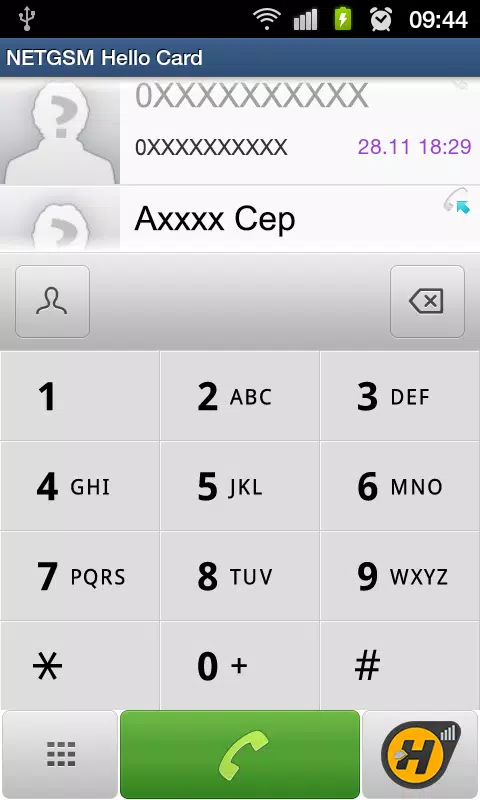
NetDIALER is a compact dialer and account management app designed for Netgsm subscribers, offering a single place to make calls, send SMS, check balances and top up without switching between multiple menus. NetDIALER places the most-used functions — Dialer, Messages, Account and History — within easy reach and keeps account information visible in real time so you can manage credit and data usage on the go. The app is intended for everyday use by customers who want a straightforward alternative to their native phone app that ties directly into Netgsm services while remaining familiar to Android users.
Key Features
The core feature set is focused and practical: you can place voice calls and send SMS from a modern dialer interface, view recent call history, and manage your contacts from the same place. NetDIALER displays your real-time account balance and current data usage and can notify you when credit runs low so you avoid unexpected interruptions. Top-up and payment functions are integrated into the app flow to reduce friction when adding credit. Call forwarding and basic call settings are configurable without navigating away, and language support helps users across regions operate the same tools in their preferred language. International calling options are exposed where supported by the operator, with clear indications when rates or availability vary by destination.
How It Works
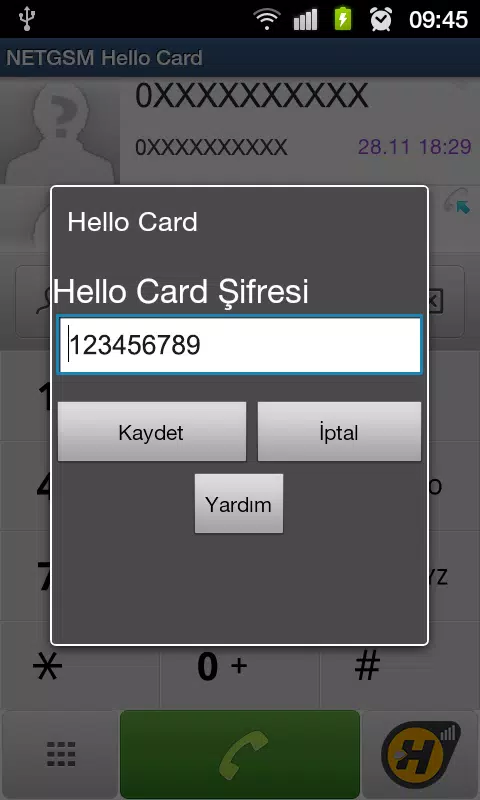
After signing in with your Netgsm credentials, the app syncs essential account details and presents them in a simple dashboard. The primary areas are arranged as tabs or labeled sections: a numeric dialer, a messaging screen for SMS, an account overview with balance and quota, and a history screen for recent calls and messages. Actions such as calling or topping up follow predictable confirm dialogs to prevent accidental purchases or unintended calls. Because NetDIALER interfaces with Netgsm services, some operations depend on the operator's network responses; the app is designed to show clear status messages if a request is pending, successful or failed.
Controls and Navigation
Navigation favors one- and two-tap operations: tap the dialer to start a call, long-press a contact to set speed-dial or call forwarding rules, and swipe between sections to access messages or account details quickly. Input controls are native Android elements for familiarity and accessibility, with support for copy/paste in message fields and a searchable contacts view. Visual cues and concise labels help reduce ambiguity when you manage payments, set forwarding, or review recent activity.
Customization and Visual Style
NetDIALER adopts a clean, utilitarian visual style with emphasis on legibility and quick scanning of information. You can personalize certain interface elements such as default language, ringtone selection for calls, and whether account notifications appear in the system tray. Contact display options — alphabetical, recent or favorites — help you shape the dialer to your habits. While the app maintains a consistent, minimal aesthetic, these small adjustments make day-to-day use more comfortable without adding complex theming systems.
User Experience and Progression
Using NetDIALER becomes progressively faster as your routines form: frequently called numbers appear in suggestions, recurring top-up options are remembered to speed future transactions, and low-balance alerts prevent surprises. There is no gamified progression or tiers; the sense of progress is practical — faster access, fewer steps and smoother account handling over time. The app prioritizes predictable performance and reduces friction for common tasks like recharging credit, checking data consumption, or toggling forwarding rules.
Accessibility and Offline Behavior
Accessibility considerations include adjustable text sizes, clear contrast between UI elements, and simple navigation patterns that work with screen readers. Basic functions such as viewing cached call history and reading previously retrieved account information are available when the device is temporarily offline, but live operations like making calls or topping up require network access to function fully. Error messages explain the difference so users understand which features are limited by connectivity rather than by the app itself.
Security and Privacy
NetDIALER uses secure login and authentication to protect account access and personal data; sensitive operations prompt for confirmation and the app stores credentials only as allowed by Android security best practices. The interface is intentionally free of unnecessary data sharing: it requests only the permissions needed for calls, messages and account management and informs the user when a permission affects a feature. For users concerned about privacy, settings provide control over notifications and how much account detail is shown on the main screen.
Limitations and Compatibility
Because the app is tailored for Netgsm subscribers, many features rely on the operator’s services and will not work with other carriers. International calling, some top-up methods and account controls may vary by region or operator policy; the app indicates when a feature is unavailable. If you do not have a Netgsm account, the app will provide limited functionality until you sign in. These constraints reflect the integration with operator systems rather than limits imposed by the app itself.
Information
User Comments

MORSE is a compact utility designed to teach, translate and transmit Morse code using sound, light, and vibration. It bundles translation tools, practice drills, and live signaling in a single interface, making it suitable for hobbyists, emergency-preparedness users, and anyone curious about learning the classic communication system.

ENTER is a mobile app that makes it simple to manage your account and services with a multiservice communications operator. The app combines payments, contract details and technical support into a single, easy-to-use interface so you can top up your balance by bank card, review connected services, switch tariff plans or temporarily suspend service without visiting an office. ENTER focuses on everyday convenience: secure card payments, transparent contract information and live chat support that let customers handle most telecom tasks quickly from their phone.

xSpaces is a compact workspace manager for Android that organizes apps, files, and shortcuts into customizable virtual spaces. It streamlines multitasking with gesture controls, quick profiles, and integrated cloud access, making it easier to switch contexts without clutter while keeping data secure and accessible on the go.

PuroSabor FM is a focused radio streaming app that brings Latin music, live shows, and talk programs into a compact interface. With easy station browsing, curated playlists, and background playback, it aims to make tuning into regional favorites simple whether you're commuting, working, or relaxing at home.
Riyaaq DATA is a productivity-focused Android app designed to centralize, visualize, and manage datasets on the go. It offers fast import/export options, a customizable dashboard, and lightweight analytics tools so professionals and power users can review important metrics and files without opening a laptop.

Smart TubeWell is a mobile-driven SCADA solution designed to bring practical IoT control and monitoring to traditional tube well installations. From a single smartphone you can view live pump status, basic water-quality indicators, flow rates and energy consumption while issuing remote start/stop and flow-adjustment commands. The app focuses on making routine checks faster, reducing unnecessary site visits, and helping managers prioritize field work by centralizing telemetry and notifications in a simple, mobile-first interface.