
 X
X
 facebook
 WhatsApp
 Email
Email

Introduction
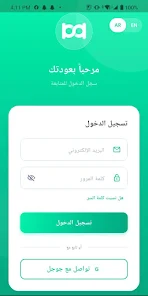
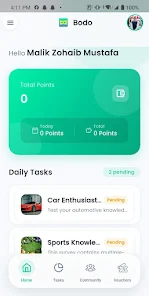
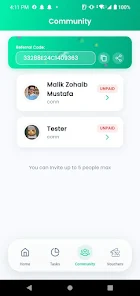
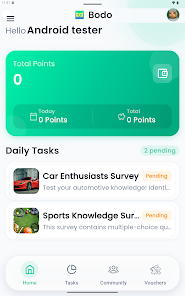
Bodo helps you turn spare moments into real rewards by completing short, everyday tasks on your phone. With Bodo you earn coins for activities such as filling brief surveys, watching short videos, or engaging with partner content, and those coins appear immediately in an in-app wallet so you can follow progress at a glance. The app is designed for quick sessions — ideal for a short wait, a coffee break, or filling downtime between errands — so you can begin earning in minutes and redeem coins for discount vouchers, gift cards and exclusive offers from familiar brands.
Key features
The core flow is intentionally simple: choose a task, follow the short instructions, complete the interaction and collect coins. Tasks are grouped by type and expected duration so you can pick activities that fit the time you have. Bodo supports a mix of task formats including micro-surveys, bite-size video viewing, and single-tap interactions with sponsored content. The in-app wallet shows earned coins, pending payouts and a clear redemption path for each available voucher or gift card.
How the system works
Tasks are presented as individual sessions rather than long-running chores, with an estimated time shown before you start. Controls are straightforward: tap to open a task, follow on-screen prompts, and confirm completion when required. Where a short video is involved, a progress bar and basic playback controls let you pause or resume. For surveys, the interface focuses on one question per screen to keep each interaction fast and mobile-friendly. Bodo emphasizes minimal taps and clear feedback so every step feels predictable and efficient.
Progression and rewards
Your progression is tracked through the coin balance and a task history that records recent completions. Coins accumulate in the wallet and can be redeemed when you reach the stated thresholds for vouchers or gift cards. To encourage steady engagement, the app highlights daily task suggestions and time-limited offers that can accelerate earning. Redemption options and required coin amounts are shown alongside each reward so you can plan which offers to pursue based on how often you use the app.
Visual style and layout
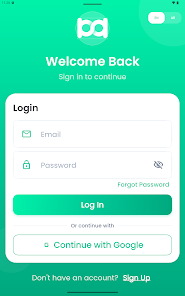
Designed for short sessions, the interface favors clear typography, high-contrast buttons and compact cards that display task type, reward and estimated time. Visual cues — such as progress bars on video tasks and completion checks on surveys — make it easy to scan available activities. The layout adapts to portrait and landscape orientations to remain usable on phones and small tablets, keeping interactions reachable with one hand during quick moments of use.
Controls, customization and accessibility
Bodo keeps controls simple and consistent: tapping, swiping between task cards and standard playback gestures for media. Users can customize notification preferences to receive fewer alerts or to be notified about new high-value offers. Accessibility considerations include adjustable text size, clear color contrasts and a flow that reduces the need for precise gestures. The interface aims to be usable by a wide audience without complex menus or hidden steps.
Replay value and challenge systems
Tasks refresh regularly and rotate through different partners, providing ongoing variety without requiring deep commitment. Time-limited offers and rotating task categories create short challenges that reward returning users who check the app frequently. Because each interaction is brief, the app encourages repeat sessions throughout the day as opportunities change, enhancing replay value without relying on aggressive gamification.
Network behavior and offline considerations
Most task types require an internet connection because they involve video delivery, surveys or partner content. Bodo is optimized to recover cleanly from brief network interruptions and to load tasks quickly on mobile data or Wi-Fi. Offline functionality is intentionally limited: you can review earned coins and previously viewed help content, but completing new tasks generally requires a connection so rewards can be validated in real time.
Limitations and expected use
Rewards are earned incrementally, so larger redemptions may take multiple sessions to achieve. Availability of specific tasks and offers depends on partners and can change over time, so the variety you see today may differ later. Earnings are based on task completion and participation frequency, and they are intended as small, incremental rewards rather than a steady income source. Bodo is best used as a way to make spare moments more productive, with transparent tracking and straightforward redemption options.
Information
 Google Play
What would it be like to download video software for free? In this collection, you can find various video software that interests you, whether it’s video players or video editors—everything you need is here. All of it is provided for free, allowing you to download with ease and without any worries.




User Comments
Bodo helps you turn spare moments into real rewards by completing short, everyday tasks on your phone. With Bodo you earn coins for activities such as filling brief surveys, watching short videos, or engaging with partner content, and those coins appear immediately in an in-app wallet so you can follow progress at a glance. The app is designed for quick sessions — ideal for a short wait, a coffee break, or filling downtime between errands — so you can begin earning in minutes and redeem coins for discount vouchers, gift cards and exclusive offers from familiar brands.

S-Trader journal יומן מסחר is a compact trading journal app built for active traders who want to record trades, reflect on decisions and measure progress without sharing sensitive data to external servers. S-Trader journal יומן מסחר gives you a focused workflow for entering buys and sells, annotating the rationale and emotional state around each trade, and reviewing clear profit-and-loss information so trading decisions can become more data-driven over time.

WowDay is a reminders and celebration assistant built to help you remember important dates and honor special moments with thoughtful messages, digital greeting cards and practical gift ideas. By supplying just three pieces of information — the relationship, the occasion and the date — WowDay schedules timely reminders, supports message composition with AI assistance, and creates high-quality custom image cards that are easy to share. The app is suited to users who organize birthdays, anniversaries and recurring celebrations; a free tier covers core tools and a Pro upgrade unlocks additional customization and templates.
Text Repeater Tool is a compact utility that helps you generate repeated text patterns, apply stylistic transformations, and create decorative or invisible messages for sharing, testing, or development tasks. Text Repeater Tool places commonly needed text-manipulation functions within a single, easy-to-use interface so you can produce repeated lines for UI testing, craft stylized social posts, or insert zero-width placeholders for layout experiments with minimal effort.
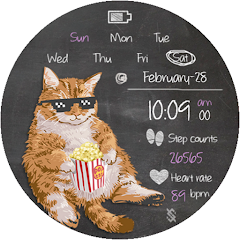
BFF146- Blackboard Art Cat is a customizable watch face that blends a playful chalkboard aesthetic with practical on-wrist information, giving users a distinctive look while keeping time, date, activity and battery status immediately accessible.
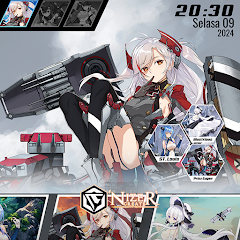
Azur Theme is a KLWP-based homescreen theme pack that transforms Android launchers with polished, animated layouts and tailored widgets, ideal for anyone who wants a distinctive look for their device. Designed by Nizer Create, Azur Theme bundles several configurable setups—ranging from minimalist to anime, cyberpunk, and high-contrast action styles—and focuses on interactive elements and smooth behavior. Note that Azur Theme requires the KLWP Pro app to function and cannot be used on its own; if you enjoy customizing icons, gestures, and live wallpapers, this theme offers ready-made starting points to build a personalized homescreen.