
 X
X
 facebook
 WhatsApp
 Email
Email
Introduction
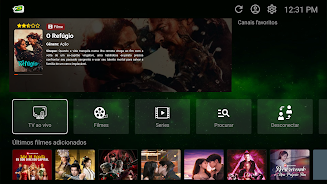
TV Brasil - TV ao Vivo is a lightweight media player designed to load and play M3U and Xtream Codes (XC) playlists with an emphasis on reliable playback and simple, predictable navigation. TV Brasil - TV ao Vivo puts control of channel lists directly in the hands of the user: you import or paste playlists, organize channels into categories, and then browse or search with a minimal learning curve. The app is intended for people who want a straightforward IPTV-style player that focuses on fast channel switching and stable streaming rather than on bundled content or complex online services.
Key features and user experience
The core functionality centers on compatibility with M3U and Xtream Codes playlist formats so you can use lists from your own sources. The player handles large playlists and provides quick indexing so channel lists open and scroll smoothly. Playback is optimized to reduce buffering and to recover automatically from brief network interruptions; the player uses an adaptive buffer strategy to keep streams responsive on typical home networks. The interface is uncluttered on purpose: clear channel rows, simple category tabs and a responsive search field make it easy to find and jump to channels, while a persistent player bar keeps basic controls available during browsing.
Controls and navigation
Navigation in TV Brasil - TV ao Vivo is designed for touch and remote control environments. Basic controls include play/pause, seek, channel up/down and a fast-access back button for returning to the previous list or category. The search function supports partial matches and filtering by name or group, so you can quickly narrow down long playlists. For Android TV and set-top hardware the app respects D-pad navigation and keeps focus behavior predictable; on phones and tablets touch gestures and standard Android navigation are used. UI elements are sized for readability and to improve accuracy when selecting items with a remote or finger.
Playlist management and customization
Playlist handling focuses on giving you practical tools to organize content. You can import M3U files or paste Xtream Codes credentials and then save the resulting playlist locally. Channels can be moved between categories, renamed, or marked as favorites for quick access. The app preserves your playlist structure between sessions so you don’t need to reconfigure every time you open it. Simple sorting and filtering options help manage very large lists, and the app stores playlists locally on the device so you retain control over them without requiring an online account.
Playback performance, caching, and offline behavior
TV Brasil - TV ao Vivo does not host streams; it plays URLs and stream entries provided by the playlists you load. To improve the viewing experience the player uses a temporary buffer to smooth short network jitter and reduce rebuffering events. While it cannot make remote streams available offline, the app caches playlist metadata and thumbnails so channel lists remain available even when a connection is interrupted briefly. Video decoding leverages the device’s native capabilities to offer efficient playback on a wide range of Android hardware, and the player aims to keep CPU and battery use modest during normal viewing.
Accessibility, settings and device support
The app includes accessibility-conscious design choices such as clear text labels, high-contrast UI modes and adjustable list density for users who prefer larger or more compact layouts. Audio track switching and subtitle selection are available when those options are provided by the stream itself, and the app respects Android system audio routing so you can use external speakers or Bluetooth headphones. TV Brasil - TV ao Vivo is built to run on phones, tablets and Android TV devices with D-pad navigation and should work across a broad range of Android versions while avoiding unnecessary permissions.
Reliability, privacy and limitations
TV Brasil - TV ao Vivo emphasizes stability and user control: it does not host, provide, sell or distribute any video content and requires users to supply their own playlists in supported formats. Because the app intentionally separates player functions from content sources, it does not offer built-in channel stores, cloud account synchronization, or recording features. Supported playlist formats are M3U and Xtream Codes only; other playlist types are not compatible. For privacy, playlists are stored locally on the device unless you choose to back them up externally. If you need a compact, dependable player to manage and view your own IPTV-style playlists, TV Brasil - TV ao Vivo offers a focused set of tools without bundled content or unnecessary extras.
Information
Other Games by the Same UpTurn Digital Marketing


The Remote App Tool collection includes many Android apps that allow remote control. With the growing number of smart devices, it's easy to misplace remotes. These apps solve that problem, offering a convenient, free way to control your devices. They provide great convenience for your daily life!




This collection of TV apps offers users several options for free streaming, featuring high-definition media players compatible with television. With these apps, you can easily watch your favorite shows without hassle. The platform boasts a vast library of video content, organized into clear categories for quick access. High-quality videos are just a click away, ensuring you never miss out on anything. If you're interested, download and start enjoying the experience today!



What would it be like to download video software for free? In this collection, you can find various video software that interests you, whether it’s video players or video editors—everything you need is here. All of it is provided for free, allowing you to download with ease and without any worries.



User Comments

TV Brasil - TV ao Vivo is a lightweight media player designed to load and play M3U and Xtream Codes (XC) playlists with an emphasis on reliable playback and simple, predictable navigation. TV Brasil - TV ao Vivo puts control of channel lists directly in the hands of the user: you import or paste playlists, organize channels into categories, and then browse or search with a minimal learning curve. The app is intended for people who want a straightforward IPTV-style player that focuses on fast channel switching and stable streaming rather than on bundled content or complex online services.

WiFi Commander is a compact WiFi utility that puts essential network information at your fingertips. Designed for users who want a straightforward, no‑nonsense tool, the app displays detailed IP information, detects networks using the WPS protocol, shows full connection details and measures signal strength. It focuses on core WiFi tasks so you can quickly diagnose connection issues, confirm security options and check performance without navigating cluttered menus. If you prefer a lightweight, focused utility for everyday WiFi troubleshooting and verification, this app delivers the basics reliably with a simple interface.

SweepFlowGo is a compact device maintenance and launcher app that helps you free storage, clear cache, and keep your home screen organized for smoother daily use. It pairs simple cleanup tools with a home-screen replacement so you can remove redundant files, manage cached data, and access frequently used apps more quickly. Users who want a lightweight utility to tidy storage and streamline everyday operation will appreciate SweepFlowGo's straightforward controls and quick setup. Note that installing the launcher may rearrange your home screen layout, but all your apps remain on the device and you can switch back if needed.

Rustavoil is a bitumen ordering app built for construction companies and contractors in Georgia who need a faster, more reliable way to request and manage deliveries. Rustavoil brings ordering, inventory visibility and delivery coordination into a single mobile workflow so teams can reduce paperwork and logistical errors while keeping procurement predictable and auditable.

AQR is a smart application that uses QR codes to deliver warnings and facilitate secure information sharing, ideal for users who want quick alerts without exposing personal data. The app focuses on privacy and convenience, helping you communicate important notices while reducing the risk of advertising, spam or fraud that often accompanies mobile sharing. As smartphones play an increasing role in daily communication, AQR aims to package warning messages into compact, scannable codes so recipients can receive timely, secure alerts. Users looking for a lightweight, privacy-minded way to share sensitive notices may find AQR useful.

CalorieBurnRate is a compact utility that calculates how efficiently you burn calories during any workout or activity. Enter the total calories burned and the minutes spent, tap CALCULATE, and the app instantly returns calories burned per minute rounded to two decimals, making it easy to compare sessions and adjust intensity. Users who track workouts, manage weight, or evaluate exercise efficiency will appreciate the straightforward input, one-tap results, copy/share options, and quick reset for multiple checks. CalorieBurnRate delivers a focused, no-frills way to turn raw calorie numbers into actionable per-minute metrics.
Look no further than Cast to TV - Screen Mirroring, Cast For Chromecast! This powerful app allows you to effortlessly broadcast your Android screen and audio in real-time speed, giving you the opportunity to enjoy movies and videos with friends and family on larger TV screens. With features like Smart View & Screen Share and control for Roku TV, this app ensures a seamless and stable screen mirroring experience. Say goodbye to small screens and hello to a whole new level of entertainment with Cast to TV!

With Screen Share With TV - Mirror Screen, you can easily mirror your Android device's screen on any smart TV, laptop, tablet, or other devices without the need for additional dongles or cables. Simply start the app, connect to the same Wi-Fi network as your TV, and begin sharing videos, music, photos, and more with just a click. This powerful app allows you to broadcast your screen and audio in real time, making it perfect for sharing content with friends and family. Try out Screen Share With TV - Mirror Screen today and enjoy seamless screen mirroring on your Samsung smart TV.

Control your TV effortlessly with WiFi TV Remote! This user-friendly app allows you to easily manage your network-enabled TV from the convenience of your phone. Simply ensure both your TV and phone are connected to the same wireless network, enter the IP address of your TV in the app settings, and voila! You'll be able to change channels, adjust volume, and more with just a few taps. Please note, this app is not a universal remote and has been tested on Fox 32LE7000T2 LED Surf TV. It may also work on other TVs made in China and sold under local brands.
Control all of your favorite TVs with just one app - TV Remote Control for Sanyo TV! Whether you have a Samsung, Vizio, Sony, LG, or any other brand of TV, this universal remote control app has got you covered. With infrared technology, you can easily navigate and control your TV from the convenience of your phone. Say goodbye to multiple remote controls cluttering your space. Simplify your TV-watching experience with TV Remote Control for Sanyo TV. Get ready to take control and enjoy your favorite shows and movies hassle-free. Please note that this app requires an IR blaster.
Look no further than AIR Remote PRO for Apple TV, an innovative app that allows you to easily control your Apple TV using your Android phone. No need to jailbreak your Apple TV, as AIR Remote utilizes default infrared codes to seamlessly replace or extend your remote. Compatible with a variety of Android devices with built-in infrared support, as well as certain Mac products with an infrared receiver, AIR Remote offers all essential functions and even additional features like swipe gestures.
Experience the convenience of controlling your FPT TV directly from your mobile with FPT TV Remote. Say goodbye to traditional remotes and hello to a seamless user experience with the ability to search for the best films and entertainment programs with just the sound of your voice. Easily access your personalized favorites list stored in the cloud and sync it with your FPT TV device. The app offers a simple registration process, quick connectivity to any FPT TV device, accurate search functionality, and personalized recommendations.