
 X
X
 facebook
 WhatsApp
 Email
Email
Introduction
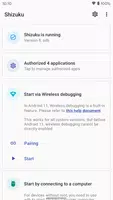
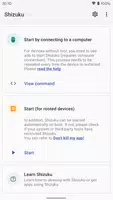
Shizuku is an Android utility that runs as a local service you can start using wireless debugging on devices running Android 11 or later. It is designed for users who want to launch the service without a USB connection to a computer: after an initial pairing step you can start Shizuku over the network, perform startup actions from the app, and keep the pairing so future launches are simpler. Because of platform limitations the wireless startup must be repeated after each reboot, but the overall workflow removes the need for a cable and makes remote management straightforward.
Key Features
⭐ Start Shizuku via wireless debugging on Android 11 or above.
⭐ Start without a USB connection to a computer.
⭐ One-time pairing: initiate pairing in the app and enter the pairing code shown in the wireless debugging notification.
⭐ Wireless startup must be repeated after every reboot due to system limitations.
⭐ Pairing and startup are handled directly from the app's interface and notifications.
Advantages
✅ Removes the need for a wired connection once pairing is completed.
✅ Allows starting the service over the local network, so no computer is required during normal use.
✅ Pairing uses the standard wireless debugging pairing code flow, making the initial setup straightforward.
✅ Clear recovery step: if startup fails, toggling wireless debugging often resolves the issue.
Disadvantages
❎ Wireless startup only works on Android 11 or newer.
❎ Due to platform limitations the startup sequence must be repeated after each reboot.
❎ Requires an initial pairing step before wireless launches will work.
Information
 Google Play

The Remote App Tool collection includes many Android apps that allow remote control. With the growing number of smart devices, it's easy to misplace remotes. These apps solve that problem, offering a convenient, free way to control your devices. They provide great convenience for your daily life!



User Comments
Shizuku is an Android utility that runs as a local service you can start using wireless debugging on devices running Android 11 or later. It is designed for users who want to launch the service without a USB connection to a computer: after an initial pairing step you can start Shizuku over the network, perform startup actions from the app, and keep the pairing so future launches are simpler. Because of platform limitations the wireless startup must be repeated after each reboot, but the overall workflow removes the need for a cable and makes remote management straightforward.

File Transfer lets you move photos, videos and documents between nearby devices without cables. File Transfer works over local Wi-Fi or by creating a device hotspot, so transfers do not use mobile data and do not require an internet connection. The app supports batch sending and large files with a clear, lightweight interface.

CleanPhoto - Photo Cleaner is an AI-powered utility that helps you reclaim storage by locating duplicate and similar photos and identifying large files that occupy device memory. CleanPhoto - Photo Cleaner scans your photo library, groups redundant shots and highlights bulky items so you can review and remove them in batches instead of sorting manually.
AI Cleaner is a storage utility designed to free up space and organize files on Android devices by removing junk, locating large items, and simplifying app and file management. With tools for clearing cache and residual files, identifying oversized folders and files, inspecting installed apps by size, and browsing your storage, AI Cleaner helps users reclaim storage and keep their device orderly. It's useful for anyone running low on space or who wants a single app to handle junk cleanup, large-file discovery, app management, and file organization without juggling multiple utilities.
mconnect Player Lite – Cast AV is a media player and casting app that plays local and network audio and video and sends streams to compatible renderers. It locates media on your device and on UPnP/DLNA servers and provides playback controls, subtitle support, and playlist management.

Samsung One UI Home is Samsung's refined launcher for Galaxy phones that replaces Samsung Experience Home with a cleaner, more focused interface. It organizes apps and widgets into Home and Apps screens, supports full-screen gesture navigation, and offers layout protection and quick touch-and-hold actions to simplify common tasks.
Look no further than Cast to TV - Screen Mirroring, Cast For Chromecast! This powerful app allows you to effortlessly broadcast your Android screen and audio in real-time speed, giving you the opportunity to enjoy movies and videos with friends and family on larger TV screens. With features like Smart View & Screen Share and control for Roku TV, this app ensures a seamless and stable screen mirroring experience. Say goodbye to small screens and hello to a whole new level of entertainment with Cast to TV!
With Screen Share With TV - Mirror Screen, you can easily mirror your Android device's screen on any smart TV, laptop, tablet, or other devices without the need for additional dongles or cables. Simply start the app, connect to the same Wi-Fi network as your TV, and begin sharing videos, music, photos, and more with just a click. This powerful app allows you to broadcast your screen and audio in real time, making it perfect for sharing content with friends and family. Try out Screen Share With TV - Mirror Screen today and enjoy seamless screen mirroring on your Samsung smart TV.
Control your TV effortlessly with WiFi TV Remote! This user-friendly app allows you to easily manage your network-enabled TV from the convenience of your phone. Simply ensure both your TV and phone are connected to the same wireless network, enter the IP address of your TV in the app settings, and voila! You'll be able to change channels, adjust volume, and more with just a few taps. Please note, this app is not a universal remote and has been tested on Fox 32LE7000T2 LED Surf TV. It may also work on other TVs made in China and sold under local brands.
Control all of your favorite TVs with just one app - TV Remote Control for Sanyo TV! Whether you have a Samsung, Vizio, Sony, LG, or any other brand of TV, this universal remote control app has got you covered. With infrared technology, you can easily navigate and control your TV from the convenience of your phone. Say goodbye to multiple remote controls cluttering your space. Simplify your TV-watching experience with TV Remote Control for Sanyo TV. Get ready to take control and enjoy your favorite shows and movies hassle-free. Please note that this app requires an IR blaster.
Look no further than AIR Remote PRO for Apple TV, an innovative app that allows you to easily control your Apple TV using your Android phone. No need to jailbreak your Apple TV, as AIR Remote utilizes default infrared codes to seamlessly replace or extend your remote. Compatible with a variety of Android devices with built-in infrared support, as well as certain Mac products with an infrared receiver, AIR Remote offers all essential functions and even additional features like swipe gestures.
Experience the convenience of controlling your FPT TV directly from your mobile with FPT TV Remote. Say goodbye to traditional remotes and hello to a seamless user experience with the ability to search for the best films and entertainment programs with just the sound of your voice. Easily access your personalized favorites list stored in the cloud and sync it with your FPT TV device. The app offers a simple registration process, quick connectivity to any FPT TV device, accurate search functionality, and personalized recommendations.