
 X
X
 facebook
 WhatsApp
 Email
Email
Introduction
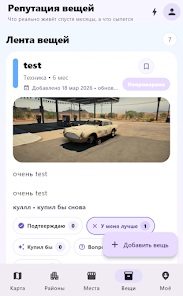
Что по району-Где реально норм is a practical, map-based app that helps you understand which neighborhoods, venues and everyday services are truly acceptable according to people who actually visited them. The app focuses on authentic, visit-based reviews and place cards that highlight everyday impressions rather than polished advertising, making Что по району-Где реально норм a simple tool for anyone choosing where to live, meet or run routine errands.
Key Features
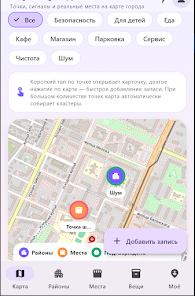
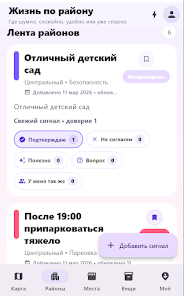
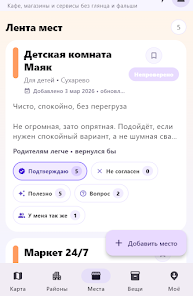
Interactive map browsing and location cards: the central screen presents districts and places on a zoomable map so you can explore nearby areas at a glance. Tap a card to read the most recent reviews, view photos uploaded by visitors and see quick summary tags that describe the place’s atmosphere, cleanliness and accessibility.
Visit-based reviews and clear posting workflow: reviews are intended to be written after real visits and emphasize practical observations. The app guides you through a short review flow where you describe what you experienced, add optional photos and mark the date of your visit to keep feedback timely and useful.
Community interaction and moderation tools: read and leave comments on place cards, react to other users’ posts and flag questionable content. Basic moderation and publication rules are applied to keep the collection focused on honest, on-the-ground information rather than promotional listings.
How it works
Controls are straightforward: pinch to zoom the map, tap to open place cards, swipe between posts and use the search box to find streets or specific venues. Filters let you narrow results by district or by recent activity, and location-based sorting shows nearest places first. The interface is designed for quick one-handed use so checking a neighborhood while on the go is fast and efficient.
Content and progression
What you see in the app improves as the community contributes. Coverage and detail vary by area: dense urban districts tend to accumulate many short, visit-based reviews quickly, while quieter neighborhoods grow more slowly. The app makes it easy to add a new place card after a visit, which helps the local database expand organically over time. Regular contributors and repeated visits naturally increase the depth and reliability of information for each location without relying on paid listings.
Visual style and customization
The visual design emphasizes readability: clear place cards with concise headings, photos with captions and plain-language review snippets. You can adjust basic display preferences in your profile to control whether cards show more photos or longer text by default. Map detail levels let you choose between a simplified district view and a more granular street-level view depending on how much context you need.
User experience and accessibility
The app prioritizes simple interactions and accessibility: large tappable areas, legible fonts and a predictable navigation structure. Text sizes respect system settings where possible and color contrasts are chosen for clarity. Whether you are a casual visitor checking a single address or a resident documenting multiple places, the flow is designed to minimize friction when reading or posting feedback.
Data, synchronization and privacy
User authorization and cloud synchronization keep your contributions and preferences consistent across devices. Your profile stores the place cards and comments you created and synchronizes them to the cloud so you can continue editing or responding from another device. Moderation is basic and community-driven: reported content is reviewed against publication rules and visible notes explain why a post was removed or edited.
Limitations and community nature
Because the app relies on real people sharing real visits, coverage may be uneven and the tone of posts can vary. Что по району-Где реально норм is explicitly not an advertising catalogue; it does not serve as a promotional platform, but rather as a resource for practical, lived experience. Expect variability in the level of detail and remember that local insights become more useful as more people participate.
How to contribute
To add value for other users, write short factual reviews after you visit a place, include one or two photos that show the relevant aspects of the location and use clear dates or tags so readers know when the observations were made. Regular contributions help build a more complete picture of your area and make Что по району-Где реально норм more reliable for everyone.
Information
 Google Play
User Comments

Remote Control turns your Android phone into a single, easy-to-use command center for smart TVs and other home entertainment devices and the Remote Control app is designed to replace a pile of physical remotes by consolidating the most common TV and media controls into one interface. The opening experience focuses on core tasks: changing channels, adjusting volume, navigating menus, and sharing photos or videos on a larger display without searching for buttons. This description explains what the app does, how the controls behave, what to expect during setup, and practical tips to get the most out of it.

JUNCESS is a compact, purpose-built utility for technicians and operators who need a fast way to inspect battery packs in the field. JUNCESS connects to Bluetooth-enabled battery management systems (BMS) after a secure sign-in, discovers nearby devices and presents core parameters such as series string count, individual cell voltages, pack current and device state of charge (SOC). The app is intentionally read-only, designed to give immediate visibility into the most relevant metrics without requiring additional measurement tools or complicated setup.
App Ops Launcher provides a simple, no-frills shortcut to Android's hidden App Ops screen so you can inspect and adjust app permissions introduced in Android 4.3 without rooting your device. App Ops Launcher places a direct launcher on your home screen that opens the system permission interface instantly, giving you quick access to per-app controls for location, microphone, camera and other sensitive features. This editor description explains how the app behaves, what to expect from its interface, and practical guidance for using the tool safely on compatible devices.

时间管家 is a compact, local-first time management app designed to help you plan, track and review your days with minimal fuss. The app combines quick task entry, an integrated session timer, and linked day/week/month planners so you can build routines, record focused work and measure progress without sending personal data to external servers. Designed for students, freelancers and office workers who prefer a private, efficient workflow, 时间管家 aims to simplify planning while giving clear visual feedback on where your time goes.

Girafe2Poche is a pocket-sized app that presents a randomly generated card and a guiding question to prompt short moments of reflection, clarity and motivation. Designed for busy days, it gives quick, meaningful prompts that fit into commutes, waiting lines or evening wind-downs, helping users explore needs and desires without demanding much time. With an intentionally minimal and intuitive interface, Girafe2Poche delivers fresh prompts each session to nudge you toward greater self-awareness and more confident, value-aligned choices, making it a practical tool for anyone who wants simple, regular moments of introspection.
Abfall App is a practical, region-focused utility designed for residents of Vorpommern-Rügen who want reliable waste collection information and fewer missed pickups. From the first setup you can select your city, district and street, then receive timely notifications for residual, organic, paper and hazardous waste collections with automatic date adjustments for public holidays. The Abfall App centralizes collection calendars, container site locations and bulky waste services so households can plan weeks in advance without guessing which items belong in which bin.
Look no further than Cast to TV - Screen Mirroring, Cast For Chromecast! This powerful app allows you to effortlessly broadcast your Android screen and audio in real-time speed, giving you the opportunity to enjoy movies and videos with friends and family on larger TV screens. With features like Smart View & Screen Share and control for Roku TV, this app ensures a seamless and stable screen mirroring experience. Say goodbye to small screens and hello to a whole new level of entertainment with Cast to TV!
With Screen Share With TV - Mirror Screen, you can easily mirror your Android device's screen on any smart TV, laptop, tablet, or other devices without the need for additional dongles or cables. Simply start the app, connect to the same Wi-Fi network as your TV, and begin sharing videos, music, photos, and more with just a click. This powerful app allows you to broadcast your screen and audio in real time, making it perfect for sharing content with friends and family. Try out Screen Share With TV - Mirror Screen today and enjoy seamless screen mirroring on your Samsung smart TV.
Control your TV effortlessly with WiFi TV Remote! This user-friendly app allows you to easily manage your network-enabled TV from the convenience of your phone. Simply ensure both your TV and phone are connected to the same wireless network, enter the IP address of your TV in the app settings, and voila! You'll be able to change channels, adjust volume, and more with just a few taps. Please note, this app is not a universal remote and has been tested on Fox 32LE7000T2 LED Surf TV. It may also work on other TVs made in China and sold under local brands.
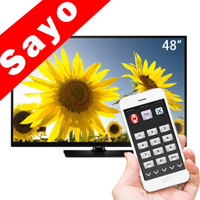
Control all of your favorite TVs with just one app - TV Remote Control for Sanyo TV! Whether you have a Samsung, Vizio, Sony, LG, or any other brand of TV, this universal remote control app has got you covered. With infrared technology, you can easily navigate and control your TV from the convenience of your phone. Say goodbye to multiple remote controls cluttering your space. Simplify your TV-watching experience with TV Remote Control for Sanyo TV. Get ready to take control and enjoy your favorite shows and movies hassle-free. Please note that this app requires an IR blaster.
Look no further than AIR Remote PRO for Apple TV, an innovative app that allows you to easily control your Apple TV using your Android phone. No need to jailbreak your Apple TV, as AIR Remote utilizes default infrared codes to seamlessly replace or extend your remote. Compatible with a variety of Android devices with built-in infrared support, as well as certain Mac products with an infrared receiver, AIR Remote offers all essential functions and even additional features like swipe gestures.
Experience the convenience of controlling your FPT TV directly from your mobile with FPT TV Remote. Say goodbye to traditional remotes and hello to a seamless user experience with the ability to search for the best films and entertainment programs with just the sound of your voice. Easily access your personalized favorites list stored in the cloud and sync it with your FPT TV device. The app offers a simple registration process, quick connectivity to any FPT TV device, accurate search functionality, and personalized recommendations.