
 X
X
 facebook
 WhatsApp
 Email
Email
Introduction
Kramer Control is a cloud-based room and space control and management platform designed to help IT and AV teams control, monitor and support AV systems, infrastructures and third-party devices across a facility. The Kramer Control name appears here because the platform merges centralized cloud management with distributed components to deliver reliability and operational visibility. Editors and integrators will find the app description below helpful when considering deployment or ongoing management.
Platform overview
The Kramer Control platform uses existing IP networks and a distributed architecture to avoid a single point of failure while providing scalable management for small rooms up to multi-building campuses. Administrators can define rooms, zones and device groups and then map control logic to those areas, so individual spaces behave exactly as required for different meeting types, classroom setups or public spaces. The system collects device health, room usage and energy metrics and presents them in a unified dashboard for easier day-to-day operations.
Controls and interface
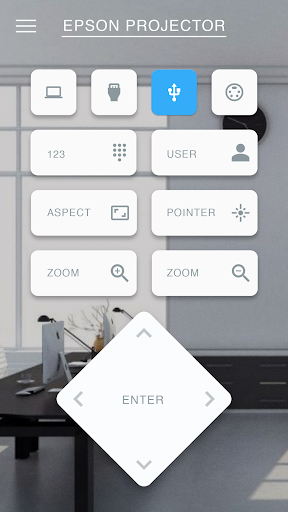
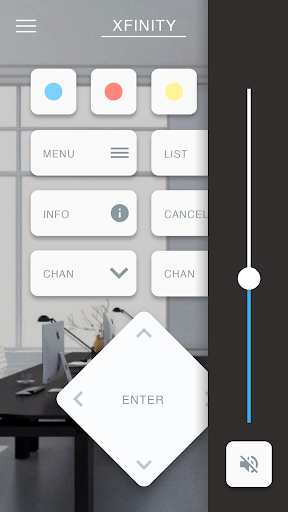
Controls are presented through an intuitive drag-and-drop builder that aims to reduce the need for custom code. Designers can assemble workflows, buttons and touch-panel layouts by placing prebuilt blocks and tying them to device drivers and automation rules. The same interface that defines controls also exports customizable touch-panel screens so end users interact with a clean, purpose-built UI rather than dealing with raw device settings.
Progression and project workflow
Project progression follows a clear lifecycle: discovery, template creation, room mapping, deployment and monitoring. Kramer Control supports reusing templates and device groups so once a room type is configured, it can be replicated across a facility. This approach shortens rollout times and provides predictable maintenance procedures, with versioning and change tracking to help administrators roll back or update control schemes safely.
Visual style and user experience
The visual style focuses on clarity and operational efficiency rather than decorative elements. Dashboards emphasize real-time status, alerts and simple controls, while touch-panel screens are configurable for color, layout and control sizing to match branding or accessibility needs. Consistent visual language helps end users and technicians locate key controls quickly, reducing training time for staff who need to interact with the system.
Room and level structure
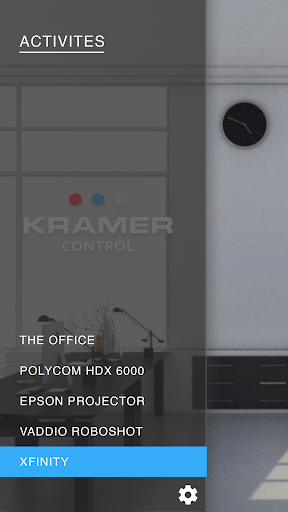
At the core of Kramer Control is a room-centric model where each space is treated as a level with its own devices, scenes and schedules. Managers can assign devices to rooms and group rooms into floors or zones for higher-level commands. This structure makes it straightforward to apply global rules, such as energy-saving modes overnight, while retaining per-room customization where required.
Customization and drivers
Customization is provided through modular drivers and the platform's Brains, which act as integration points for third-party hardware. Where a direct driver exists, advanced functions can be exposed on touch panels and automation logic. If a specific integration is required, the system can often be extended using supported device drivers or by coordinating with vendor-provided interfaces, though the availability of advanced features depends on driver support.
Offline behavior and deployment considerations
Because Kramer Control relies on IP networks and cloud-hosted management, full remote features require stable internet connectivity. Many deployments use distributed components that keep essential room-level logic running locally if a cloud connection is interrupted, but exact offline behavior depends on the specific deployment model and hardware used. Organizations with strict on-premises requirements should evaluate compatibility and plan for redundancy.
Monitoring, analytics and challenge systems
The platform automatically captures usage patterns, device health indicators and energy consumption to support preventative maintenance and cost analysis. Alerts and fault reporting are configurable so technicians receive meaningful diagnostics instead of raw logs, which helps reduce mean time to repair. Administrators can set thresholds and escalation paths so the system surfaces the most critical issues first.
Accessibility, repeatability and longevity
Accessibility is supported through customizable touch-panel layouts and clear dashboards that can be scaled for different user groups. Repeatability is a strong point: templates and exported configurations let teams reproduce stable setups across sites, increasing long-term reliability and lowering training overhead. Kramer Control aims to be a practical operational tool rather than a point solution, focusing on predictable management and maintenance workflows.
Limitations and suitability
No platform is without trade-offs: advanced integrations may require additional configuration or vendor cooperation, and reliance on IP infrastructure means organizations must plan for network resilience. Kramer Control is best suited to facilities seeking a unified, scalable approach to AV and room control with centralized visibility and remote troubleshooting capabilities, while still allowing room-level customization and local reliability where needed.
Information

The Remote App Tool collection includes many Android apps that allow remote control. With the growing number of smart devices, it's easy to misplace remotes. These apps solve that problem, offering a convenient, free way to control your devices. They provide great convenience for your daily life!




User Comments

Tirta Gadog places a compact, practical guide to the Tirta Gadog venue in Bogor on your device, helping visitors plan fishing trips, family outings, meals, and event attendance with clear, easy-to-find information. The app opens with a short history of the site since its October 2014 opening and orients new guests to the venue’s scenic position between Mount Gede and Mount Salak, while offering tools to browse fishing facilities, dining options like Rozanno’s Resto & Bar, and upcoming attractions such as the Hello Kitty Museum. Designed for quick planning and on-the-go reference, Tirta Gadog focuses on accurate venue details, visitor convenience, and straightforward navigation rather than complex online services.

Zora is a dynamic news and finance app that blends technology coverage with practical financial advice, helping users stay informed and make smarter decisions. The app collects global and local headlines, product updates, and real-time market insights, and presents them through an approachable interface that suits both casual readers and serious investors. Users may want Zora for its mix of up-to-date tech reporting, actionable money tips, and community-driven discussions. Regular success stories — including profiles from Ethiopia — add motivation and practical examples, while built-in tools and curated analysis aim to simplify complex topics so readers can act with confidence.
NWP Action Center brings utility management to your mobile device so property owners, operators, and field teams can monitor pre-billing activity, respond to alerts, and manage multiple units while on the go. The NWP Action Center mirrors the account structure and billing information you use on desktop, so you sign in with the same credentials and retain familiar navigation and context. Built for people who travel between properties or spend time offsite, the app consolidates actionable items and provides timely contact to account representatives to speed decisions and resolution.
Careem Captain puts driving work in your hands: this driver app connects you with passengers across MENA, Pakistan and Turkey while letting you decide when, where and for how long you want to work. The app helps you accept trips, navigate to pickups with GPS precision, and collect payments by cash or card, while offering 24/7 in-app support and local training to get started. If you want flexible hours, direct control over your earnings and a steady stream of ride requests in major cities, Careem Captain is designed to make driving a practical and reliable way to earn.
CRHESA is a dedicated sales application built to support Carlson Rezidor Hotel Group sales teams by consolidating marketing materials, pricing information and proposal tools into a single, mobile-friendly workspace. The app gives sales personnel quick access to current property content, promotional offers and document templates so they can prepare professional proposals and presentations on the go. Users are advised to check for content updates after installing CRHESA so they always work with the latest rates and collateral. The description below explains how the app organizes resources, how it integrates with common document viewers, and what to expect during everyday use.
Kramer Control is a cloud-based room and space control and management platform designed to help IT and AV teams control, monitor and support AV systems, infrastructures and third-party devices across a facility. The Kramer Control name appears here because the platform merges centralized cloud management with distributed components to deliver reliability and operational visibility. Editors and integrators will find the app description below helpful when considering deployment or ongoing management.